Introduction
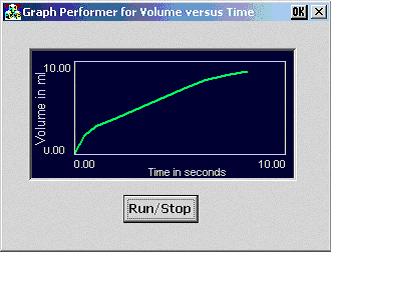
This article is for developing 2D Real Time Graphs. I was searching the net to develop the graph as shown above. I found that the picture control had been used to draw the graph in Microsoft Visual Studio. To develop this application, I needed to use the Microsoft eMbedded Visual C++ 3.0.
Historically, I've shown "live" Instrument readings through the constant updating of a numerical value by using constant value array. The Graph shows the real time data from the instrument
This MECGraphCtrl is based on the bitmap repainting concept used in Mark C. Malburg. It provides significant enhancements through the display of scaling information and plotting of double precision values. The user implementation is described below.
In the control's owner (for example, dialog) insert a dummy picture control. Size the Custom Control border to be the desired size of the GraphCtrl. Name the control something that sounds technical, like "IDC_GRAPH_CUSTOM". In the property of the custom control, For class, write “GRAPH_CUSTOM”. This is the string for the class that should be registered in the Constructor of the Dialog class.
1. Insert the control in the owner class.
Add a member variable of type MECGraphCtrl.
class MECPerformerDlg : public CDialog
{
...
protected:
static BOOL RegisterWndClass(HINSTANCE hInstance);
MECGraphCtrl m_oGraphCtrl;
}
2. Register the custom control.
BOOL MECPerformerDlg::OnInitDialog()
{
WNDCLASS wc;
wc.lpszClassName = _T("GRAPH_CUSTOM");
wc.hInstance = hInstance;
wc.lpfnWndProc = ::DefWindowProc;
wc.hIcon = 0;
wc.lpszMenuName = NULL;
wc.hbrBackground = (HBRUSH) ::GetStockObject(LTGRAY_BRUSH);
wc.style = CS_GLOBALCLASS;
wc.cbClsExtra = 0;
wc.cbWndExtra = 0;
}
3. Create the control.
BOOL MECPerformerDlg::OnInitDialog()
{
...
CRect rect;
GetDlgItem(IDC_GRAPH_CUSTOM)->GetWindowRect(rect) ;
ScreenToClient(rect) ;
GetDlgItem(IDC_GRAPH_CUSTOM)->ShowWindow(SW_HIDE);
m_oGraphCtrl.Create(WS_VISIBLE | WS_CHILD, rect, this) ;
...
}
4. Personalize the Control
Set the vertical range, background color, grid color and plot color.
BOOL MECPerformerDlg::OnInitDialog()
{
...
CRect rect;
GetDlgItem(IDC_GRAPH_CUSTOM)->GetWindowRect(rect) ;
ScreenToClient(rect) ;
GetDlgItem(IDC_GRAPH_CUSTOM)->ShowWindow(SW_HIDE);
m_oGraphCtrl.Create(WS_VISIBLE | WS_CHILD, rect, this) ;
m_oGraphCtrl.SetXRange(0,10,2);
m_oGraphCtrl.SetRange(0, 10, 2) ;
m_oGraphCtrl.SetYUnits("Volume in ml") ;
m_oGraphCtrl.SetXUnits("Time in seconds") ;
m_oGraphCtrl.SetBackgroundColor(RGB(0, 0, 64)) ;
m_oGraphCtrl.SetGridColor(RGB(192, 192, 255)) ;
m_oGraphCtrl.SetPlotColor(RGB(0, 255, 0)) ;
...
}
5. Use the control.
Call the m_oGraphCtrl.AppendPoint(nRandomX, nRandomY); function with the the data value to be appended to the plot.
Values can be modified to achieve different styles of displays.
I am basically from Salem, Tamilnadu, India. I have been working in Microsoft Visual C++ since October 1998. I have experienced in VC++ 6.0, eVC++ 3.0, SOCKETS, COM/DCOM. And having knowledge in MTS, COM+.



 General
  News
News  Suggestion
  Question
  Bug
Bug  Answer
  Joke
Joke  Praise
  Rant
Rant  Admin
Admin 


 Submit an article or tip


