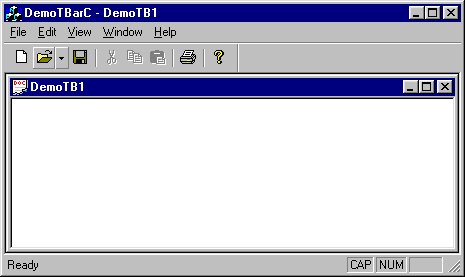
|
|
 |
Is it possible to move the dropdown arrow to the bottom of the button instead of its right.
|
|
|
|
 |
|
 |
Hi..
I'm trying to implement windows explorer 'views' type of menu. I have got a context menu which shall be invoked on pressing a toolbar button. The toolbar button shall contain a drop down arrow too. Please can anybody help me out?..
|
|
|
|
 |
|
 |
Hi
this is nice. However, I'd like to have a toolbar to pop instead of a menu. How would I do that? I couldn't find any article on this. Thanks for guiding me.
Mat
|
|
|
|
 |
|
 |
How do I add menu item function and update function for multiple and dynamic menu items?
I add a drop arrow button in my toolbar. And then I want to dynamically add the menu items to the drop arrow button. But one menu item need one action function and upddate function, then the menu will be enabled. The number of menu items I want to add to drop arrow is dynamical and multiples.
The drop arrow picture is at the web:
http://cid-fbeb6373d9321a7f.skydrive.live.com/self.aspx/Questions/drop%20arrow%20button.bmp
PS:my drop arrow referenced the article of "Adding a drop arrow to a toolbar button" http://www.codeproject.com/KB/toolbars/toolbar_droparrow.aspx
|
|
|
|
 |
|
 |
I used the vs2008 to compile the demo source code.
But it appear some errors as below:
Could somebody tell me how to solve this problem?
錯誤 1 error C2440: 'static_cast' : 無法由 'void (__thiscall CMainFrame::* )(NMTOOLBARA *,LRESULT *)' 轉換為 'void (__thiscall CCmdTarget::* )(NMHDR *,LRESULT *)'
|
|
|
|
 |
|
 |
Solution:
transfer the paramter type from NMTOOLBARA* to NMHDR*
void CMainFrame::OnToolbarDropDown(NMHDR* pnmtb, LRESULT *plr)
and conevrt the NMHDR* to NMTOOLBARA*
NMTOOLBARA* pp=(NMTOOLBARA*)pnmtb;
void CMainFrame::OnToolbarDropDown(NMHDR* pnmtb, LRESULT *plr)
{
CWnd *pWnd;
UINT nID;
NMTOOLBARA* pp=(NMTOOLBARA*)pnmtb;
// Switch on button command id's.
switch (pp->iItem)
{
case ID_FILE_OPEN:
pWnd = &m_wndToolBar;
nID = IDR_MENU1;
break;
default:
return;
}
// load and display popup menu
CMenu menu;
menu.LoadMenu(nID);
CMenu* pPopup = menu.GetSubMenu(0);
ASSERT(pPopup);
CRect rc;
pWnd->SendMessage(TB_GETRECT, pp->iItem, (LPARAM)&rc);
pWnd->ClientToScreen(&rc);
pPopup->TrackPopupMenu( TPM_LEFTALIGN | TPM_LEFTBUTTON | TPM_VERTICAL,
rc.left, rc.bottom, this, &rc);
}
|
|
|
|
 |
|
 |
There's some weird bug with CToolbar when XP theme is applied to an application. I've ran into this bug when I was updating one application to use XP styles. It took me a while to realize what was going on and then some more time trying to track down
1. Add xp manifest file to the same folder as the demo executable.
2. Run demo
3. Now, open Internet Explorer and notice how toolbar buttons got larger and cut off at the bottom. Here's a screenshot:
http://img231.imageshack.us/img231/1118/demotbarxptheme9ce.png[^]
Some more investigation revealed that it only happened with XP themes applied and only for toolbars with dropdown. But why??? Debuggin this took hours. Spy++ was hanging my system to a crawl and only hard reboot helped. I did found though that IE was sending WM_SETTINGCHANGE to my application and after that the buttons would get corrupt. Calling SetButtonSizes at any point after IE would corrupt the buttons didn't work.
I was deep in CToolBar code trying this and that and was geting very frustrated by this. And then it dawned on me: if it was the dropdown style that had a problem, then what if we temporarily get rid of it and then restore it when it was safe?!
So the solution I tried was to derive from CToolBar (which was already done in my case), listen for WM_SETTINGCHANGE, then remove dropdown style and add then add it again:
void CMyToolBar::OnSettingChange(UINT uFlags, LPCTSTR lpszSection)
{
DWORD dwExStyle = SendMessage(TB_GETEXTENDEDSTYLE);
if (dwExStyle&TBSTYLE_EX_DRAWDDARROWS){
SendMessage(TB_SETEXTENDEDSTYLE, 0, 0);
PostMessage(TB_SETEXTENDEDSTYLE, 0, TBSTYLE_EX_DRAWDDARROWS);
}
CToolBar::OnSettingChange(uFlags, lpszSection);
}
It's not a perfect solution because a button with dropdown shifts one pixel, but it's much better then the large and tuncated buttons.
Hope this helps someone.
P.S. It seems like this bug was fixed in MFC for VS.NET . But if you are still on VC++6, then you'll need this fix
|
|
|
|
 |
|
 |
I want to know is it possible to display arrow at the leftmost end of button so that it may look normal in a right to left toolbar for rtl langauges?
|
|
|
|
 |
|
 |
is there a way to do both non arrowed toolbar buttons as well as ones with arrows? if you turn on TBSTYLE_EX_DRAWDDARROWS then all the ones you want to be drop down have it, and you can't mix and match between the two styles... anyone know how to do it? thanks!
|
|
|
|
 |
|
 |
Hi,
i have a problem with replacing icons in TBSTYLE_DROPDOWN buttons.
After i choose an option in my submenu, i'd like to replace an existing button icon with new one, chosen from submenu.
I don't have an idea, how to do it.
Anyone has any sugestions.. ?
|
|
|
|
 |
|
 |
My question is how can I add DropDown Button to Internet Explorer Standard Toolbar. I've tried a lot to find a way but can't find one, Do you know of anyway that might be helpful?
Thanks,
Atif Goheer
|
|
|
|
 |
|
 |
Yes that is easy to do!
It is very easy to add a button WITH a dropdown to Internet Explorer!
Bill SerGio
|
|
|
|
 |
|
 |
And how it can be done?
I found no way to do it by adding registy entry, I had to add a separate toolbar with one dropdown button.
|
|
|
|
 |
|
 |
hi,
great work ! so I tried to implement these dropdown buttons by myself in an IE toolbar project. first everything works fine. the button is displayed and the arrow too. I added the wm_notify handler and started the app. but when I try to click on the arrow nothing happens. no event (neither tbs_dropdown nor anything else) is send. further more the button itself is not pressable - means I cannot press it down.
anybody any ideas ?
thanx
pinguin751
|
|
|
|
 |
|
 |
Add message handler to the button, i can press the button, but click on the arrow noting happens.
who can tell me why? i follow the steps exactly as the article
|
|
|
|
 |
|
 |
i have same problem, i try to use dropdown button (BTNS_WHOLEDROPDOWN style). The button displayed but can not press (nothing happen when i click)
plss .. help
thanks..
R.
|
|
|
|
 |
|
 |
I have the same problem. I know this comment is on somethin very old, but I can make the drop down arrow and when I click on it, nothing happens. It does not depress.
Mike
|
|
|
|
 |
|
 |
Hi,
Did you add:
ON_NOTIFY(TBN_DROPDOWN, AFX_IDW_TOOLBAR, OnToolbarDropDown)
to the message map?
Kirk Stowell
codejocksoftware
www.codejock.com
|
|
|
|
 |
|
 |
First, thank you so much for helping!
Yes, I do have the ON_NOTIFY in the message map.
I should meantion that I have this toolbar in a COM dll for an IE toolbar.
I can make buttons to do all kinds of cool stuff, like make XMLHttpRequests, and change the current page of the browser. However, I can not get any actions assigned to the drop down button.
Thanks,
Mike
|
|
|
|
 |
|
 |
Is the ON_NOTIFY event getting fired? Do you have the notification handler declaired for the owner of the toolbar?
Kirk Stowell
Codejock Software
www.codejock.com
|
|
|
|
 |
|
 |
This is the relevant code:
This is in my class:
BEGIN_MESSAGE_MAP(CKBToolBarCtrl, CToolBarCtrl)
//{{AFX_MSG_MAP(CKBToolBarCtrl, CToolBarCtrl)
ON_WM_SIZE()
ON_WM_KEYDOWN()
//ON_CONTROL_REFLECT(0, OnCommand)
ON_NOTIFY(TBN_DROPDOWN, IDR_IETOOLBAR , OnHandleMenu)
//}}AFX_MSG_MAP
END_MESSAGE_MAP()
This is in my .h file
afx_msg void OnHandleMenu(NMHDR *pNMHDR, LRESULT* pResult);
As you can see, I have IDR_IETOOLBAR in the middle. I have tried all kinds of constants and nothing works.
In the function, OnHandleMenu, the first line is ASSERT(0);. My intention is for that to alert me when the function gets called so I know the event is being captured. That has never happened. So my conclusion is that the event is not being captured correctly.
Thank you!
Mike
|
|
|
|
 |
|
 |
Hi Mike,
If you are handling the message in an owner window such as CMainFrame then you would use ON_NOTIFY because the toolbar sends the TBN_DROPDOWN message to the owner window to "notify" the owner of the event that occured. If you are handling the message in a derived class then you would need to use ON_NOTIFY_REFLECT instead of ON_NOTIFY. If you want to use a derived class then I would suggest using CToolBar instead of CToolBarCtrl.
Here is an example of how you would implement this.
ToolBarEx.h:
#if !defined(__TOOLBAREX_H__)
#define __TOOLBAREX_H__
#if _MSC_VER > 1000
#pragma once
#endif
#include <afxtempl.h>
class CToolBarEx : public CToolBar
{
public:
CToolBarEx();
virtual ~CToolBarEx();
public:
void SetDropArrow(UINT nCmdID, UINT nMenuID);
protected:
virtual void ShowPopupMenu(UINT nCmdID);
afx_msg void OnTBDropDown(NMTOOLBAR* pNMTB, LRESULT *pResult);
DECLARE_MESSAGE_MAP()
CMap<UINT, UINT, UINT, UINT> m_mapCmd2Mnu;
};
#endif
ToolBar.cpp:
#include "stdafx.h"
#include "Resource.h"
#include "ToolBarEx.h"
#ifdef _DEBUG
#define new DEBUG_NEW
#undef THIS_FILE
static char THIS_FILE[] = __FILE__;
#endif
CToolBarEx::CToolBarEx()
{
}
CToolBarEx::~CToolBarEx()
{
}
BEGIN_MESSAGE_MAP(CToolBarEx, CToolBar)
ON_NOTIFY_REFLECT(TBN_DROPDOWN, OnTBDropDown)
END_MESSAGE_MAP()
void CToolBarEx::ShowPopupMenu(UINT nCmdID)
{
UINT nMenuID;
if (!m_mapCmd2Mnu.Lookup( nCmdID, nMenuID ))
return;
CMenu menu;
if ( menu.LoadMenu( nMenuID ))
{
CMenu* pPopup = menu.GetSubMenu( 0 );
ASSERT( pPopup );
CRect rc;
SendMessage( TB_GETRECT, nCmdID, ( LPARAM )&rc );
ClientToScreen( &rc );
pPopup->TrackPopupMenu( TPM_LEFTALIGN | TPM_LEFTBUTTON | TPM_VERTICAL,
rc.left, rc.bottom, this, &rc );
}
}
void CToolBarEx::OnTBDropDown(NMTOOLBAR* pNMTB, LRESULT *pResult)
{
ShowPopupMenu( pNMTB->iItem );
*pResult = 0;
}
void CToolBarEx::SetDropArrow(UINT nCmdID, UINT nMenuID)
{
int iItem = CommandToIndex( nCmdID );
if (iItem != -1)
{
GetToolBarCtrl( ).SendMessage( TB_SETEXTENDEDSTYLE, 0,
( LPARAM )TBSTYLE_EX_DRAWDDARROWS );
SetButtonStyle( iItem,
GetButtonStyle( iItem ) | TBSTYLE_DROPDOWN );
m_mapCmd2Mnu.SetAt(nCmdID, nMenuID);
}
}
Now in your CMainFrame class all you need to do is call SetDropArrow for as many command + menu combinations you wish to add, for example:
m_wndToolBar.SetDropArrow( ID_FILE_NEW, IDR_MENU1 );
m_wndToolBar.SetDropArrow( ID_FILE_OPEN, IDR_MENU2 );
Let me know if this helps.
Kirk Stowell
Codejock Software
www.codejock.com
|
|
|
|
 |
|
 |
Kirk,
Thank you so much! That post was very enlightening! I have my drop down working, and I learned more about how to manage my code in my project.
Again, thank you so much for your time!
Mike
|
|
|
|
 |
|
 |
You are quite welcome, glad I could help.
Kirk Stowell
Codejock Software
www.codejock.com
|
|
|
|
 |
|
 |
Thanks for the help with this Kirk. One additional question. I have an Update CCmdUI handler for each item in my popup, since I want certain items checked. It looks like the handler isn't called unti I actually click on an item, rather before the menu is displayed. I tried adding the handler to my mainframe class, but that didn't get called at all. Any ideas?
TIA
Eric
|
|
|
|
 |