Introduction
ActiveX is a set of technologies from Microsoft that enables interactive
content for the World Wide Web. With ActiveX, Web sites come alive with
multimedia effects, interactive objects, and sophisticated applications that
create a user experience comparable to that of high-quality CD-ROM titles.
A Cookie is a small packet of information used to store persistent state
information on the user’s computer.
In this project, I build an ActiveX Server Component which will be invoked by
an ASP to store the information in a cookie, and to access the cookie using ATL
COM. The component will check for the existence of the cookie and create it if
it's not present. The project is divided into seven steps. Do them in order because later
steps depend on tasks you have completed in earlier steps.
- Create New Project
- Add ATL Object
- Adding a method for control
- Build ASP for client
- Testing
1. Create New Project
First you will create the initial ATL project using the ATL COM AppWizard.
- In the Visual C++ environment, click New on the File menu,
then choose the Projects tab.
- Select the ATL COM AppWizard.
- Type SimpleActiveX as the project name.
Your dialog box should look like this:
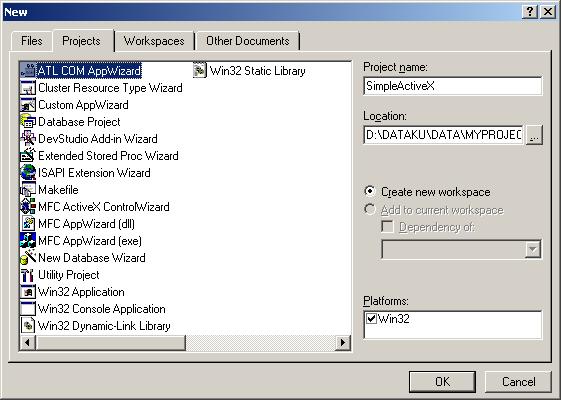
Figure 1. New project
Click OK and the ATL COM AppWizard presents a dialog box offering
several choices to configure the initial ATL project (figure 2). After that,
click the Finish Button

Figure 2. Setting for ATL COM
2. Add ATL Object
To add an object to an ATL project, you use the ATL Object Wizard. Click New
ATL Object on the Insert menu, and the ATL Object Wizard appears.
Figure 3. Insert ATL on project
In the first ATL Object Wizard dialog box, select the category of object you
want to add to your current ATL project. Some of the options you can select are
a basic COM object, a control tailored to work in Internet Explorer, and a
property page. In this project, we will create a standard control, so set the
category as Objects on the left, then on the right select ActiveX
Server Component. Finally, click Next.
A set of property pages is displayed that allows you to configure the control
you are inserting into your project. Type "Cookie" as the short name.
The other fields are automatically completed.
Figure 4. Properties of ActiveX Server Component
Click on the Attributes tab. Click Both for Threading Model, No
for Aggregation and also click Support ISupportErrorInfo check box.
Figure 5. Properties for Attributes tab.
Click ASP tab for default properties and then click OK button
Figure 6. Properties for ASP
3. Adding a Method to the Control
ICookies is the
interface that contains your custom methods and properties (figure 7). The
easiest way to add a method to this interface is to right-click it in ClassView
and select Add Method and then it'll show dialog like figure 8.
Figure 7. Add Methode for this project
Figure 8. Properties for adding method
Type GetCookie for Method Name and [out,retval] BSTR *bVal for
parameter. Finally, click OK
The source code for this method: GetCookie()
STDMETHODIMP CCookies::GetCookie(BSTR *bCookie)
{

	HRESULT hr;
	CComPtr<IRequestDictionary>pWriteDictionary;
	CComPtr<IRequestDictionary>pReadDictionary;


	if(bCookie==NULL) return E_POINTER;
	if(m_bOnStartPageCalled)
	{

		hr=m_piRequest->get_Cookies(&pReadDictionary);
		if(FAILED(hr))
			return S_FALSE;

		CComVariant vtIn(_T("LOGIN"));
		CComVariant vtOut;

		hr=pReadDictionary->get_Item(vtIn,&vtOut);
		if(FAILED(hr))
			return S_FALSE;

		hr=VariantChangeType(&vtOut,&vtOut,0,VT_BSTR);
		if(FAILED(hr))
			return S_FALSE;

		if(!wcslen(V_BSTR(&vtOut)))
		{
			CComVariant vtRespon;
			vtRespon="<html><body><center>Fill your name and password<br>"
			         "<form method=post action=setcookie.asp>";

			m_piResponse->Write(vtRespon);
			vtRespon="Name     : <input type=text name=user><br>Password : "
			         "<input type=password name=password><br>"
			         "<input type=submit value=OK>";
			m_piResponse->Write(vtRespon);
			vtRespon="</center></form></body></html>";
			m_piResponse->Write(vtRespon);

		}
		else
		{
			*bCookie=::SysAllocString(V_BSTR(&vtOut));
			CComVariant vtRespon;

			vtRespon="<html><body><center>Welcome ";
			m_piResponse->Write(vtRespon);

			vtRespon=*bCookie;
			m_piResponse->Write(vtRespon);

			vtRespon="<br></form></body></html>";
			m_piResponse->Write(vtRespon);
		}
	}

	return S_OK;
}
Finally, Build this project becomes a DLL application.
4. Build the ASP client
This code for client application, MyCookie.asp :
<%
    Set obj=Server.CreateObject("SimpleActiveX.Cookies")
    str=obj.GetCookie()
%>

<html>
    <title>
       Test ActiveX Server Component
    </title>
    <body>
       The cookie stored is "<%=str%>"
    </body>
</html>
and code for SetCookie.asp :
<%
   response.cookies("LOGIN")=Request.form("user")
   response.cookies("LOGIN").expires=date+365
%>

<html>
   <title>
      SetCookie.asp
   </title>
   <body>
   </body>
   <center>
       Your login has been verified
   </center>
   </body>
</html>
5. Testing
To test this project, we must put files MyCookie.asp and SetCookie.asp
on our ASP server. Firstly, we run MyCookie.asp. Fill name and Password.
This case, information about name will be stored on cookie. So, if we want entry
this website again, then we get our name automatically based on information on
the cookie.
Figure 9. Test our Activex Server component.
Reference
Componet Object Model (COM) from Platform SDK, MSDN.
He gradueted from Sepuluh Nopember Institute of Technology (ITS) in Department of Electrical Engineering, Indonesia. His programming interest is VC++, C#, VB, VB.NET, .NET, VBScript, Delphi, C++ Builder, Assembly,and ASP/ASP.NET. He's founder for PE College(www.pecollege.net), free video tutorial about programming, infrastructure, and computer science. He's currently based in Depok, Indonesia. His blog is http://geeks.netindonesia.net/blogs/agus and http://blog.aguskurniawan.net



 General
  News
News  Suggestion
  Question
  Bug
Bug  Answer
  Joke
Joke  Praise
  Rant
Rant  Admin
Admin 


 Submit an article or tip


 How can I obtain the client logon name?
 ![Rose | [Rose]](https://codeproject.global.ssl.fastly.net/script/Forums/Images/rose.gif)


