Introduction
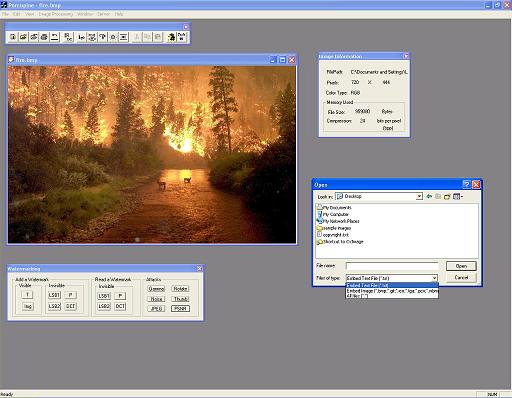
Porcupine deals with digital image watermarking. You can embed any visible watermark like a text or another image in any position, or store information invisibly inside using a secret key (password).
Digital watermarking is a type of Steganography. In this field, except for the storage capacity of the host, the integrity of the information embedded to the host is very important. It is a technique which allows the dissimulation of information that verifies the owner, in digital sound, video, or image (in this case). The information can be encrypted. It constitutes a group of bits containing information about the creator, the owner, or the signal itself. Digital watermarking aims to validate the host and the undeniable identity of the legal owner. It provides a way for controlling host signals and represents the rightful holder. It also discourages illegal reproduction, and provides a way for safe distribution via the internet.
Some applications of digital watermarking:
- The protection of intellectual rights, which is the most important application. When an illegal reproduction is detected, the offender should suffer the consequences of the law.
- The proof of authenticity. The host must carry the digital signature of the creator.
- The integrity of the host, if it continues to carry the digital signature.
- The dissuasion of reproduction (copy control), caused by the fear of the probability that the offenders will be perceptible and suffer the consequences of the law.
- The transmission of information without becoming perceptible from a third person, thanks to the invisible placement inside the host and its likely encrypted form.
Porcupine supports all of the known image formats (BMP, GIF, ICO, TGA, JPEG, PNG, TIFF, JPEG-2000, etc.).
Features
Visible Watermarking
- Text Watermarking: Embeds a text on the image with the color and position of your choice. Each time, the text color selected and the pixel colors behind the text are checked. If they are the same, the text color changes automatically.
- Image Watermarking: Embeds an image of your choice. Embedding options are via logical AND, OR, XOR, adding or subtracting, or drawing using the alpha channel.

Invisible Watermarking
Spatial Domain
- LSB manipulation: Hides any file in the Least Significant Bit of pixels chosen by a certain equation. This could be done randomly but that way, there should be a certain threshold on the file size to be watermarked (random numbers can not be given forever). The equation solution solves this issue, and exploits the image dimensions. Furthermore, there are two "LSB watermarking" options with different pixel positions for multiple watermarking. This type of watermark is considered a "fragile watermark". It can be destroyed with the slightest manipulation (so don't save the image as JPEG). The information is protected via XOR scrambling or Blowfish encryption.
Example
Attack Results
- Patchwork: This is a statistical method that adds a Gaussian distribution. There is no information stored. The distribution is added randomly, and its existence proves the authenticity of the image.
Example
Attack Results
Frequency Domain
- DCT Watermarking: Embeds information in the frequency domain. This is done using the 2-D Discrete Cosine Transform. The information is stored in the low-mid frequencies of the image. The storage capacity of this technique is very poor. In most cases, one or two words are enough. To prevent image destruction, the user is required to give the smallest DCT coefficient above which the watermark will be inserted. If a small coefficient, which doesn't contribute to the image creation, is changed, the image will be destroyed. This method is considered a robust watermarking method. Porcupine uses only grayscale images for this technique.
Example and attack results
- Batch Watermarking: This option allows you to simultaneously put a visible or invisible watermark in a number of images. The "LSB watermark" and "Patchwork" options save the final images in BMP format as it is a format with no compression.
Among others, there is also an FTP upload available for uploading your watermarked images, a text reader, and a PSNR calculator.
Image Library
| Basic Image Processing Classes in:
| Porcupine Index Theory
|
CxImage
| eikonaDoc.h
eikonaView.h
mass.h
|
|
To run the program, you have to download the CxImage Library and do a batch build. Then download the Porcupine source and place the folder inside the CxImage folder, along with the others (bin, CxImage, Debug, demo, etc..). Download the required LIBs and place them inside the Porcupine source folder. Since you want to mess with the source code and have Visual Studio installed, you probably don't need the required DLLs. You're ready to go.



 General
  News
News  Suggestion
  Question
  Bug
Bug  Answer
  Joke
Joke  Praise
  Rant
Rant  Admin
Admin 


 Submit an article or tip


