Introduction
Hi All,<o:p>
<o:p>
Here is some cool stuff to call .NET assembly from Script Component of SSIS.<o:p>
Remember whenever we use “Script Component” while developing SSIS application, by default we get list of assembly on click of “Add Reference” from default path …Microsoft.NET\Framework\v2.0.50727, as shown below, <o:p>
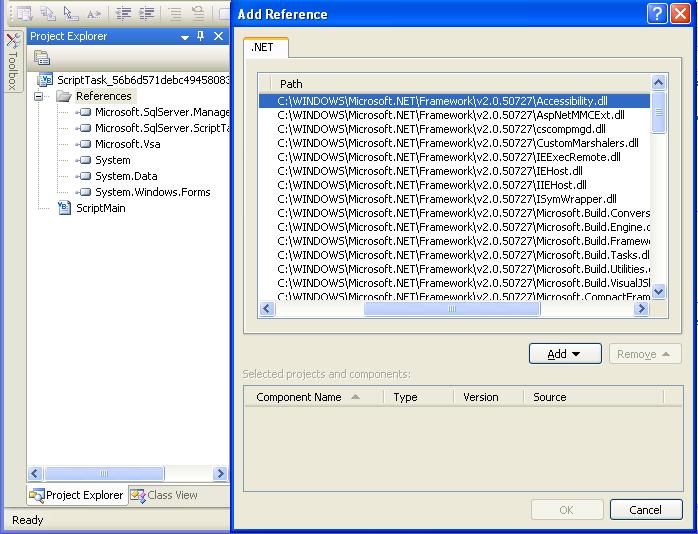
Now question is how to call any business logic (Included in .NET assembly) from Script Component…? <o:p>
I would say put physically that assembly (Which needs to be referenced) at …Microsoft.NET\Framework\v2.0.50727. But I believe this would be just a work around not a proper solution. <o:p>
What follows is another approach to accustom described functionality,<o:p>
1. Import “System.Reflection” assembly in Script Component<o:p>
2. Add assembly (Which need to be referenced) in GAC<o:p>
3. Write following code to call external assembly from your own Script Component of SSIS.<o:p>
<o:p>
//Define variable of type [Assembly] <o:p>
Dim targetAssembly As [Assembly] = Nothing<o:p>
//Load assembly named “CallBySSIS” from GAC into defined variable <o:p>
targetAssembly = [Assembly].LoadWithPartialName("CallBySSIS")<o:p>
//Define variable which used to hold “Type” object<o:p>
Dim targetType As Type<o:p>
//Get specific class from assembly here “clsTest”<o:p>
targetType = targetAssembly.GetType("CallBySSIS.clsTest")<o:p>
//Define variable of type Object<o:p>
Dim objClsTest As Object<o:p>
//Get instance of “clsTest” into defined variable<o:p>
objClsTest = targetType.InvokeMember("clsTest", BindingFlags.CreateInstance, Nothing, Nothing, Nothing)<o:p>
//Now you are free bird to call function of class “clsTest” named //“writeToFile(String strMessage)”<o:p>
objClsTest.writeToFile("Colour Dataflow : " + ex.Message) <o:p>
4. Add “option Strict Off” on the top of script component; else compile time error for casting will occur.<o:p>
I hope this article will save SSIS developers life, since it shows path how to use complex logic written previously. <o:p>
I am a .NET developer cum designer. I work for Zensar Technologies Ltd. Pune (INDIA), I consult, I develop, I debug and besides that I speak at conferences and user groups and I also write. I have written some articles on WCF, WF, SSIS, Compression decompression, CLR Store Procedure, SQL Server Reporting Services 2005, Extended grid and lot more to count.
Reach to me on:-a.malpani@zensar.com



 General
  News
News  Suggestion
  Question
  Bug
Bug  Answer
  Joke
Joke  Praise
  Rant
Rant  Admin
Admin 


 Submit an article or tip


