Click here to Skip to main content

Advanced Numeric Edit Control

By , 2 Dec 2001
 

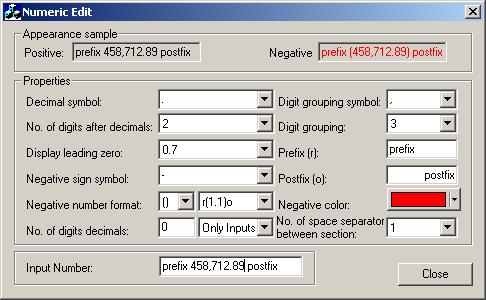
Sample Image - XRNumericEditCtrl.jpg

Introduction

The CXrNumericEdit class is derived from the normal CEdit class.

To use this class

  • Add the CXrNumericEdit source file to project.
  • Add standard edit control
  • Change CEdit class to CXrNumericEdit
    public:
        //Dialog Data
    	//{{AFX_DATA(CNumericEditDlg)
    	enum { IDD = IDD_NUMERICEDIT_DIALOG };
    	CXrNumericEdit	m_ctrlPositiveValue;

To get and set the value in the CXrNumericEdit control use the DDX functions.

void CNumericEditDlg::DoDataExchange(CDataExchange* pDX)
{
	CDialog::DoDataExchange(pDX);
	//{{AFX_DATA_MAP(CNumericEditDlg)
    DDX_Text(pDX, IDC_POSITIVE_SAMPLE, m_dbPositiveValue);
	...
	//}}AFX_DATA_MAP
}

Thanks to

  • Randy More for 'All you ever wanted to know about the Clipboard'
  • Ian J Hart by Number, Currency, Percentage Edit Control
  • Dundas Software for the Masked Edit Control

License

This article has no explicit license attached to it but may contain usage terms in the article text or the download files themselves. If in doubt please contact the author via the discussion board below.

A list of licenses authors might use can be found here

About the Author

ramarez
Web Developer
Cuba Cuba
Member
No Biography provided

Sign Up to vote   Poor Excellent
Add a reason or comment to your vote: x
Votes of 3 or less require a comment

Comments and Discussions

 
You must Sign In to use this message board.
Search this forum  
    Spacing  Noise  Layout  Per page   
GeneralOh, my god! No Any Notememberfishyoungman15 Jan '13 - 15:51 
I want to modify your code,how to start Sleepy | :zzz: :(
GeneralNegative value flawsmemberRaul Sobon19 Dec '07 - 19:17 
There is a bit of a flaw in the api in that its not easy
to simply say, GetNumericInputData() and return a negative int
if someone types in -500 , you get simply 500 back.
 
Many functions such as OnGetText etc.. do insert a negative symbol (tho not using the negativeSymbol variable, but hardcoded to _T("-"), but others such as OnCopy do not (which is less usefull)
 
It just means adding a wrapped function to do a GetValue() which handles these, which should have been in there at the start.
 
SetNumericInputData() too is a little misleading in that by default it ignores a negative value, which is not right, as if it knows its value, negative should be as easily handled.
 
Other than that its ok.
_______________________________
Raul Software Engineer (www.ac3dec.com

GeneralA Bug!memberAli Khanlarkhani1 Dec '07 - 21:10 
First, thanx for you nice control.Rose | [Rose]
I used it in many projects succesfuly.Cool | :cool:
Currentlly I encountered with a problem:
It is impossible to copy data to clipboard by context menu.Sleepy | :zzz:
Please try:
1) right click in control
2) from context menu select 'copy'
 
ThanxSmile | :)

GeneralCreating the DLLmemberkevinlkingma22 Nov '06 - 2:46 
Hi:
 
I am having problems creating the DLL file. Can you give me instructions?
GeneralLimitText( nMax ) is invalidmemberallehiman30 May '06 - 18:19 
I can`t use LimitText(nMax) to limit he number of the input chars~?
Can I change the code like that?
void CXrNumericEdit::CharNumeric(UINT nChar, UINT nRepCnt, UINT nFlags)
{
// Added by 9ft
UINT nMax = GetLimitText();
int nText = GetStringContents().GetLength();
BOOL bLimit = ( nText < nMax );
//---end
int nSelectionStart=0;
int nSelectionEnd =0;
 
GetSel(nSelectionStart, nSelectionEnd);
TRACE(_T(" %2d, %2d Before\n"), nSelectionStart, nSelectionEnd);
 
if(nSelectionStart== nSelectionEnd) {
int nActualIBlush | :O :- önsertionPoint= RPtoLP(nSelectionStart);
BOOL bIsPrompt= IsPromptPosition(nActualInsertionPoint);

//modifyed by 9ft
if(m_bInsertMode && !bIsPrompt && bLimit )
nActualInsertionPoint= InsertAt(nActualInsertionPoint, (TCHAR)nChar);
else if (IsValidInputPosition(nActualInsertionPoint))
nActualInsertionPoint= SetAt (nActualInsertionPoint, (TCHAR)nChar);
 
if (nActualInsertionPoint>= 0)
nSelectionStart= LPtoRP(nActualInsertionPoint + 1);
 
Update(nSelectionStart);
}
else {

int nActualInsertionPoint= RPtoLP(nSelectionStart);
POSITION pos= m_listNumericData.FindIndex(nActualInsertionPoint);

if (pos== NULL)
return;
 
CXrNumericData* pobjData=new CXrNumericData();
pobjData->m_chValue= (TCHAR)nChar;
m_listNumericData.InsertBefore(pos, pobjData);
 
if(DeleteRange(RPtoLP(nSelectionStart)+ 1, RPtoLP(nSelectionEnd)+ 1)) {

if(nActualInsertionPoint >= 0)
nSelectionStart= LPtoRP(nActualInsertionPoint + 1);
 
Update(nSelectionStart);
}
}
}


hero hero
Questioncan I mention your name in my app?memberMihai Moga11 Apr '06 - 23:01 
Hi, I want to mention your name in a application I'm working on, and I don't known your full name. Can you please tell me? Thanks in advance. You made a very good edit control!
GeneralRegional SettingsmemberJDonovan20 Nov '03 - 13:38 
There are actually a couple of bugs when the format is set to where the decimal value is another other than a period '.', both on displaying and entering the data. On the display side, supposing you have say a COMMA set for the decimal value in the regional settings, then no values beyond the decimal point are displayed, only 0. On the entry side, it is impossible to enter ',' as the decimal point. I've managed to get all of these items fixed with several small patches throughout the code, if anyone is interested drop me an email (see my profile settings). This really is a very, very nice class.
 
- Jeff Donovan


GeneralRe: Regional SettingsmemberMátyásföldi Imre1 Oct '07 - 23:24 
Is your solution public? If yes, how can we get it?
GeneralError with Buddy ControlmemberJDonovan20 Nov '03 - 5:45 
This is a great class and thank you! There is a small error in that if the edit control has an attached buddy control, the keyboard arrows will now no longer work with the spinner. The solution is to:
 
1) In the xrnumericedit.cpp file, goto the function "OnKeyDown()", and remark out the VK_DOWN and VK_UP cases.
 
2) In the same function, same case, add a default handler to pass the message on to the base control, as in:
 
default:
CEdit::OnKeyDown(nChar, nRepCnt, nFlags);
break;
 
That will fix it and allow the keyboard arrows to again control the spinner.
 
Thanks again for providing the class,
 
Cheers!
 
- Jeff Donovan
 

GeneralThere is also a bug...membersoftyan8 Oct '03 - 0:03 
There is also aboug when i do the setting as below:
 
m_edit.SetCountDigitsAfterDecimals(0);
m_edit.SetCountDigitsDecimals(2);
m_edit.SetDisplayDigitsDecimalsFormat(xrDDDFDataTypeFull);
m_edit.SetDisplayLeadingZero(xrDLZDataTypeParcial);
 
The edit will not catch the 0(zero) at first digit.

General General    News News    Suggestion Suggestion    Question Question    Bug Bug    Answer Answer    Joke Joke    Rant Rant    Admin Admin   

Permalink | Advertise | Privacy | Mobile
Web02 | 2.6.130523.1 | Last Updated 3 Dec 2001
Article Copyright 2001 by ramarez
Everything else Copyright © CodeProject, 1999-2013
Terms of Use
Layout: fixed | fluid
