Introduction
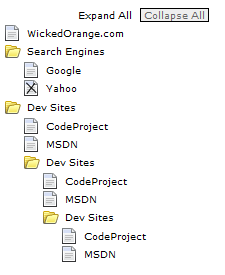
I needed a good looking TreeView for my site (wickedorange.com/vb2005intro), so I found this article by D.D. de Kerf, and modified it considerably. The differences between these two articles are purely aesthetic; for example, there is now a CSS file which you can use to change the look of the tree quite easily. There are also a few "workarounds" to make sure it works in Firefox and IE.
Please note: I had to change the icons because of License Agreements. The original icons are part of the IconBuffet Studio icon pack which comes free with Visual Basic Express 2005 (if you register).
Using the code
See tree.html in the source if you just want to start making trees.
The code is pretty basic to use. First, we include references to the CSS and JS files included:
<head>
 <link href="tree.css" rel="stylesheet" type="text/css" />
 <script src="tree.js" type="text/javascript"></script>
 <title>TreeView Example</title>
</head>
Then, we add code to the body which calls the JavaScript code...
- "
addExpandCollapseAll" adds the buttons at the top of the tree. - "
addNode(text, url, target)" adds a normal node, which doesn't contain sub items.
We use "startParentNode(text)" to begin a parent node, which can contain normal nodes and other parent nodes. We then use "endParentNode()" to close any parent node which we started.
<body>
<script language="javascript">
    addExpandCollapseAll();

    addNode("WickedOrange.com","http://www.wickedorange.com","mainFrame");

    startParentNode("Search Engines");
        addNode("Google","http://www.google.com","mainFrame");
        addNode("Yahoo","http://www.yahoo.com","mainFrame");
    endParentNode();

    startParentNode("Dev Sites");
          addNode("CodeProject","http://www.codeproject.com","mainFrame");
        addNode("MSDN","http://www.msdn.com","mainFrame");
         startParentNode("Dev Sites");
              addNode("CodeProject","http://www.codeproject.com","mainFrame");
            addNode("MSDN","http://www.msdn.com","mainFrame");
             startParentNode("Dev Sites");
                  addNode("CodeProject","http://www.codeproject.com","mainFrame");
                addNode("MSDN","http://www.msdn.com","mainFrame");
            endParentNode();
        endParentNode();
    endParentNode();
</script>
</body>
Points of Interest
Sometimes, Firefox doesn't find child nodes using nextSibling, previousSibling etc.. like IE does, so I had to name each item that needed to be modified later; for example, the parent node images need to be changed when expanded.
History
Nothing yet!
This member has not yet provided a Biography. Assume it's interesting and varied, and probably something to do with programming.



 General
  News
News  Suggestion
  Question
  Bug
Bug  Answer
  Joke
Joke  Praise
  Rant
Rant  Admin
Admin 


 Submit an article or tip


