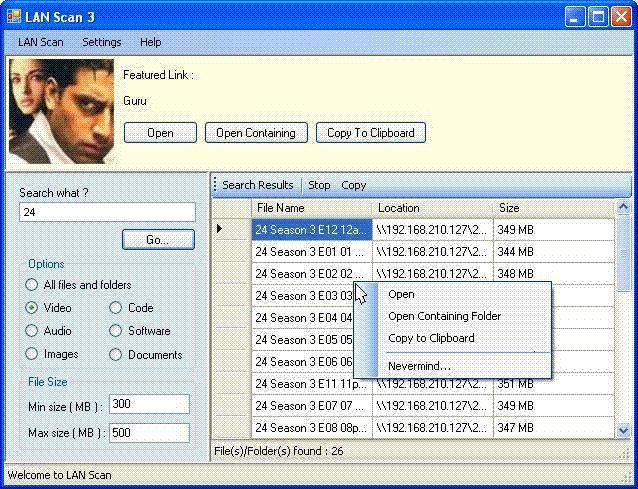
Introduction
LanScan is a tool designed for the purpose of searching for files and folders which are shared over a Local Area Network. It is particularly useful in organizations where a lot of folders are shared on individual systems.
At the outset, I would like to declare that I have used a library designed by Robert Deeming. Robert Deeming has explained the library in this article : http://www.codeproject.com/cs/internet/networkshares.asp. I would like to thank him for sharing such a wonderful piece of work.
Background
This article assumes that you have a reasonable understanding of C#, basic understanding of threads and general knowledge of local area networks.
Using the code
Here's how the application works. You specify an IP range. The tool searches for live hosts. It then determines the list of folders shared by each system and looks for files (according to a keyword that you specify).
The first point of interest would be - how to determine whether a system with a particular IP address is active. This can be achieved using the Ping class defined in the namespace System.Net.NetworkingInformation. The Ping class offers both synchronous and asynchronous methods to detect whether a remote host is reachable. I would be using the asynchronous method because I don't want the system to halt whenever I ping a remote host. Here's the code for it.
Ping pingSender = new Ping();
pingSender.PingCompleted += new PingCompletedEventHandler(AddHost);
int timeout = 1000 ;
byte[] buffer = new byte[] { 100 };
PingOptions options = new PingOptions(64, true);
pingSender.SendAsync("192.168.209.178", timeout, buffer, options, null);
AddHost is called when a Ping operation is complete. Here's how to check the result of the Ping operation.
private void AddHost(object sender, PingCompletedEventArgs e)
{
PingReply reply = e.Reply;
if (reply == null)
return;
if (reply.Status == IPStatus.Success)
{
}
}
Now the second point of interest would be how to list the shared folders for an active remote host. Here's where Robert Deeming's library comes into the picture. Two classes defined in this library are ShareCollection and Share. ShareCollection is a class capable of determining the shared folders for a given IP Address and storing the information in objects of type Share. Given below is the code to explain the working.
ShareCollection sc = new ShareCollection(reply.Address.ToString());
foreach (Share s in sc)
{
}
Lastly, to search for files in a particular share, you have to use recursion. The basic logic is to begin in a shared folder. Process the names of each file in that folder. Once this is done, recursively apply the same logic to each sub-directory until no files or folders remain. A problem with this approach arises if the directory structure is too deep. In this case, the tool would waste a lot of time looking for files in a particular share. To prevent this, we employ the feature of search depth. Search depth is an integer variable which is incremented by one everytime the search moves to a folder a level deeper in the directory tree. Whenever the variable exceeds a particular value (generally a small integer like 2 or 3) the recursion stops and the function returns. Here's the code to explain the point.
ShareCollection sc = new ShareCollection(reply.Address.ToString());
foreach (Share share in sc)
{
    RecursiveSearch(share.ToString(), 0);
}
Then we declare the recursive function:
private void RecursiveSearch(string path,int depth)
{
DirectoryInfo di = new DirectoryInfo(path);
if (!di.Exists)
return;
depth++;
if(depth>Settings.searchDepth)
return;
string keyword=Settings.keyword;
if (di.Name.ToLower().Contains(keyword.ToLower()))
{
AddRow(name,parent, "Folder");
}
foreach (FileInfo file in di.GetFiles())
{
if (file.Name.ToLower().Contains(keyword.ToLower()))
{
AddRow(file.Name, di.FullName,size);
}
}
foreach (DirectoryInfo subdir in di.GetDirectories())
{
RecursiveSearch(subdir.FullName, depth);
}
}
Well...that's all there is to it. Of course, there are a lot of interface design issues which I am not discussing here because explaining GUI is not the objective behind this article. In addition, there is a lot of exception handling and other minor details which I choose not discuss. After all, something should be left to imagination. Nevertheless you can find it all in the source code(see the link at the top of the page).
Points of Interest
In every little project which I have done, I find that there is a bit of weird coding that you can't understand (rather you don't want to), you don't want to use it, but you have to and you do. It seems that Windows Form Controls are not very thread friendly, so whenever you try to update a Form Control from a thread other that the thread you created, you get unexpected results. So here's how to get away with it. This code shows how to add rows to a table in a dataGridView(dgvResult irrespective of the thread. This method can be modified to handle any other Windows Form Control.
delegate void SetCallback(params object[] objects);
private void AddRow(params object[] objects)
{
    if (this.dgvResult.InvokeRequired)
    {
        SetCallback d = new SetCallback(AddRow);
        this.Invoke(d, new object[] {objects});
    }
    else
    {
        (dgvResult.DataSource as DataTable).Rows.Add(objects);
    }
}
More information about this problem can be found in this article by Rüdiger Klaehn http://www.codeproject.com/csharp/threadsafeforms.asp



 General
  News
News  Suggestion
  Question
  Bug
Bug  Answer
  Joke
Joke  Praise
  Rant
Rant  Admin
Admin 


 Submit an article or tip


