Introduction
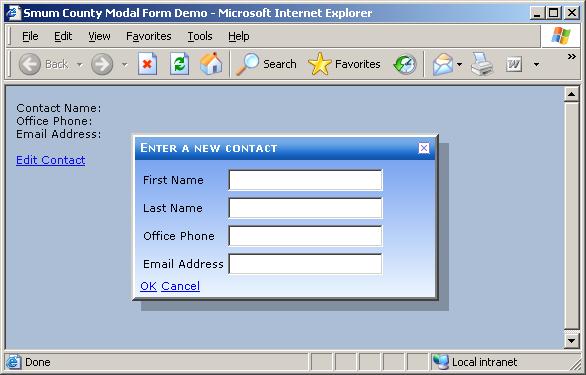
The ModalPopupExtender control provided by the ASP.NET AJAX Control Toolkit allows the display of content in a div panel that floats in the middle of the page and prevents the user from interacting with the rest of the page until the div panel has been closed, thus creating a modal form type of entry on a web page. This is a really useful technology, but I wanted to make a few improvements in this modal form-like interface.
Specifically, I wanted to:
- Create a panel like control into which I can place content which will be displayed in the modal form without having to include a separate
ModalPopupExtender control on the page. - Standardize the look of the modal form by automatically including a form-like header when the form is displayed, and allowing both the header and content to be styled using stylesheets.
- Allow the modal form to be dragged around the page like a real modal form.
- Provide the modal form with a more opaque drop shadow than the
ModalPopupExtender normally provides.
ModalForm Control
To start, since I want this control to be a simple container into which I can drop other controls and content, it makes the most sense to create this control by inheriting from the Panel server control.
[ToolboxData("<{0}:ModalForm runat="server">")]
public class ModalForm : Panel
{
    public ModalForm() : base()
    {}
}
Just doing this gives us all the functionality of the Panel control meaning we have a container into which we can drop other stuff. Now, we need to make it look like a real modal form. This means creating a header with a title and a close icon that can be clicked in order to close the form. This is done during the rendering of the control by the CreateContainerControls routine.
private Panel CreateContainerControls()
{
Panel header = new Panel();
header.ID = "Header";
_extender.PopupDragHandleControlID = header.ID;
header.CssClass = this.HeaderCss;
Panel title = new Panel();
LiteralControl titleText = new LiteralControl(this.Title);
title.Controls.Add(titleText);
title.Style.Add("float", "left");
header.Controls.Add(title);
HtmlImage imageButton = null;
if (CloseImageUrl != "")
{
Panel closeImage = new Panel();
imageButton = new HtmlImage();
imageButton.ID = ID + "_Button";
imageButton.Border = 0;
imageButton.Src = GetCloseImageUrl();
imageButton.Style.Add("cursor", "pointer");
imageButton.Attributes.Add("image", Path.GetFileName(CloseImage));
imageButton.Attributes.Add("rolloverImage",
Path.GetFileName(CloseRolloverImage));
imageButton.Attributes.Add("onMouseOver",
"RolloverImage(event);");
imageButton.Attributes.Add("onMouseOut",
"RolloverImage(event);");
closeImage.Controls.Add(imageButton);
closeImage.Style.Add("float", "right");
closeImage.CssClass = CloseImageCss;
header.Controls.Add(closeImage);
}
Panel content = new Panel();
content.CssClass = this.ContentCss;
int numChildren = this.Controls.Count;
for (int i = 2; i < numChildren; i++)
content.Controls.Add(this.Controls[2]);
_popup.Controls.Add(header);
_popup.Controls.Add(content);
if (CloseImageUrl != "" && CancelControlId != "")
imageButton.Attributes.Add("onClick", GetCloseScript());
this.Style.Add("display", "none");
return header;
}
In the above, I'm creating a header panel at the top of the ModalForm container panel with a content panel below this. The header panel contains two other panels, one for the caption which is floated to the left, and another for the image that is used to close the modal form which is floated to the right. The header, close image, content, and container panels can all have different stylesheet classes which gives the developer full control over the look of the modal form. Those controls that were children of the ModalForm container panel when the control was designed are moved to the new content panel. Note that I am attaching a JavaScript function to the onClick event of the image that will close the form. This function will simply force a click on whatever control has been setup in the ModalPopupExtender to close the modal form.
Setting the PopupDragHandleControlID property of the modal popup extender control will cause the modal popup to be draggable. The creation of the class level _popup and _extender variables used above will be discussed in the next section.
Creating the ModalPopupExtender on the Fly
So far, we've got a panel control that mimics the look of a modal form, but it doesn't actually have any of the modal form functionality. This is supplied by connecting the ModalForm control to a ModalPopupExtender control that is created on the fly by overriding the control's OnInit and CreateChildControls routines.
protected override void OnInit(EventArgs e)
{
EnsureChildControls();
base.OnInit(e);
}
protected override void CreateChildControls()
{
base.CreateChildControls();
_extender = new ModalPopupExtender();
_extender.ID = ID + "_ModalPopupExtender";
_popup = new System.Web.UI.WebControls.Panel();
_popup.ID = ID + "_Popup";
_extender.TargetControlID = ActivateControlId;
_extender.BackgroundCssClass = BackgroundCss;
_extender.CancelControlID = CancelControlId;
_extender.OkControlID = OkControlId;
_extender.DropShadow = DropShadow;
_extender.OnOkScript = OnOkScript;
_extender.PopupControlID = _popup.ID;
_popup.Width = this.Width;
_popup.CssClass = this.CssClass;
this.CssClass = "";
if (!this.DesignMode)
{
Controls.AddAt(0, _popup);
Controls.AddAt(0, _extender);
}
}
The OnInit override calls EnsureChildControls which forces the CreateChildControls to run. This routine then simply instantiates the ModalPopupExtender control and popup panel on which the modal popup extender will operate. It sets the appropriate properties of these controls, and adds them to the Controls collection of the ModalForm control. Note that all of the properties you can set on the ModalPopupExtender control are exposed as properties of the ModalForm control, which are then passed on to the ModalPopupExtender control at this point.
Fixing Drag
There is a bug in the drag functionality of the ModalPopupExtender, at least in the version of the toolkit I used to create this demo. When the modal popup is dragged and then released, the popup snaps back to its original startup position. To fix this, I made the following changes to the DragPanelExtender which is used to give the modal popup drag functionality. In the onDragEnd method of the FloatingBehavior.js file, insert the line below that is in bold:
this.onDragEnd = function(canceled) {
canceled = false;
if (!canceled) {
var handler = this.get_events().getHandler('move');
if(handler) {
var cancelArgs = new Sys.CancelEventArgs();
handler(this, cancelArgs);
canceled = cancelArgs.get_cancel();
}
}
If the DragPanelExtender is used elsewhere in your website, this change may prevent the drag panel extender from working as you expect, but for our purposes with the modal popup extender, this works.
The ModalPopupExtender initially displays the modal form directly in the center of the visible browser window, and keeps it there when the browser window is scrolled or resized. Since our modal form is draggable, we can move it away from this initial display position. However, when the browser window is resized or scrolled, the modal form will be put right back in the middle of the browser window. To keep this from happening, we need to make a small change to the ModalPopupExtender control in order to disable this functionality. The change must be made in the ModalPoupBehavior.js JavaScript file which performs client side functionality for the ModalPopupExtender control. Specifically, the bolded lines below from the _attachPopup function, which add a client side handler to the resize and scroll events of the browser window, must be commented out:
_attachPopup : function() {
if (this._DropShadow && !this._dropShadowBehavior) {
this._dropShadowBehavior = $create(AjaxControlToolkit.DropShadowBehavior, {},
null, null, this._foregroundElement);
this._dropShadowBehavior.set_Opacity(.25);
this._dropShadowBehavior.set_Width(10);
}
this._windowHandlersAttached = true;
},
In addition, the bolded lines below from the _detachPopup function, which detaches the resize and scroll event handlers from the browser window, must be commented out:
_detachPopup : function() {
if (this._windowHandlersAttached) {
if (this._scrollHandler) {
}
if (this._resizeHandler) {
}
}
if (this._dropShadowBehavior) {
this._dropShadowBehavior.dispose();
this._dropShadowBehavior = null;
}
},
Altering the Drop Shadow
The ModalPopupExtender natively allows you to specify that the modal form should appear with a drop shadow, but the default shadow it uses is a solid black which looks pretty bad. By tweaking the _attachPopup function in the modalbehavior.js file, we can easily alter the characteristics of the drop panel that is attached to the modal form. I added the bolded lines below to this routine in order to give the drop shadow an opacity of 25% and a width of 10 pixels:
_attachPopup : function() {
if (this._DropShadow && !this._dropShadowBehavior) {
this._dropShadowBehavior = $create(AjaxControlToolkit.DropShadowBehavior,
{}, null, null, this._foregroundElement);
this._dropShadowBehavior.set_Opacity(.25);
this._dropShadowBehavior.set_Width(10);
}
this._windowHandlersAttached = true;
},
In Conclusion
The ModalForm control can be used in a web application at any point where you might choose to use a modal form in a WinForms application. For example, it could be used where a MultiView control may normally be used, in order to display a data entry form to the user. Or, it may be used to create a more user friendly and attractive message box. In any case, I think this project shows how those controls included in the ASP.NET AJAX Control Toolkit can be extended and modified in order to meet the needs of your application.
Demo Notes
Web.config, in the demo project, is setup to use the Basic theme which has an associated stylesheet and theme defined in the App_Themes folder. This is what gives the modal form its look. Web.config is also setup to recognize the 'ajaxtoolkit' prefix for the AJAX Control Toolkit assembly and the 'sc' prefix for the SmumCounty.WebControls assembly.
Since the ModalForm control creates and uses a ModalPopupExtender control from the ASP.NET AJAX Control Toolkit, this control may only be used with an AJAX enabled web project, and the form on which the control resides must also host a ScriptManager control.
The JavaScript file modalform.js has been included as an embedded resource in the project, and thus does not need to be distributed as a separate JavaScript file on the website that uses the ModalForm control.
The demo solution included above includes a project called AjaxControlToolkit. This is the ASP.NET AJAX Control Toolkit but with many of the controls removed to make the download smaller and with changes to the ModalPopupExtender as indicated above.
Revision History
- November 15, 2006 – Created.
- July 23, 2007 – Revised to work with the latest AJAX Control Toolkit.
- August 1, 2007 – Fixed a small bug related to having more than one Smum Modal Form on a page.
Lou has been a software developer for more than 16 years now mostly working on database applications. He is a big fan of the .NET environment.



 General
  News
News  Suggestion
  Question
  Bug
Bug  Answer
  Joke
Joke  Praise
  Rant
Rant  Admin
Admin 


 Submit an article or tip


