Introduction
Instead of fighting with the Forms.TabControl, I thought that writing one from scratch should be a lot of fun. My goal was to produce a tab control with specific behaviours, and simple to use, and at the same time, with explorer inheritance, graphics, delegation, and collections.
This tab control is specific to creating a MDI interface with one tab page for each form. Some of the behaviours that were implemented are:
- Always open the new page at the first tab
- Hide the tab pages that can't fit in the screen
- Don't scroll tab pages, instead, bring a hidden tab page to the first position when it's selected
- Have a list of the tab pages (forms) in a drop down menu
- Ability to reorder tabs by dragging
- Easy owner draw
- Close button at the tab
- Clicking on overlapped part of the tab does not select the other tab and also
- Clicking outside the border doesn't select the tab (achieved by the
Region property) - Expose the maximum of functionality and configurability as possible
- Very simple to use
What this is not
Well, this is not a docking panel. Also, there is some functionality that wasn't implemented like left/right Alignment, RightToLeft, support to add tab pages at design time (what doesn't really make sense in this case), container tab pages, and others.
This is not a very fast control, since I exposed a lot of functionality/customizations, but did my best to be OK and look cool.
What can be customized
Almost everything. To understand the control, let's take a look at the objects and regions.

- The first two lines are the
TopSeparator - Followed by the
TabTop - On the left the Tabs area
- On the right the Control Buttons area
- The space between the tabs is the
TabOffset - All the bottom part is the form
The tab is composed of the following areas from left to right:
TabPadLeft Icon Text CloseButton TabPadRight
Most customizations are made through properties. All the properties are in the TabControl, and some of them are in the TabPage, so you can change some appearance on each specific tab.
The icon and the text in the tab are the Icon and Text properties of the form, respectively. All the colors in the control can be changed. The close button in the tab can be replaced by an image. The TopSeparator, the tab icon, the tab Close button, and the control buttons can be displayed or not. And there is a lot more. Look at the control to see what’s possible.
The tab shape can be changed by the GetTabRegion event. The tab background can be OwnerDraw by the event TabPaintBackGround, and the border can be handled by the event TabPaintBorder. The events occur in the order mentioned.
Using the control
To use the control, you first need to add it to a form. Ideally, you should dock the control in it.
After that, you can change all the properties through the designer.
To insert a TabPage (form) in the control:
Dim MyForm As New AnyForm
MyForm.Tag = TabControl1.TabPages.Add(MyForm)
You don't show the form, instead you just add it to the control. Very simple, isn't it? On an existing program, you just need to add the control to the main form, and where you have the Show call for the form, you just replace by the Add method.
TabControl1.TabPages.Add(MyForm)
You will probably not need to change any property in your form. The Add method changes the necessary ones.
TabControl.TabPages.Add is a function that returns the created TabPage. You can save it to a variable, or you can ignore the returned value. In the example above, I saved the TabPage in the Form.Tag property, this is a good Idea if you want to have a fast access to the TabPage.
To activate an existing form in the control:
DirectCast(MyForm.Tag, MdiTabControl.TabPage).Select()
TabControl1.TabPages(MyForm).Select()
You can access a tab page by the Index or by the Form, and you can get the Index by the TabPage or by the Form.
To change the tab shape:
Private Sub TabControl2_GetTabRegion(ByVal sender As Object, ByVal e As _
MdiTabControl.TabControl.GetTabRegionEventArgs) _
Handles TabControl2.GetTabRegion
e.Points(1) = New Point(e.TabHeight - 2, 2)
e.Points(2) = New Point(e.TabHeight + 2, 0)
End Sub
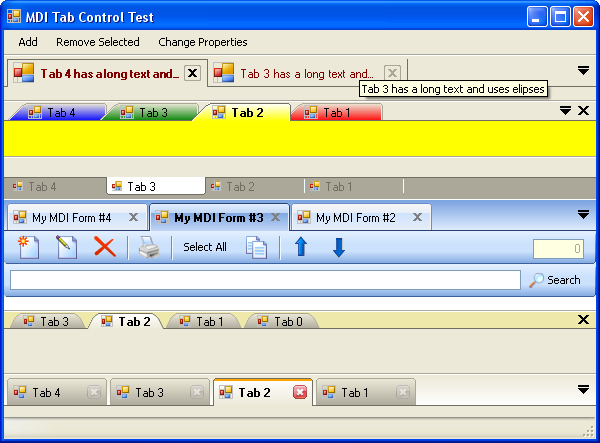
This example above changes the default shape to the colourful one in the first picture.
To OwnerDraw the tab background:
Private Sub TabControl1_TabPaintBackground(ByVal sender As Object, ByVal e As _
MdiTabControl.TabControl.TabPaintEventArgs) _
Handles TabControl1.TabPaintBackground
e.Handled = True
End Sub
To OwnerDraw the tab border:
Private Sub TabControl1_TabPaintBorder(ByVal sender As Object, ByVal e As _
MdiTabControl.TabControl.TabPaintEventArgs) _
Handles TabControl1.TabPaintBorder
e.Handled = True
End Sub
You can leave the Handled property set to false so the control will draw the border, but you can do some extra painting after the control has painted the background and before the border painting, as you can see in the "MY MDI Form #2" tab in the first picture.
Inside the code
The class TabPage inherits from System.Windows.Forms.Control. The control itself is the tab, and the form is an attribute of it. It exposes the Click event, which is fired when the tab is clicked/selected. There is no CloseClick event, since it is captured by the form Close event.
The class TabControl inherits from System.Windows.Forms.UserControl. This class has three internal classes. The GetTabRegionEventArgs is inherited from System.EventArgs, the TabPaintEventArgs inherited from PaintEventArgs, and the TabPageCollection inherited from CollectionBase.
Also, there is the Friend class ControlButton inherited from System.Windows.Forms.Control that is used by the DropButton and the global CloseButton.
The Close button in the tab is not a contained control. It's part of the control itself and is controlled by the tab's mouse events.
Updates
Some enhancements and some changes to the original version. The file LastChanges.txt on the zip file has what's changed.
The new property TabGlassGradient deserves a comment here. My solution for the Glass Look that's on Firefox tabs and IE 7 tabs was pretty simple. I get the gradient from two colors, cut the gradient in 1/3, and invert the bottom. I don't know how the others are doing it, but works fine this way. Here is the code.
Friend Function CreateGlassGradientBrush( _
ByVal Rectangle As Rectangle, ByVal Color1 As Color, _
ByVal Color2 As Color) As Drawing2D.LinearGradientBrush
Dim b As New Drawing2D.LinearGradientBrush(Rectangle, _
Color1, Color2, Drawing2D.LinearGradientMode.Vertical)
Dim x As New Bitmap(1, Rectangle.Height)
Dim g As Graphics = Graphics.FromImage(x)
g.FillRectangle(b, New Rectangle(0, 0, 1, Rectangle.Height))
Dim c As New Drawing2D.ColorBlend(4)
c.Colors(0) = x.GetPixel(0, 0)
c.Colors(1) = x.GetPixel(0, x.Height / 3)
c.Colors(2) = x.GetPixel(0, x.Height - 1)
c.Colors(3) = x.GetPixel(0, x.Height / 3)
c.Positions(0) = 0
c.Positions(1) = 0.335
c.Positions(2) = 0.335
c.Positions(3) = 1
b.InterpolationColors = c
g.Dispose()
x.Dispose()
Return b
End Function
Don't forget to recompile before opening the main form on the test project.
That's it for now. I'm gonna have a diet Pepsi!
History
- July 04, 2011: Updated download file.
Eduardo Oliveira graduated in Computer Systems Analysis in Rio de Janeiro - Brazil in 1990.
He has been working as Programmer Analyst since.
In 2001 immigrated to Canada and today lives in Calgary and works with .NET and SQL server, developing desktop and web applications.



 General
  News
News  Suggestion
  Question
  Bug
Bug  Answer
  Joke
Joke  Praise
  Rant
Rant  Admin
Admin 


 Submit an article or tip


