Click here to Skip to main content

Generate a Crystal Reports report without a database

By , 21 Nov 2006
 

Introduction

Sometimes we want to do tricks with the Crystal Reports engine, like profiting from the Exporting functions to create Word, Excel, or PDF files. What if we don't read the data from a database? This article shows the details on creating a Crystal Reports sub report, and how to fill it from code, without a database.

Using the code

Create the Project:

  1. File -> New -> New project

    Create a New Crystal Reports Visual Basic Windows Application.

Create the DataSet schema:

  1. Right click the Crystal Reports project -> Add -> New Folder

    Name it DataSets.

  2. Right click the DataSets folder -> Add -> New Item

    Create a new CRDataSet DataSet.

  3. Right click the CRDataSet Designer Page -> Add -> New Element

    Name it MainTable.

  4. Add new Field1, Field2, Field3 rows.

  5. Repeat steps 3 and 4, add a new DetailTable element.

You will have the following DataSet tables schema:
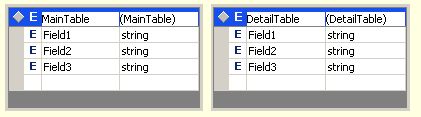
DataSet tables schema

Create the Crystal Reports report:

  1. Right click the Crystal Reports project -> Add -> New Folder

    Name it Reports.

  2. Right click the Reports folder -> Add -> New Item

    Open a new MainReport Crystal Reports report.

  3. Click the Register Later button to close the annoying register window, if it appears.

  4. Select Subreport and click OK. In the Contain Subeport Expert window Data tab, expand Project Data -> ADO.NET DataSet -> CrystalReport.CRDataSet.

  5. Select MainTable. Click the Insert Table button.

  6. Click Next.

  7. Click the Add All button. Click Next. Click Next. Click Next.

  8. Next to the Create a Subreport choice of the Subreport window tab, type DetailReport in the Report Name edit box.

  9. Click the Report Expert button. Insert DetailTable. Click Next to open the Subreport Generator.

    1. Add All fields. Click Next. Click Next. Click Next. Click Next.

    2. Type "No DB Subreport Crystal Report Sample" as the Subreport Title.

    3. Click Finish.

  10. Click Next. Type "No DB Crystal Report Sample." as the Main Report title. Click Finish.

Add the a CrystalReportViewer1 to the form.

  1. Open the Form1 form. Click View -> Toolbox in the menu.

  2. Drag (from the bottom of the Windows Forms tab in the Toolbox) a CrystalReportViewer into the form.

  3. Right click the CrystalReportViewer1 CrystalReportViewer in the form -> Properties.

  4. Set the Dock property to Fill.

Add the code to fill and show the Crystal Reports report.

Right click the Form -> View Code. Add the following Form1_Activated method:

Private Sub Form1_Activated(ByVal sender As Object, _
        ByVal e As System.EventArgs) _
        Handles MyBase.Activated
    Dim dsObj As CRDataSet = New CRDataSet
    FillDataSet(dsObj)

    Dim cr As MainReport = New MainReport

    ' Set the report DataSet   
    cr.SetDataSource(dsObj)

    CrystalReportViewer1.ReportSource = cr

End Sub

Add the following FillDataSet method:

Public Sub FillDataSet(ByRef dataSet As CRDataSet)

    ' Turn off constraint checking before the dataset is filled.
    ' This allows the adapters to fill the dataset without concern
    ' for dependencies between the tables.
    dataSet.EnforceConstraints = False
    Try
        ' Attempt to fill the dataset MainTable
        dataSet.MainTable.AddMainTableRow("Hello!", _
                         "This is", "my sample data")

        ' Attempt to fill the dataset DetailTable
        dataSet.DetailTable.AddDetailTableRow("This is", _
                           "the detail", "information")
        dataSet.DetailTable.AddDetailTableRow("added", _
                           "without the", "need of")
        dataSet.DetailTable.AddDetailTableRow("actually", _
                           "access a", "database.")
    Catch ex As Exception
        ' Add your error handling code here.
        Throw ex
    Finally
        ' Turn constraint checking back on.
        dataSet.EnforceConstraints = True
    End Try

End Sub

Build and run the application.

That's it!

History

  • 21 Nov 2006 - Posted.

License

This article has no explicit license attached to it but may contain usage terms in the article text or the download files themselves. If in doubt please contact the author via the discussion board below.

A list of licenses authors might use can be found here

About the Author

rmortega77
Software Developer CIMEX S.A.
Cuba Cuba
Member
Rodolfo Ortega is a Cuban Computer Scientist. He works as IT Auditor for the CIMEX S.A. subsidiary in Holguin, Cuba. He lives and works in Holguin, in the eastern part of the island of Cuba.

You can contact him at rodolfom[]cimex.com.cu for any personal message: Ideas on new articles, bibliography about new APIs, questions, are wellcome.

Submit questions related with current article to the article forum.

Sign Up to vote   Poor Excellent
Add a reason or comment to your vote: x
Votes of 3 or less require a comment

Comments and Discussions

 
You must Sign In to use this message board.
Search this forum  
    Spacing  Noise  Layout  Per page   
GeneralMy vote of 5membersupriya chaladi29 Mar '13 - 1:06 
awesome reference
GeneralCrystal Reports with VB.Net - 2 tables of a datasetmemberJosephNjugunah7 Oct '11 - 23:27 
Hi,
I'am using VS 2008 and crystal reports in which I need to develop a report that contains data and a graph (from database). For the graph it needs its own dataset table, and the data to show on the report in another table. I've tried using 2 tables of dataset, it ain't working.
Please help, what do I do?
 
---> And again, how does 'linking tables' n a dataset work?
Joseh.

GeneralMy vote of 5memberawarahoo16 Feb '11 - 20:47 
that article help me lot
GeneralGenerate a Crystal Reports report without a database in Framework 3.5memberHappy Jedgar8 Mar '10 - 9:54 
Hi...
 
I got lost following these instructions. I have a project and created my schema (Part2.xsd) and report (Part2-2009Aug.rpt). Now how do I connect them?
 
The instructions next add the CrystalReportViewer1 to the form. but I cannot find the CrystalReportViewer1 or Form1.
 
I'm sure the answer is simple, but I just don't see it yet.
 
"Happy" Jedgar
:=)
GeneralIf anyone receives the "Object reference not set to an instance of an object" error.memberdamir_john13 Mar '09 - 4:39 
As I converted the project into Visual Studio 2008 I received an error each time I tried to either print or export. The error was "Object reference not set to an instance of an object".
 
To resolve this just change the handler of Form1_Activated to me.load.
 
So it will be: Form1_Activated(ByVal sender As Object, ByVal e As System.EventArgs) Handles me.Load
GeneralWonderful code.memberXiayi5922 Oct '08 - 5:38 
This is great. I have been searching for idea like this because I was asked to create a web form and then convert it into pdf. There are a lot of suggestions on the web, but most of them want you to buy their software. I have used .net crystal report before, this should be easy to develop.
 
Thank you very much.
GeneralSeparate Cross-tab crystal report group into pagesmemberLouie Aschi13 Feb '08 - 3:37 
Hello everybody
 
I built a cross-tab crystal report and I choose a specefic field for
group the result according to it,
 
But I need every group appear in new page, not in separated tables
can anybody help me please.
 
Thanks a lot
QuestionWith subreports...memberelierha26 Oct '07 - 7:01 
Hi, I have a project that have reports with subreports, what can i do to send the dataset tables to subreports?
 
Thank you.
 
Elier
QuestionDesigning Query for Crystal ReportmemberMuhammad.Hanif28 Nov '06 - 18:41 
I want to design a query for crystal report which includes information regarding the sale and stock status of distributor of a production company
 
1. Today's Date
2. Distributor's information from distributors table
3. Products list from products table
4. Opening stock balance against each product from (StockReceiveMaster and StockReceiveDetail tables)
5. Stock received against each product from (StockReceiveMaster and StockReceiveDetail tables) within today's date
6. Stock issued against each product from (StockIssueMaster and StockIssueDetail tables) within today's date
7. Closing Stock at the end of day calculating from StockReceive and StockIssue
 
If someone can guide me Please.


Muhammad Hanif
GeneralChanging database type at run timememberAlexEvans28 Nov '06 - 16:12 
Thanks for sharing
 
I have lots of Crystal reports that have been designed to run against an MS-SQL Server. Now I want to run these same reports against a MYSQL Server…
 
Is there a way to change this at run time (through an API or any other way) with the need to maintain TWO versions of each report.
 
Hope someone can help me out here…
 
Cheers
Alex

General General    News News    Suggestion Suggestion    Question Question    Bug Bug    Answer Answer    Joke Joke    Rant Rant    Admin Admin   

Permalink | Advertise | Privacy | Mobile
Web03 | 2.6.130516.1 | Last Updated 21 Nov 2006
Article Copyright 2006 by rmortega77
Everything else Copyright © CodeProject, 1999-2013
Terms of Use
Layout: fixed | fluid
