Introduction
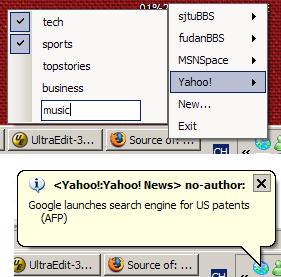
InfoBot differs from many other RSS aggregators in that it doesn't need the user to refresh or view the webpage/application himself or herself. The user could easily subscribe to the channels what he or she likes in the small menu items, no complicated Window Forms at all. InfoBot raises a bubble in the system tray to give a notification about the new information when you are working with other things. Click on the bubble links to go to the web page of the news.
(This application was originally designed to view my school's BBS more conveniently (Instead of refreshing the web pages to view new messages when people are talking on the board, I just focus on my other work and infoBot will inform me of the new messages.)
User Configuration
The user's configuration file is stored in cfg.xml.
When infoBot starts, infoBot.RssManager loads the XML file and initializes all the websites(infoBot.RssGroup) and the channels (infoBot.RssPiece). Similarly, the configuration is saved to cfg.xml when infoBot exits.
Update RSS
This work is done in infoBot.RssInfo. I used a BackgroundWorker (just like a thread) to update the RSSs in the background and set timeout value to each connection(HttpWebRequest). When a channel takes a long time to connect or fetch the RSS file, the priority of the site is decreased, so that it won't affect the other channel's refresh rate too much. infoBot.RssInfo.Update() is the function to be called when a RssInfo class is being updated.
Further Work
Though the current work seems simple, I think there are still a lot of meaningful things to do.
For example, by filtering the new messages in a smart way and popping up only the valuable information (maybe by users' keywords and other preferences), this application can be a smart agent for the users. But how to rate the messages' value for the user is a headache for me. If you have any advice about how to implement this, please inform me.
History
- 14th December, 2006: Initial post
the world is a vampire...



 General
  News
News  Suggestion
  Question
  Bug
Bug  Answer
  Joke
Joke  Praise
  Rant
Rant  Admin
Admin 


 Submit an article or tip


 Any idea on how to include it into the installing file?
