Introduction
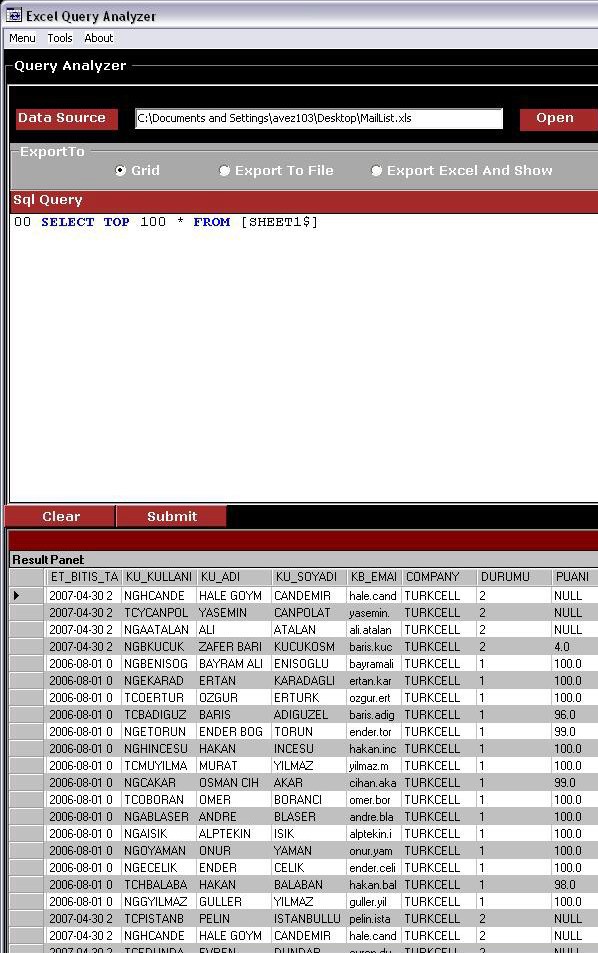
This article shows how can you use excel with SQL queries.Like SQL Query Analyzer it shows your query results on result panel.You can see your sql code with highlighted keywords like select,update etc. and can easily select your excel file as data source and run your query on it.
Usage
On the main menu type your query and click submit.
SELECT * FROM [SHEET1$] WHERE USERS IN(SELECT US_ID FROM [SHEET2$])
SHEET1 AND SHEET2 your excel sheets.You can modify it with your own.
Code
using System;
using System.Drawing;
using System.Collections;
using System.ComponentModel;
using System.Windows.Forms;
using System.Data.OleDb;
using System.Data;
using System.Data.SqlClient;
using System.IO
public DataSet DataReader(string SqlQ,string DataSource)
{
string ConStr="Provider=Microsoft.Jet.OleDb.4.0;Data source="+ DataSource +";Extended Properties=\"Excel 8.0;IMEX=1\"";
OleDbConnection Conn = new OleDbConnection(ConStr);
Conn.Open();
OleDbDataAdapter adapter = new OleDbDataAdapter(SqlQ,Conn);
OleDbCommand cmd = new OleDbCommand();
DataSet ds = new DataSet();
ds.DataSetName = "Result Panel";
adapter.Fill(ds);
return ds;
}
public void ExportToExcel()
{
Excel.ApplicationClass excel = new Excel.ApplicationClass();
excel.UserControl= true;
System.Globalization.CultureInfo oldCI= System.Threading.Thread.CurrentThread.CurrentCulture;
System.Threading.Thread.CurrentThread.CurrentCulture = new System.Globalization.CultureInfo("en-US");
System.Threading.Thread.CurrentThread.CurrentCulture = oldCI;
excel.Application.Workbooks.Add(true);
System.Data.DataTable table = DataReader(Query,DataSource).Tables[0];
int ColumnIndex=0;
foreach( System.Data.DataColumn col in table.Columns)
{
ColumnIndex++;
excel.Cells[1,ColumnIndex]=col.ColumnName;
}
int rowIndex=0;
foreach(DataRow row in table.Rows)
{
rowIndex++;
ColumnIndex=0;
foreach(DataColumn col in table.Columns)
{
ColumnIndex++;
excel.Cells[rowIndex+1,ColumnIndex]=row[col.ColumnName];
}
}
excel.Visible = true;
Excel.Worksheet Worksheet= (Excel.Worksheet)excel.ActiveSheet;
Worksheet.Activate();
}
public void ExportToGrid(ref DataGrid grid)
grid.DataSource = DataReader(Query,DataSource);
grid.Show();
public void ExportToTxt()
{
SaveFileDialog sfd = new SaveFileDialog();
sfd.Filter = "Excel (.xls)|*.xls|Text (.txt)|*.txt|Word (.doc)|*.doc";
sfd.FileName = "NewDocument";
sfd.ShowDialog();
FileStream fs = new FileStream(sfd.FileName.ToString(),FileMode.Create);
StreamWriter sw = new StreamWriter(fs);
System.Data.DataTable table = DataReader(Query,DataSource).Tables[0];
foreach(DataRow row in table.Rows)
{
foreach(DataColumn col in table.Columns)
{
sw.Write(row[col].ToString()+ "\t");
}
sw.Write("\n");
}
sw.Close();
}
This member has not yet provided a Biography. Assume it's interesting and varied, and probably something to do with programming.



 General
  News
News  Suggestion
  Question
  Bug
Bug  Answer
  Joke
Joke  Praise
  Rant
Rant  Admin
Admin 


 Submit an article or tip


