Summary
This article gives you an introduction about how Fortran can be used to write a wide variety of applications under the .NET framework.
Introduction
In the article titled IL "THE LANGUAGE OF CLR" - A PLATFORM FOR CROSS-LANGUAGE, I already talked about the cross language capabilities of Microsoft.NET architecture. In this section, I would like to draw your attention towards one of the popular languages Fortran and would like to present some examples to show how Fortran extends its capability to deliver wide range of applications under .NET.
Fujitsu and Lahey teamed up for writing Fortran compiler that targets Common Language Runtime Environment to exploit the best features of Common Language Infrastructure. Fujitsu Software is an active member that is participating in the standardization of many of the drafts relating to .NET. Lahey had brought many solutions and products relating to Fortran in the past and is working hard to bring many other products that target Microsoft.NET.
I happened to go through the previews provided by Fujitsu-Lahey Software and take this privilege to present some examples and feeling about this new compiler. Though it’s not the final version of the release, I would like to provide future prospects of this language.
Installation Instructions
If you don’t have the Lahey/Fujitsu Fortran for .NET Technology Preview1 software, you can download the file LaheyFortranPreview1 (1.92MB), a Windows Installer Package, from http://www.lahey.com/net_down.htm.
Software Requirements
- Windows 2000 Server
- Windows 2000 SP1 or higher
- .NET SDK Beta 2 ( Doesn’t work with Beta1)
LaheyFortranPreview1
Command-Line Applications - Fortran
It's very useful to understand various compiler options available for LFC.EXE (Lahey FORTRAN Compiler). Once you know them, you will be able to generate "exe" files or "dll" depending on the application usage. The following are some of the important compiler options available for LFC. Default extension for the Fortran files is ".f95"; symbolizing that Fortran 95 syntax is followed.
| Option | Meaning |
-[n]exe | Generates an executable file. This is the default option for the ILASM |
-[n]dll | Generates a library file with the extension .DLL |
-[n]g | Generates debugging information |
refer <names> | Specifies assembly file names (semicolon delimited) |
-out <name> | Compiles to file with specified name (user must provide extension, if any) |
-win | Creates a Windows application |
-winconsole | Creates a Windows console application |
Generating an Executable
To generate an executable file from myFile.f95; issue the following command at the command prompt:
lfc myFile.95
Generating a DLL
To generate a library file from myFile.il; issue the following command at the command prompt:
lfc myFile.f95 -dll
Type the following program in a Notepad and save it with the name welcome and with the extension .f95. It's not mandatory to save it with the extension .f95. However, that is the default extension for Fortran programs under .NET Framework using, Lahey Fortran compiler. It gets compiled to welcome.exe.
program Gui_Sample
  typealias :: MessageBox   => type(System%Windows%Forms%MessageBox)
  typealias :: DialogResult => type(System%Windows%Forms%DialogResult)
  type(DialogResult) :: display
  display = MessageBox%Show("Welcome to .NET","Patni Computer Systems Limited")
end
By running the welcome.exe, you will see the output as that of the following:
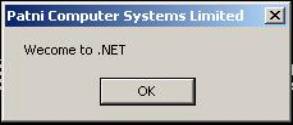
Let's try and find out what System%Windows%Forms%MessageBox mean. System.Windows is a name of the Namespace; Forms is the name of the class name; while MessageBox represents method name. As an important fact, all the .NET compliant languages make use of same class libraries called as base class libraries (BCL). Sometimes also referred to as .NET framework class libraries.
Cross Language Programming using Fortran.NET
Now let's see how to make use of cross-language capabilities of .NET framework. Let's now write a program using Fortran and inherit that into another language(C#). It's not mandatory to use C#, you may opt for any .NET compliant language. We won't stop there; we shall try and override the method written in Fortran using C#. This is what makes .NET environment so special. Write application using any language and use that piece of work across different other languages. Which means that all languages nearly acquire the same capabilities under .NET framework.
The following is a simple Fortran program, which display a message in a dialogue box. Type the following program in Notepad (you may use any editor) and save it as getMessage.f95. Compile the following program by issuing the following command:
lfc getMessage.f95 -dll
The following program gets compiled as a library (getMessage.dll).
subroutine getMessage
      typealias :: MessageBox   => type(System%Windows%Forms%MessageBox)
      typealias :: DialogResult => type(System%Windows%Forms%DialogResult)
      type(DialogResult) :: display
      display = MessageBox%Show("Welcome to .NET","Patni Computer Systems Limited")
    end subroutine getMessage
Now, we shall try to inherit this into a C# (Csharp) program. The following is a simple C# program which inherits the code written using Fortran. Type the following code in Notepad and save it with the name showMessage.cs (default extension for C# program is .cs). "csc" stands for C# compiler.
using System;
class showMessage
{
public static void Main()
{
getMessage.__procedure();
}
}
By executing the above program, you will find the following output:
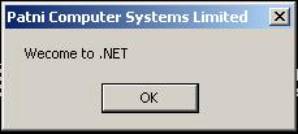
Now that we have seen how to inherit the Fortran code into another language, we will move ahead and try to override this implementation in C# program.
In the following program, we will override the method __procedure() with new implementation.
using System;
class showMessage
{
public static void Main()
{
__procedure();
}
public static void __procedure()
{
Console.WriteLine("Hi, This is really wonderful for Fortran programmer");
}
}
Type the above program in Notepad and save it as showMessage1.cs. By overriding, we mean that it should now display the new implementation when we compile and run the above program. Now let's check it! When we compile the above program and execute it, we will get the following output at the command prompt.
This is really wonderful for a Fortran programmer!
This is really amazing! Now, Fortran could be used in more meaningful way. No doubt it has its strengths but it acquires many more under the .NET umbrella.
ASP.NET Applications - Fortran
At the time of writing this article (LaheyFortranPreview1) doesn't provide direct support for ASP.NET applications. But soon, we will be seeing the direct support for ASP.NET and some other features of .NET framework. This means that at this moment, you won't find support for the following syntax <…language = "Fortran"…>. It also doesn't provide support for web services. However, if you have programming for .NET, you can make use of Fortran class as inline functions and write web services using languages such as C# and managed C++, etc.
Conclusion
Fujitsu and Lahey are trying to get Fortran.NET as soon as possible to the market. They got a very good reputation for delivering COBOL/Fortran related products and solutions. Fujitsu is actively participating in standardization efforts of CLI (ECMA) and very recently, it has been ratified by ECMA. The other participants include Hewlett-Packard, Intel Corporation, IBM, ISE, Microsoft, Monash University, Sun Microsystems, etc. There is no doubt that Fortran could be used more effectively than ever, for delivering wide range of applications. All those people using Fortran can now think of designing distributed applications, writing server-side programming, writing Windows applications and so on. Be tuned for further developments in this area, as this is one of the popular languages used across the globe even today.
License
This article has no explicit license attached to it, but may contain usage terms in the article text or the download files themselves. If in doubt, please contact the author via the discussion board below. A list of licenses authors might use can be found here.
Narayana Rao Surapaneni is a Microsoft Certified Solution Developer for .NET, Microsoft Certified Solution Developer and a Sun Certified Java Professional.
He has received international acclaim for authoring dozens of industry papers on .NET and other Microsoft technologies for leading web sites and magazines. He is on the panel of contributors for IT magazine.
He has delivered many public seminars on the .NET framework, C#, web services, Service Oriented architecture and ASP.NET. Surapaneni lead Microsoft.NET & Web Services Center of Excellence.
His priorities include:
• Track technology/product releases
• Develop a strategy for each specific technology/product
• Develop methodologies/frameworks
• Develop prototypes and proof-of-concepts
• Microsoft.NET Framework 2.0/ASP.NET 2.0/ VS.NET 2005
• Integration and collaboration services
• Web Services and Service Oriented Orchitectures
He is the co-author of the following books:
1. Java & .NET: A Developer Guide to Interoperability and Migration (ISBN: 81-203-2444-7, http://www.prenticehallindia.com/)
2. Migrating to .Net: A Pragmatic Path to Visual Basic .Net, Visual C++ .Net and ASP .Net (ISBN: 0-13-100962-1, www.amazon.com)
3. Microsoft.NET Tutorial for beginners
(http://download.microsoft.com/download/8/e/7/8e725d96-7ec3-498b-9fa7-86779aed101f/dotNET%20Tutorial%20for%20Beginners.pdf)
Narayana Rao Surapaneni is a recipient of the world wide Most Valuable Professional Award by Microsoft (2002-2004). He was also awarded the Asia Most Valuable Professional by Microsoft. He is one of the charter members of MCSD.NET
When it comes to the suggesting a solution he emphasizes on the importance of well thought architectures and design principles. It is no surprise that many clients see him as the person whom they can approach to arrive at a right technology solution!



 General
  News
News  Suggestion
  Question
  Bug
Bug  Answer
  Joke
Joke  Praise
  Rant
Rant  Admin
Admin 


 Submit an article or tip


