Introduction
I made this control as a favor to my friend who is an electrical engineer. He needed a Task Manager style control to display a sampled signal coming from a device that he was making. I did a quick search on codeproject, and the closest thing I could find was Anup. V.’s Plotter control but it lacked the scrolling capability. So I finally had to get my hands dirty and made this plotter control. Now I’m posting it here guessing that there might be other electrical engineers out there who are in a desperate need of such a control.
Demo Project
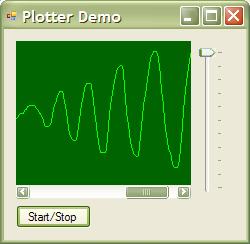
Tip: Use the vertical track bar to change the current value.
Using the Plotter Control
-
Set the Min & Max properties.
-
Set the BackColor & ForeColor properties to adjust the colors to your liking.
-
Use the Add method to add new values periodically (e.g. from a timer event handler).
Changes History
01/03/2006
Fixed a bug when the graph was drawn incorrectly when the control was put on a form with AutoScaleMode different than None and the system font size was different from the size the application was built with.
This member has not yet provided a Biography. Assume it's interesting and varied, and probably something to do with programming.



 General
  News
News  Suggestion
  Question
  Bug
Bug  Answer
  Joke
Joke  Praise
  Rant
Rant  Admin
Admin 


 Submit an article or tip


