Introduction
I have read a lot of articles here on the CodeProject site and have greatly appreciated the work and ideas that everyone here has shared, so I decided to share this control as payback. The MdiTabStrip was developed out of the need to have a tabbed interface for an MDI application I am working on. I really liked the look and functionality of the Internet Explorer 7 tab control, so this became the basis for my control. It is not an exact replica, but it has a lot of similar features, as you will see in the demo. The only things missing that I wish could be included are the buttons and drop-down buttons of the IE7 control. I have a working version of a control that inherits from the ToolStrip component, but because the ToolStripDesigner class is not public and thus cannot be inherited, I can't add the designer experience I want for the tabs. I may post it one day if someone requests it, but for now it is still a work in progress.
My testing environment is very narrow, so I will appreciate any feedback as to how the control performs. Also, if there are any comments, suggestions and even complaints that you want to share, by all means do so. If there is a better way of doing something, I am always interested in learning. I hope someone finds this control useful. If not in whole, then maybe some part of it.
Background
This control is based on a windowless concept in which the control and its constituent parts only use one window handle. The tabs for each MDI child window and the tabs for scrolling appear to be separate controls that act independently of each other. However, the painting, layout, mouse events and drag-drop events are all handled by the container control. It was after reading an article here on CodeProject by Alexey A. Popov: "Extending Windows Forms - lightweight views" and studying the ToolStrip control using Lutz Roeder's .NET Reflector that I began to understand the power and flexibility of a windowless control. When looking at the IE7 tab control, I realized that the best way to reproduce it would be to use this method.
Using the code
There are really only two things you need to do to be up and running with this control. Add it to your form and set the form's IsMdiContainer property to True. Since the MdiTabStrip hooks into the parent form's MdiChildActivated event, it will automatically add a tab to its collection when a new form is opened as an MDI child. If this event is raised and a tab already exists for the child form, then this tab is made active. Each tab ties itself to its related form and hooks to this form's FormClosed event. It is through this event that the tab is removed from the collection.
Points of interest
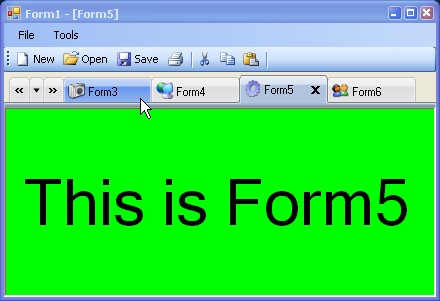
Besides duplicating -- although not exactly -- the visual look of the IE7 tab control, it also duplicates most of its functionality. You can set a maximum and minimum width for the tabs. These settings come into play when you resize the form. The tabs will scale their size according to the amount of space available. When their size is below the set minimum, they start to disappear. This is when the scroll tabs become visible.
You can rearrange the order of each tab by dragging and dropping them to a new location. The control draws indicators as to where the tab will be positioned if dropped at the current location of the mouse pointer. I also included a custom cursor for the drag operation.
With the drop-down menu tab, you can select which form to activate via a menu. The currently active form's menu item is checked and when the tab for the form is currently hidden -- because there is not enough room to display it -- the background of the menu item is a light gray.
I have added a lot of customizability to this control, although I am sure I left something out that someone will ask for. There are basically three "types" of tabs: Active, InActive, and MousedOver. For these tab types, you can set the tab background color, foreground color, border color and font. I had hoped to create a designer that was similar to the ToolStrip's designer where, as you clicked on each item of the ToolStrip, the Property Browser window would show that item's properties. After studying the designer with .NET Reflector, I found that the switching between components was done via a method that was not public. So, giving up on this, I created a designer that used a form with a PropertyGrid control and used my own logic to set the grid's SelectedObject property.
I commented the code as much as I could to try and explain what was being done and why. I recommend opening the included demo and trying out the control. Some things are better understood seeing them in action than reading about them.
History
- 5 Jan 2007 - Original version posted.
- 8 Jan 2007 - Updated demo download.
- 16 Apr 2007 - Version 1.5 - Fixes and enhancements.
- Enhancement - Added a drop shadow behind the close button glyph. This gives the glyph a little more dimension.
- Fix – Although not truly a bug, the resizing of the control did not behave correctly. The proposed width for the tabs was based on whole numbers. Let's say you had four tabs open and you were resizing the parent form smaller and smaller and you got to the point where the proposed width for each tab was smaller than the minimum width allowed. You would have to resize the window 4 pixels before the tab width would scale again. If you had ten tabs open, it would take 10 pixels before the tabs would resize. This update calculates a proposed width the same way as before but also takes into account any remainder left over from this calculation and evenly distributes it between the tabs.
- Changed the
Text property for the MdiTab class. It now shadows the Control.Text property and returns the text of the Form it is tied to. Setting the Text property does nothing. - Added the following events:
CurrentMdiTabChanged MdiTabAdded MdiTabClicked MdiTabIndexChanged MdiTabRemoved
- Added two new classes to handle the event arguments for the above events:
MdiTabStripTabClickedEventArgs and MdiTabStripTabEventArgs. - The
MdiTabStrip will now correctly draw the image set as the BackgroundImage. - Due to so many requests, I decided to add in a fix for the display issues noted when opening the first form, when switching between tabs and the control box displaying when no
MenuStrip is on the parent form. Although this is not a problem with the MdiTabStrip control and these problems still occur even if this control is not on the form, I decided to incorporate the fix that was suggested by Patrick Sears. Thank you, Patrick. I added a new property called MdiWindowState that has two possible values: Normal and Maximized. When set to Normal, you control each form's appearance through its properties. When set to Maximized, the MdiTabStrip will change each form's properties concerning the form's border, control box and docking.
- 22 Apr 2007 - Fixes and Enhancements.
- Added support for
RightToLeft. - Fixed bug where if the Form's
Text property was changed, the tab's text did not update correctly and the drop-down item's text did not update at all.
- 6 Jul 2007 - Version 1.5.5 Fixes and Enhancements.
- Added
NewMdiTab class
- Class exposes event named
OnMdiNewTabClicked. A developer can handle this event to open a new form of choice. - Three new properties that are used for this class:
MdiNewTabImage, MdiNewTabVisible and MdiNewTabWidth. If no image is specified then a default one is used.
- Added tooltips for tabs.
- Two new properties for this feature:
ShowTabToolTip and NewTabToolTipText.
This member has not yet provided a Biography. Assume it's interesting and varied, and probably something to do with programming.



 General
  News
News  Suggestion
  Question
  Bug
Bug  Answer
  Joke
Joke  Praise
  Rant
Rant  Admin
Admin 


 Submit an article or tip


 )
)