Click here to Skip to main content

Class for Adding Buttons, Menu Items and Explorer Bars to Internet Explorer

By , 19 Feb 2007
 

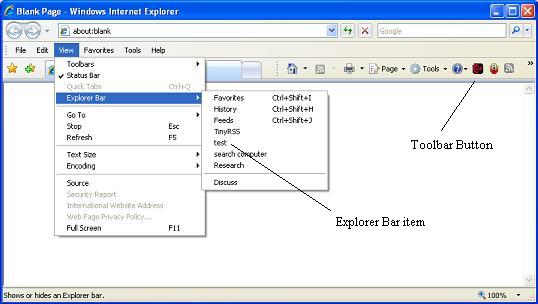
Sample Image - CorKatIEExtension.jpg

Menu Items

Sample image

Explorer Bars

Introduction

This is a C# class for the addition of buttons, menu items and explorer bars in Internet Explorer. It should work for Internet Explorer 5 and above, but has only been tested on Internet Explorer 7. It is written as a standalone class and can be referenced by either a Windows Forms application or an ASP.NET application. Included in the source download are two test applications; one for Windows Forms and one for ASP.NET, as well as the full source for the class.

Background

There is a tutorial in the MSDN library for adding these features to your registry. I wanted to create an application to do it so that I wouldn't be searching and editing the registry manually. Also if you build an Explorer toolbar, you could use this class to add the buttons at installation time, rather than rewriting the functionality for each bar you create. The article can be found here and I would recommend reading it to understand what the class does and how it edits your registry.

Using the Code

I have added all the functionality to the InternetExplorerExtender class. To use the class, simply add a reference to the object and instantiate the object.

using CorKat.RegistrySettings;
InternetExplorerExtender iee = new InternetExplorerExtender();

You will also need to reference Microsoft.Win32 to access the RegistryKey class. This enables you to set the root of the registry you wish to enter the settings in, i.e. CurrentUser or LocalMachine.

using Microsoft.Win32;

Class Names

  • CorKat.RegistrySettings.IEEConstants;
  • CorKat.RegistrySettings.IEEenums;
  • CorKat.RegistrySettings.InternetExplorerExtender;

Methods

  • CreateRegistryEntry_MenuItem()
  • CreateRegistryEntry_Button()
  • CreateNewExplorerBar()
  • DeleteKey(string key)
  • DeleteIECache()

Properties

There are many properties. Most have a default value. You will only need to populate certain properties depending on what items you want to add. I have set the object up this way so that you populate the properties before calling the create function and it will use these values to create the registry entries.

An example to add a button using the minimum properties is shown below:

// set the properties
iee.ButtonText = "MyButton";
iee.ApplicationPath = "c:/path/filename.exe";
iee.HotIcon = "c:/path/hoticon.ico";
iee.Icon = "c:/path/icon.ico";

// call the registry creation function for a button
iee.CreateRegistryEntry_Button();

An example to add a menu item using the minimum properties is as follows:

iee.MenuText = "myMenuItem;
iee.ApplicationPath = "c:/path/filename.exe";
// call the registry creation function for a menu item
iee.CreateRegistryEntry_MenuItem();        

The menu is added to the "Tools" menu in Internet Explorer by default. You can also add it to the "Help" menu. To do this, set InternetExplorerExtender.MenuItem to IEEenums.MenuItem.help.

An example to add an Explorer bar using the minimum properties is as shown below:

//set the properties 
iee.MenuText = "MyExplorerBar"; 

// if the explorer bar is a DLL, populate the DLL property. 
//NB if left blank the default is "Shdocvw.dll". this is used for HTML pages
if (txtdll.Text != "") 
    iee.Dll = txtdll.Text;

// if the explorer bar is an HTML page or file, populate the URL property
if (txtURL.Text != "") 
    iee.URL = txtURL.Text; 
iee.CreateNewExplorerBar();

This creates a new item in the view | explorer bar menu and stores the new CLSID in a property. To create a button for the HTML page/DLL immediately after this, call the CreateButton function.

//set the registry paths
iee.BaseRegistryKey = Registry.CurrentUser;
iee.RegistryPath = IEEConstants.Extensions;
iee.TypeOfDetail = IEEenums.DetailType.explorerbar;

// set the properties
iee.ButtonText = "MyButton"
iee.HotIcon = "c:/path/hoticon.ico";
iee.Icon = "c:/path/icon.ico";

// call the registry creation function for a button
iee.CreateRegistryEntry_Button();

There are three core functions for creating the registry entries:

  • CreateRegistryEntry_MenuItem()
  • CreateRegistryEntry_Button()
  • CreateNewExplorerBar()

If you wish to create a toolbar button for the explorer bar, you call the CreateNewExplorerBar() function first. This creates the guid that is stored in the registry for the new explorer bar and stores it in a property for the button registry entry to use. This is the full code for the function:

public void CreateNewExplorerBar()
{
    CreateNewGuid(); //populates AppGuid with a new id
    string SubKey = IEEConstants.ExplorerBarPath + AppGuid;
    //Create a registry entry for the guid
    RegistryKey rk = Registry.ClassesRoot.CreateSubKey(SubKey);
    //set the default value to the name that will appear 
    //in the Internet Explorer menu
    rk.SetValue("", MenuText);

    // create a new sub key for the horizontal or vertical bar
    string impCat = SubKey + "\\Implemented Categories\\";
    if (Vertical)
        impCat += VerticalCatId;
    else
        impCat += HorizontalCatId;

    rk = Registry.ClassesRoot.CreateSubKey(impCat);

    // create a new sub key for InProcServer32
    string inproc = SubKey + "\\InProcServer32";
    rk = Registry.ClassesRoot.CreateSubKey(inproc);
    //set its default value to Shdocvw.dll for an html page or *.dll 
    //for a custom file
    rk.OpenSubKey(inproc);
    rk.SetValue("", Dll);

    //Create a new string value under InProcServer32
    rk.SetValue("ThreadingModel", "Apartment");
    
    // create a new sub key for Instance
    string instance = SubKey + "\\Instance";
    rk = Registry.ClassesRoot.CreateSubKey(instance);
    rk.OpenSubKey(instance);
    //Create a new string value under Instance
    rk.SetValue("CLSID", "{4D5C8C2A-D075-11d0-B416-00C04FB90376}");

    // create a new sub key for Instance
    string InitPropertyBag = instance + "\\InitPropertyBag";
    rk = Registry.ClassesRoot.CreateSubKey(InitPropertyBag);
    rk.OpenSubKey(InitPropertyBag);
    //Create a new string value under Instance
    rk.SetValue("URL", URL); // the html page to open in the explorer bar

    DeleteIECache();

    SubKey = IEEConstants.ExplorerBars + AppGuid;
    //Create a registry entry for the guid
    rk = BaseRegistryKey.CreateSubKey(SubKey);
    // store the BandCLSID for making a button
    BandCLSID = AppGuid;
}

Then you can call the CreateRegistryEntry_Button function:

public void CreateRegistryEntry_Button()
{
    // Create a new id for the button
    CreateNewGuid();
    //set the path to the new registry entry
    //string SubKey = RegistryPath + AppGuid;
    string SubKey = IEEConstants.Extensions + AppGuid;
    //Create the registry entry for the guid
    RegistryKey rk = BaseRegistryKey.CreateSubKey(SubKey);

    //set the default class id used for 3 details.  
    //gets reset if an explorerbar type is used
    string strCLSID = ToolbarExtensionForExecutablesCLSID;

    //create the common registry string values and set them
    rk.SetValue("Default Visible", Visible);
    rk.SetValue("ButtonText", ButtonText);
    rk.SetValue("HotIcon", HotIcon); //path to *.ico file
    rk.SetValue("Icon", Icon); //path to *.ico file

    //CorKat.RegistrySettings.regProperties.
    switch (TypeOfDetail)
    {
        case IEEenums.DetailType.executable:
        {
            rk.SetValue("Exec", ApplicationPath);
            break;
        }
        case IEEenums.DetailType.script:
        {
            rk.SetValue("Script", ApplicationPath);
            break;
        }
        case IEEenums.DetailType.com:
        {
            rk.SetValue("ClsidExtension", ComCLSID);
            break;
        }
        case IEEenums.DetailType.explorerbar:
        {
            strCLSID = ToolbarExtensionForBandsCLSID;
            rk.SetValue("BandCLSID", BandCLSID);
            break;
        }
    }
    //set the class id
    rk.SetValue("CLSID", strCLSID);
}   

The third function creates the menu items. NB: By default the explorer bar registry entry creates a menu item in View | Explorer Bars. This function creates a menu item in either the tools menu (default if nothing is specified) or the help menu.

public void CreateRegistryEntry_MenuItem()
{
    // Create a new id for the menu item
    CreateNewGuid();
    //set the path to the new registry entry
    //string SubKey = RegistryPath + AppGuid;
    string SubKey = IEEConstants.Extensions + AppGuid;
    //Create the registry entry for the guid
    RegistryKey rk = BaseRegistryKey.CreateSubKey(SubKey);
    //create the common registry string values and set them
    rk.SetValue("CLSID", ToolbarExtensionForExecutablesCLSID);
    rk.SetValue("MenuText", MenuText);

    //set the default menu to tools and switch if help is selected
    string strMenu = "tools";
    if (MenuItem == IEEenums.MenuItem.help)
        strMenu = "help";
    rk.SetValue("MenuCustomize", strMenu);

    //create the detailed registry string values and 
    //set them for the application type details
    switch (TypeOfDetail)
    {
        case IEEenums.DetailType.executable:
        {
            rk.SetValue("Exec", ApplicationPath);
            break;
        }
        case IEEenums.DetailType.script:
        {
            rk.SetValue("Script", ApplicationPath);
            break;
        }
        case IEEenums.DetailType.com:
        {
            rk.SetValue("ClsidExtension", ComCLSID);
            break;
        }
        // no case for explorer tool bars as they appear on the 
        // view menu automatically when set up
        // as their set up is different they use a different function
    }
}   

All new entries into the registry require a unique GUID. The function CreateNewGuid caters to this and is called when creating a new explorer bar, button or menu item.

    private string CreateNewGuid()
        {
            AppGuid = Guid.NewGuid().ToString().ToUpper();
            return AppGuid;
        }   

There are three functions used to retrieve registry entries for the button menus and explorer bars. These are used in the Windows example to populate list views for selection and deletion of the entries.

/// Retrieve the subkeys names at the current key.
/// returns a string array
public string[] SubKeyNames()
{
    try
    {
        // Setting
        RegistryKey rk = BaseRegistryKey;
        rk = rk.OpenSubKey(RegistryPath);
        string[] strKeys = rk.GetSubKeyNames();
        return strKeys;
    }
    catch
    {
        return null;
    }
}
/// return an array containing all the sub values of a given key
public string[] SubKeyNames(string key)
{
    try
    {
        RegistryKey rk = BaseRegistryKey;
        RegistryKey regSubKey = rk.OpenSubKey(RegistryPath + "\\" + key);
        string[] strKeys = regSubKey.GetValueNames();
        return strKeys;
    }
    catch
    {
        return null;
    }
}
/// Retrieve the value of the subkeys at the provided subkey key.
public string GetValue(string ValueName, string key)
{
    try
    {
        // Setting
        RegistryKey rk = BaseRegistryKey;
        RegistryKey regSubKey = rk.OpenSubKey(RegistryPath + "\\" + key);
        // If the RegistryKey exists...
        if (regSubKey != null)
            return regSubKey.GetValue(ValueName).ToString();
        else
            return "";
    }
    catch
    {
        return "";
    }
}   

Also there is a function for deleting a key and any subkeys it may have:

public void DeleteKey(string key)
{
    string subkey = RegistryPath + key;
    RegistryKey rk = BaseRegistryKey;

    RegistryKey regSubKey = rk.OpenSubKey(subkey);
    // If the RegistryKey exists, I delete it
    if (regSubKey != null)
        rk.DeleteSubKeyTree(subkey);
}   

The last function DeleteIECache deals with the way Internet Explorer caches the explorer bar menu and needs to be called whenever you create or delete an explorer bar. Otherwise when you open Internet Explorer it will look like nothing has happened due to the fact that it is cached.

public void DeleteIECache()
{
    //delete the registry entry for enums so the 
    //explorer bars aren't cached and the new ones show
    RegistryPath = ComponetCat1Cache;
    RegistryKey rk = BaseRegistryKey;

    RegistryKey regSubKey = rk.OpenSubKey(RegistryPath);
    // If the RegistryKey exists, I delete it
    if (regSubKey != null)
        rk.DeleteSubKeyTree(RegistryPath);

    RegistryPath = ComponetCat2Cache;
    //rk = Registry.CurrentUser;

    regSubKey = rk.OpenSubKey(RegistryPath);
    // If the RegistryKey exists, I delete it
    if (regSubKey != null)
        rk.DeleteSubKeyTree(RegistryPath);
}   

Points of Interest

When you add a new explorer bar by editing the registry, it doesn't show up in the Internet Explorer menu due to the way in which Internet Explorer caches its menus. The MSDN tutorial adding Explorer bars tells you to delete the registry entries:

HKEY_CLASSES_ROOT\Component Categories\{00021493-0000-0000-C000-000000000046}\Enum
HKEY_CLASSES_ROOT\Component Categories\{00021494-0000-0000-C000-000000000046}\Enum

This is the wrong location. You need to delete:

HKEY_CURRENT_USER\Software\Microsoft\Windows\CurrentVersion\Explorer\Discardable\
PostSetup\Component Categories\{00021493-0000-0000-C000-000000000046}\Enum
HKEY_CURRENT_USER\Software\Microsoft\Windows\CurrentVersion\Explorer\Discardable\
PostSetup\Component Categories\{00021494-0000-0000-C000-000000000046}\Enum

However, you don't need to worry about this. Once the new Explorer bar is created, the function will do this for you. However, I have made the function DeleteIECache public so that you can call it if necessary.

History

  • Version 1.0 (initial version) - 22/01/2007
  • Added Visual Studio 2003 zip - 20/02/2007 - N.B. It contains the same class as the Visual Studio 2005 version, but the test app only shows you how to add a button.

License

This article, along with any associated source code and files, is licensed under The Code Project Open License (CPOL)

About the Author

A55imilate
Web Developer
Greece Greece
Member
No Biography provided

Sign Up to vote   Poor Excellent
Add a reason or comment to your vote: x
Votes of 3 or less require a comment

Comments and Discussions

 
You must Sign In to use this message board.
Search this forum  
    Spacing  Noise  Layout  Per page   
QuestionThe new added toolbar button not appear before reset or manaul add from IE's Toolbar menumemberdfer5 Jul '08 - 9:47 
Even I close all IE windows and re-open,new added buton does not appear,but can be added by:View/Toolbar/Costom.../Add..or Reset
QuestionI dont download the sample...memberdannet212 Dec '07 - 14:06 
Please, anybody send the sample to daniel.iglesias75@gmail.com.
tanks...
QuestionHow to redirect to another site when user clicked the my toolbar buttonmembermonarch_ilhan1 Aug '07 - 19:59 
Hi,
 
First of all, thank you very much for you very helpful and good job. It was realley needed.
My question is, I want to create a toolbar button in IE by using your library. But my need is,
when user clicked the button, it should get the current URL and pass it as a query string to another site. For example; if I am in http://www.microsoft.com/msdn/library/default.aspx, when I clicked the button, it should redirect me to the page http://www.mysite.com/submit.aspx?URL=http://www.microsoft.com/msdn/library/default.aspx
How can I achive this? Can you please help me?
 
Does your class work on non-framework installed machines?
 
Regards
Ilhan
QuestionAdd Menu in Windows ExplorermemberPankajMishra17 Jun '07 - 20:37 
Nice Article but I am looking for some code by Which I can add menu's and Buttons in Explorer Toolbar and menu's just as this code does in IE.
Any Idea how can I do that ? Any Link or code snippet would be helpful..
 
...Pankaj Mishra


Pankaj Mishra

Questionhow find coordinate of a button (created by myself)memberdjm_bourn11 Jun '07 - 22:04 
i want to go to the button that it was created by another person ,i.e. it isn't system button.the button is on a bar of ie;e.g,googl bar's bookmark,how auto go to it by a program ? a million thank!
QuestionCompatibility and ScriptingmemberNickRice26 Apr '07 - 0:23 
Hi,
 
A really cool application!
 
I have a few questions based on my usage, but I think it will help other users as well:
 
1. What versions of IE is the toolbar button and explorer bar object compatible with? Will it work with the older IE 5/5.5 or the newer IE 7?
 
2. How can I trigger some local JavaScript (a .js file) on the click of a toolbar button? There's only an option in the sample program to link a CGI script. I basically want the toolbar button to interact with the current document (example: highlight certain words on the current web page using JavaScript etc.)
 
3. I assume the end-user of the IE addon will need .NET framework 1.1/2.0 on their computer?
 
Thanks again, and keep up the good work mate!
QuestionRe: Compatibility and ScriptingmemberNickRice24 May '07 - 19:05 
Please respond to me previous questions. Thanks in advance!
QuestionRe: Compatibility and ScriptingmemberNickRice5 Jun '07 - 8:48 
Hi,
 
How can I trigger some local JavaScript (a .js file) on the click of a toolbar button? There's only an option in the sample program to link a CGI script. I basically want the toolbar button to interact with the current document (example: highlight certain words on the current web page using JavaScript etc.)
 
Kindly reply! Many thanks Smile | :)
AnswerRe: Compatibility and Scriptingmemberdfer5 Jul '08 - 9:33 
Just manual change the script file name and extention as "*.*" when browsering/select script file,or you can modify the source code directly,I think.
 
I can launch JS(action.htm) and interact with the current document this way,and it's one of the only two ways for this purpose,the other and better way is COM DLL,have a look at here:
 
http://msdn.microsoft.com/en-us/library/bb735854(VS.85).aspx[^]
 
Creating Add-ons for Internet Explorer: Toolbar Buttons
 
But the sample is programming in C++,I prefer C#.
QuestionUse custom dll in explorer barmemberOrenk925 Feb '07 - 17:53 
Hi,
 
In the CreateNewExplorerBar function there is this remark:
//set its default value to Shdocvw.dll for an html page or *.dll for a custom file
 
My question is:
What should the custom dll contain to be used in an explorer bar?
What API/Functions ?
 
Thanks,
 
Oren.

 
OK.

AnswerRe: Use custom dll in explorer barmemberA55imilate25 Feb '07 - 22:04 
Theres an article here in the msdn library, that has the required interface implementations.
 
I haven't tried it as I wrote my library to use, for showing a html page. I left the comment there so that other developers (or if I need to in the future) can see where to impliment the custom dll.
GeneralJust a thank you...memberTBear SoftWare20 Feb '07 - 18:30 
I just had to tell you thank you. I've been trying to find a way to make a second "Links Bar" for IE. In the past, I've tried a couple programs specifically designed to do that, but they fell short and I have since put this project on hold until I found a way. A quick look at your work and I think this may be exactly what I was looking for. I'll have a closer look when I wake up in the morning.
 
I'm just beginning to learn C# so this will also be a good learning experience for me.
GeneralRe: Just a thank you...memberA55imilate21 Feb '07 - 21:13 
Cool. I'm glad it has helped someone Big Grin | :-D
GeneralI have visual studio 2003 [modified]memberRamez Quneibi17 Feb '07 - 4:53 
Hi, great work but i have made a desktop application using visual studio 2003, i downloaded your code but i discovered that you used visual studio 2005 and it didnt work. I need your code written in 2003, if you have it please send it to me, otherwise if you can kindly tell me how to add a button for my C# application to the IE i will appreciate.
 
Thanx a lot
 

-- modified at 11:08 Saturday 17th February, 2007
 
I hope that i am helping programmers

GeneralRe: I have visual studio 2003memberA55imilate19 Feb '07 - 21:16 
Hi Ramez,
 
I've added a download for vs2003. The testing facility is minimal for this (I just added a button to see if it worked ok). You can look at the code from the 2005 version to see how the other bits work.
 
If I get time and you feel you need it, I will backwards convert the rest.
 
Hope this helps
 
Assim.
GeneralRe: I have visual studio 2003memberRamez Quneibi24 Feb '07 - 6:00 
Hi Mr.Assim
 
If you could convert it,i will really appreciate because i need it.
Thanks a lot for your kind cooperation


I hope that i am helping programmers

GeneralRe: I have visual studio 2003memberA55imilate25 Feb '07 - 22:31 
To add a button, you can use the 2k3 example.
 
All you will need to do is change the following paths in the button click event on the test form
private void button1_Click(object sender, System.EventArgs e)
{
	InternetExplorerExtender iee = new InternetExplorerExtender();
	// set the properties
	iee.ButtonText = "MyButton";  //text that will appear on hover over
	iee.ApplicationPath = "notepad.exe"; //application to open, use full path for your apps
	iee.HotIcon = @"C:\Source\RegEdit\ExtendIE\Icons\Icon1.ico"; // icon
	iee.Icon = @"C:\Source\RegEdit\ExtendIE\Icons\Icon1.ico"; // icon
	// call the registry creation function for a button
	iee.CreateRegistryEntry_Button();
}
  • Where it says "notepad.exe" change this to the full path of your c# app.exe eg "c:/myapp/myapp.exe"
  • Make sure the icon properties point to a real *.ico file.
  • Close IE and reopen and the button should be there.
NB if the button doesnt show try checking the tools | toolbars | customize menu and add it from "available toolbar buttons"
 
Hope this helps
GeneralRe: I have visual studio 2003memberRamez Quneibi26 Feb '07 - 19:12 
It is woking..... thanks a lot
 
Thanks

General General    News News    Suggestion Suggestion    Question Question    Bug Bug    Answer Answer    Joke Joke    Rant Rant    Admin Admin   

Permalink | Advertise | Privacy | Mobile
Web02 | 2.6.130523.1 | Last Updated 20 Feb 2007
Article Copyright 2007 by A55imilate
Everything else Copyright © CodeProject, 1999-2013
Terms of Use
Layout: fixed | fluid
