Click here to Skip to main content

AJAX AutoComplete/AutoSuggest TextBox

By , 2 Oct 2007
 
Sample Image - maximum width is 600 pixels

Introduction

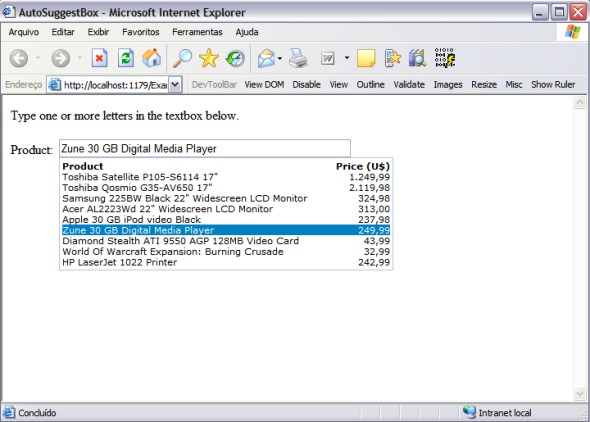
This is an AJAX AutoSuggest ASP.NET textbox I've created a while ago. It is built on top of the Anthem.NET library.

Background

When building enterprise web applications, we often need to let the user select one item from a large list of records. For instance, on an order entry form, the user must be able to select the customer from a large list of customers. For performance reasons, it would be insane to just load a DropDownList with 50000 items. The other alternative would be to open another form where the user would be able to search and select the desired customer. I've used this approach before, but the users usually found it very annoying and were constantly demanding a better solution.

Solution

The AJAX boom made it an easy problem to solve. An AutoSuggest textbox, where the user would type a part of the desired customer name and the control would show the matches, would fit perfectly here. Yet, I couldn't find one that would completely fill my needs. I needed an AutoSuggest textbox with the following features:

  • Built-in validation
  • Template-based content
  • Ability to bind to all sorts of objects (collection, datatables, etc)
  • Ability to work like a DropDownList
  • Smooth integration with Anthem.NET
  • Ability to show a header
  • No need to call webservices

The Control

This custom control is based on the Anthem library. I decided to use Anthem because at that time I was already using it on my projects. The Atlas Project was not mature enough and Anthem seemed much easier and more powerful. The Anthem library now has an official AutoSuggest control, but I haven't checked it out yet. If you are not familiar with Anthem.NET yet, I encourage you to check it out. It's pretty simple and works great. The JavaScript OO model was based on another free AutoSuggest control that I found on this web site. I found it pretty nice, but it was missing some functionality I needed.

Setting Up

To use this AutoSuggest control, you will need to reference both the Anthem.dll and Anthem.AutoSuggest.dll in your project. The download contains these DLLs, the AutoSuggest source code and an example project source code.

Using the Code

The first thing you need to do is to add the control to your page. This can be done through drag and drop or by writing the tags directly into the ASPX source file. Since I didn't add any relevant design-time support, I think you'd better stick with the ASPX source code. In this example we are using the AutoSuggest control to display the names of various bands and the user must select his favorite one.

<Anthem:AutoSuggestBox runat="server" 
    ID="asbFavoriteBand" DataKeyField="ID" 
    TextBoxDisplayField="Name" AutoCallBack="true" 
    ItemNotFoundMessage="Item not found!" >
    <itemtemplate>
        <%# ((Band)Container.DataItem).Name %>
    </ItemTemplate>
</Anthem:AutoSuggestBox>

I think most of the property names are self-explanatory. I encourage you to go through the properties and play with them. For those unfamiliar with the Anthem.NET library, the AutoCallBack attribute tells that after the selected value has changed, the control will trigger a callback to the server. It's equivalent to the AutoPostBack property of the regular ASP.NET controls. Notice that you can use the ItemTemplate in the same manner in which you use it with the Repeater, DataList or DataGrid controls. The DataKeyField property tells the control which field it will use to set the SelectedValue property.

After adding the control to the page, you should set up the event handlers. The most important event you should handle is the TextChanged event. This is where you are going to fill the suggested list. Another important event is the SelectedValueChanged. This event is fired whenever you change the current value. To wire up these handlers, you can write the following code in the OnInit method:

protected override void OnInit(EventArgs e)
{
    base.OnInit(e);
    this.asbFavoriteBand.TextChanged += 
        new Anthem.AutoSuggestBox.TextChangedEventHandler(
        asbFavoriteBand_TextChanged);

    this.asbFavoriteBand.SelectedValueChanged += 
        new Anthem.AutoSuggestBox.SelectedValueChangedHandler(
        asbFavoriteBand_SelectedValueChanged);
}

Here's the code to handle the TextChanged event:

void asbFavoriteBand_TextChanged(object source, 
        Anthem.AutoSuggestEventArgs e)
{
    //Creates a dataview from a datatable
    DataView dv = new DataView(_dtBands);

    //Filters the datatable based on the CurrentText property
    dv.RowFilter = string.Format("BandName LIKE '%{0}%'", e.CurrentText);

    //Sets the dataview as the control's datasource
    asbFavoriteBand.DataSource = dv;
    asbFavoriteBand.DataBind();
}

In the snippet above, you can use any data source on the AutoSuggest control. Usually you would query the database for the result set. It's when you call the DataBind method that the suggested list appears on the screen.

Points of Interest

There are, definitely, some nice aspects of this control that demand a closer look at how .NET controls work, like using embedded web resources (images, JavaScript and CSS files), supporting template based content, triggering events and handling the JavaScript integration.

Object-Oriented JavaScript is also worth a look. It really makes things easier.

License

This article has no explicit license attached to it but may contain usage terms in the article text or the download files themselves. If in doubt please contact the author via the discussion board below.

A list of licenses authors might use can be found here

About the Author

Cassio Mosqueira
Software Developer (Senior)
Canada Canada
Member
I've been developing .NET enterprise applications since 2000.
 
I am originally from Rio de Janeiro and I am currently working at http://www.intelligentcoder.com in Ontario.

Sign Up to vote   Poor Excellent
Add a reason or comment to your vote: x
Votes of 3 or less require a comment

Comments and Discussions

 
You must Sign In to use this message board.
Search this forum  
    Spacing  Noise  Layout  Per page   
QuestionValue not getting in the normal asp:textbox [modified]memberChandrashekar Srinivasan16 Apr '12 - 18:39 
while selecting the value from autosuggestbox, SelectedValueChanged event is getting fired but that time can't able to assign value from autosuggestbox to asp:textbox control. Please help me

modified 17 Apr '12 - 0:57.

AnswerRe: Value not getting in the normal asp:textboxmemberkanchan.srajput31 Aug '12 - 2:08 
I am facing same problem please help me
GeneralOnclick in the elementsmembersmntpzl3 Mar '11 - 0:10 
Hi,
I would place the event to call the server at the click of the selected item down in the cascade.
E 'possible?
How? thanks a lot!
I hope for your help!
GeneralAppreciate your workmemberXITIJ_CODE_0417 Feb '11 - 9:12 
I wish to thank you from bottom from my Heart to creating this wonderful control.I'm new to Ajax but helped really well. But i had faced some minor Bugs which i want to share with you and i hope you would suggest me some improvements
1>I had used 5 AutoSuggest TextBox in page each are in a individual cell of Table. While showing the Suggestions the Controls below is goes Downwards as the List is showing suggestions which makes the Page Looks improper.
For Example In the Company name i had very less names so it won't disturb the Page Layout,but the Product List is almost 200-300 items in it,while showing the suggestions that Cells goes bigger as the Suggestion are Shown.
2>Sometimes working on the Page having AutoSuggest TextBox controls on it Shows "Error While creating the Controls ,AutoCallBAck Property Cannot set True Manually"
Then the whole project must be build and restart the Visual Studio to get back to Normal condition.
I really appreciate your hard work , and i can't thank you enough.
QuestionIs it possible to set AutoSuggestBox ReadOnly?memberMember 404403014 Nov '10 - 16:29 
Very nice and useful control!!! No problem to involved it to my project. Only one question: is it possible to set AutoSuggestBox ReadOnly? When my DetailsView is in ReadOnly model I want the AutoSuggestBox is ReadOnly, too.
 
P.S. I have to put AutoSuggestBox out of DetailsView to make it work. I don't know how to set it as ReadOnly when the DetailsView is ReadOnly.
 
Many Thanks,
 
Jenning
Generalvisible property of anthem set runtime and its event are not working with update panel (3.5) [modified]membergunasathia22 Sep '10 - 19:00 
hi ,
I use anthem AutoSuggestBox to display batchno. in my project , if i set control visible property at runtime its event are not working and it throw an java script error.
undefined is not an object
any suggestion on this welcome.
gunasekaran
modified on Tuesday, September 28, 2010 12:08 AM

Questionhow work in asp.net with vb.netmemberste199017 May '10 - 23:32 
hi, i'm try the code in vb.net but not work..
can you post me an example in vb.net? thank you
GeneralSpeed problemmemberterrix7712 May '10 - 20:59 
Hello Cassio and to all, optimal this plan but applying it to a my application web in which I interrogate 500000 records becomes slow too much. The problem is that all the data come loaded in the page_load. How it can not be only loaded all the data in the page_load but interrogating the databse when it comes typed the text in the textbox? Thanks for l' aid
Questioncan you helme version phpmemberariodoni22 Mar '10 - 10:59 
can you help me version php
GeneralScroll BugmemberKeshav Fulpagare14 Sep '09 - 23:02 
Hi Cassio, I downloaded the AutoSuggest TextBox project, and it is giving me scrolling problem. When the page is scrolling the suggestins are going up and down to. Please help.
 
Thanks & Regards,
Keshav Fulpagare
GeneralRe: Scroll BugmemberSoslan Prado14 May '10 - 4:33 
I think this control is great, but I have the same problem with scrolling, did Casio solved it?
Please, help me on this.
Thanks in advance.
GeneralRe: Scroll Bugmemberkinghim18 Nov '10 - 19:58 
This control use javascript to find the display position, please read the AutoSuggest.js, a method MoveMenuDivIfAbsolutePos() will run before show the suggest, and this method included another method findPos(obj) to find the display position.
 
First, edit the MoveMenuDivIfAbsolutePos(), "postion: fixed" is positioned relative to the viewport and it will not change when the window is scrolled, so I changed to "absolute".
divMenu.style.position = "absolute";
 
In MoveMenuDivIfAbsolutePos(), you can see the method findPos(obj), it seem to find the display position,
function findPos(obj) {
    var curleft = curtop = 0;
    if (obj.offsetParent) {
        curleft = obj.offsetLeft
        curtop = obj.offsetTop
        while (obj = obj.offsetParent) {
            curleft += obj.offsetLeft
            curtop += obj.offsetTop
        }
    }
    return [curleft, curtop];
}
It has not calculate the scroll offsets, so I change to:
function findPos(obj) {
    var curleft = curtop = 0;
    if (obj.offsetParent) {
        curleft = obj.offsetLeft
        curtop = obj.offsetTop
        while (obj = obj.offsetParent) {
            curleft += obj.offsetLeft
            curtop += obj.offsetTop
        }
    }
    
    if (document.body.scrollLeft != 0)
       curleft -= document.body.scrollLeft;
    if (document.body.scrollTop != 0)
       curtop -= document.body.scrollTop;
    
    return [curleft, curtop];
}
I tested the code, it seem work in the firefox and IE but not work in Chrome....
Any other suggestion for that?
QuestionWill it work if I add it dynamically?memberMember 42823403 Sep '09 - 7:00 
First of all, thanks a lot for this fantastic control. Much better than the AutoCompleteExtender of the AjaxControlToolkit.
 
I have created a user control, which contains this AutoSuggestBox. This user control works perfectly. But if I dynamically add this control to my web form like below, it doesn't work.
 
MyAutoSuggestBoxControl masbc = LoadControl("~/UserControls/MyAutoSuggestBoxControl") as MyAutoSuggestBoxControl;
MyPlaceHolder1.Controls.Add(masbc);
 
This dynamically added user control masbc does not work.
 
You have any idea how to shoot this problem? Thanks.
AnswerRe: Will it work if I add it dynamically?memberMember 42823403 Sep '09 - 10:21 
It's me again.
 
It is fine if dynamically added AutoSuggestBox does not work. But, how can we have the AutoSuggestBox fire again after we have selected the text item and inserted it into the textbox?
 
Let me make it clearer:
 
I have a web form in my asp.net 3.5 application where users can send emails. I am letting users enter recipients' email addresses in the AutoSuggestBox. The form looks like this:
 
To: [                                    ]  <-- This is an AutoSuggestBox
Cc: [                                    ]  <-- This is an AutoSuggestBox
 
I am getting users email address through a stored procedure I write in my SQL Server 2005 database. It works perfectly while users type off in the AutoSuggestBox.
 
I'd like to enter more than 1 email addresses in the same text box, separated by commas. But it seems that AutoSuggestBox won't fire if I have already selected one item and inserted into the textbox. Do you have any boolean property for the AutoSuggestBox control like FireMultipleTimes which we can set to true? If this is not clear, please refer to the picture description at the following address. I am sure you will know what I am talking about. Please get back to me about this problem. Really appreciate your hard work.
 
http://gnewsgroup.googlepages.com/autosuggestbox[^]
AnswerRe: Will it work if I add it dynamically?memberMember 42823404 Sep '09 - 6:30 
Actually, I just saw that in your example, you do have DynamicControl.aspx. Unfortunately, the dynamic AutoSuggestBox is added very early in the page cycle in OnInit.
 
I modified DynamicControl.aspx like this:
 
Place a Button control in DynamicControl.aspx:
 
<asp:Button ID="BtnAdd" Text="Add AutoSuggestBox" runat="Server" OnClick="BtnAdd_Click" />
 
And in the code behind, I have:
 
 protected void BtnAdd_Click(object sender, EventArgs e)
    {
        Anthem.AutoSuggestBox one = GenerateAutoSuggestBox("uno");
        pnDynamic.Controls.Add(one);
        Anthem.AutoSuggestBox two = GenerateAutoSuggestBox("dos");
        pnDynamic.Controls.Add(two);
        Anthem.AutoSuggestBox three = GenerateAutoSuggestBox("tres");
        pnDynamic.Controls.Add(three);
    }
 
    private Anthem.AutoSuggestBox GenerateAutoSuggestBox(string cid)
    {
        Anthem.AutoSuggestBox asbFavoriteBand = new Anthem.AutoSuggestBox();
        asbFavoriteBand.ID = cid; //"asbFavoriteBand";
        asbFavoriteBand.DataKeyField = "ID";
        asbFavoriteBand.TextBoxDisplayField = "Name";
        asbFavoriteBand.AutoCallBack = true;
        asbFavoriteBand.ItemNotFoundMessage = "Band not found!";
        asbFavoriteBand.TextChanged += new Anthem.AutoSuggestBox.TextChangedEventHandler(asbFavoriteBand_TextChanged);
        asbFavoriteBand.SelectedValueChanged += new Anthem.AutoSuggestBox.SelectedValueChangedHandler(asbFavoriteBand_SelectedValueChanged);
        asbFavoriteBand.ItemDataBound += new Anthem.AutoSuggestBox.ItemDataBoundHandler(asbFavoriteBand_ItemDataBound);
        return asbFavoriteBand;
    }
 
Now the added AutoSuggestBoxes do not work.
GeneralInvitation for new .NET Programming resource website a Author and supportermemberRavenet1 Aug '09 - 18:56 
Dear Sir,
 
I have a launched new web site for .NET programming resources. www.codegain.com. I would like to invite to the codegain.com as author and supporter. I hope you will joins with us soon.
 
Thank You
RRaveen
Founder www.codegain.com
 
Cheers,Earn and Enjoy
RRave
MCTS,MCPD
http://ravesoft.blogspot.com


GeneralThank you! [modified]memberEmilotti17 Jun '09 - 15:14 
Hi Cassio,
i tried to get several autosuggest boxes working but yours is the best for me and its really simply to get it working (well, except for MultiViews).
Thank you so much!
 
The only problem is that I am using the control within a MultiView (and also in a user control sitting on a view of a MutliView) and that seems to make a difference (outside the MutliView it works totally fine). Within the MutliView the control adds the suggestion list (all values in a big block of text) right next to the textbox in the middle of the page (it still shows the suggestions). Sigh | :sigh:
 
The suggestions will only be shown partly and are then cut off if the control is near the bottom of the page.
 
Am i doing something wrong?
Thanks for any suggestions or help. Smile | :)
 
Cheers
Jana
 
modified on Wednesday, June 17, 2009 11:20 PM

GeneralRe: Thank you!memberEmilotti17 Jun '09 - 18:44 
actually, that was my fault... I forgot to set AutoUpdateAfterCallBack="false" in the MultiView. Blush | :O
Solved. All works beautifully.
Thanks
Questionscrolling problem not solved yet ?memberrembrant8521 May '09 - 3:31 
Hi Cassio I download the LAST version of the AutoSuggest TextBox progect,and it seems You have not solve the scrolling problem yet,(when the page is scrolling) the suggestins are going up and down to ,Help plise .Thanks RembrAnt.
QuestionRe: scrolling problem not solved yet ?memberSoslan Prado14 May '10 - 4:32 
I have the same problem with scrolling, did Casio solved it?
Please, help me on this issue.
Thanks in advance.
Questionis this source code require any licence agreement?memberSandeep Ramani30 Mar '09 - 20:55 
hi Cassio Mosqueira,
 
Nice Article ..Quite useful
 
but i hv doubt abt using yr code and dll in my projects..
 
is this source code require any licence agreement?
 
can i use it in my project..whether any licence agreement is required for tht or not?
AnswerRe: is this source code require any licence agreement?memberCassio Mosqueira31 Mar '09 - 4:18 
Yes, you can use it in your project. You don't need any license agreement.
 
Regards,
Cassio Alves
Cool | :cool:

QuestionProblems of using Anthem.Net with pages having master pagememberManish Partey24 Mar '09 - 20:29 
Hi
 
I have used your code in my page with master page and without master page.
On without master page your script running fine
 
but on pages with master pages its not working
 
plz suggest.
 
Frown | :( Frown | :( Frown | :( Frown | :( Frown | :( Frown | :( :(
QuestionHow to enable/disable an anthem:autosuggestbox?memberarchy2k813 Mar '09 - 23:32 
Hi Cassio
i need to enable/disable an autosuggestbox based on the item selected in another autosuggestbox. How do i do this? I dont find autosuggestbox.enabled property. Could you plz help me out.
Thanks
Archana
QuestionDesigner support & matching items in the data sourcememberhumba13 Mar '09 - 7:53 
First of all thank you for the control.. finally one that basically allows me to work as if I weren't dealing with AJAX.
 
However, I've ran into some major issues concerning the designer. Visual Studio 2008 SP1 has major issues handling that control. For instance, every couple hours, it suddenly adds two elements inside the AutoSuggestionBox markup.. and then naturally nothing will work anymore. If you remove the added textboxes, the designer can no longer render the control. The first thing it complains about is being unable to assign 'true' to AutoCallback.
 
Remove that and it starts moaning about properties like ItemNotFoundMessage - basically almost everything (one time it even complained about the Width parameter).
 
Also, if you assign events in the designer, there's an inexplicable access problem.. it says it cannot access the event handler when you try to compile.. even when you declare it as public (and I checked that the event args are all declared as public as well).
 
Do you have any plans of making the control more GUI friendly? The standard Anthem controls have not given me any grief so far and I can configure everything in the GUI and won't have to resort to code (I define everything but the ID in the OnInit method now.. that way the designer cannot complain).
 
I'm also couldn't quite figure out your mentioning of the ItemTemplate.
 
We have two control properties that seem to relate to what is shown in the textbox: DataKeyField and TextBoxDisplayField. However, how exactly do they matter and how do they relate to the ItemTemplate? As far as I can tell they seem to do nothing.
 
And with regards to the ItemTemplate.. so far every template I've seen included a control.. e.g.
 

<asp:label id="Label1" runat="server" text="<%# Bind("Creator") %>" xmlns:asp="#unknown">

 
Inside the control, you define the data binding.
 
Your example looks like this:
 
<![CDATA[<%# ((Customer)Container.DataItem).Name%>]]>
 
No control and consequently you cannot use the Bind or Eval statements. Could you elaborate a bit on that use of the ItemTemplate. How would you do it if your data source isn't a List but some sort of data set? Could you, with a data set, somehow use the DataKeyField and TextboxDisplayField to refer to column names in the data source?
 
Regards
Stephan

General General    News News    Suggestion Suggestion    Question Question    Bug Bug    Answer Answer    Joke Joke    Rant Rant    Admin Admin   

Permalink | Advertise | Privacy | Mobile
Web01 | 2.6.130516.1 | Last Updated 2 Oct 2007
Article Copyright 2007 by Cassio Mosqueira
Everything else Copyright © CodeProject, 1999-2013
Terms of Use
Layout: fixed | fluid
