Click here to Skip to main content

TDL: Protocol for .dan.g.'s ToDoList, Useful for SVN Users

By , 25 Apr 2008
 

Application Edition

Script Edition

Requirement

Goal

Many users use TortoiseSVN (a Subversion Client for Windows) to control source code, and use .dan.g.'s ToDoList to manage issues and bugs.

If a user uses a Web application bug/issue tracker, SVN can set its URL in the projects' property. Then the user can click bug/issue ID in the log window to open the bug/issue page.

But how to do that with ToDoList, a Windows application?

We must implement a URL protocol to call ToDoList.exe. There are two ways:

  1. Have APPS implement a real URL protocol
  2. Register a fake protocol in Windows registry

This article follows the second way.
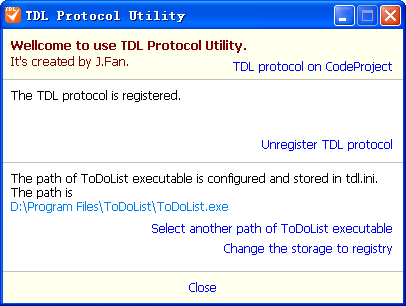
Sample image
Application edition screenshot.

Sample image

Script edition screenshot.

Difference Between Application Edition and Script Edition

App Edition Script Edition
URL Pattern tdl:filename?tid
tdl:/filename?tid
tdl://filename?tid
tdl:///filename?tid
tdl:///filename?tid
Requirement WSH
Internet Explorer 6.0+
User Interface Windows Form HTML Page
Configuration Storage Registry or INI Only INI

Introduction

The program registers a fake protocol named TDL in Windows, by writing to the registry. The registered things are as follows (contents of an exported *.reg file):

Windows Registry Editor Version 5.00

[HKEY_CLASSES_ROOT\tdl]
@="\"URL: ToDoList protocol\""
"URL Protocol"=""

[HKEY_CLASSES_ROOT\tdl\shell]

[HKEY_CLASSES_ROOT\tdl\shell\open]

[HKEY_CLASSES_ROOT\tdl\shell\open\command]
@="wscript \"C:\\Program Files\\TodoList\\Tdl\\todolist.wsf\" \"%1\""

After registering, the user can run the URL tdl:///blabla in the address bar of Internet Explorer or Run Dialog (Start Menu->Run, or [Win]+[R]) and Windows should call the registered command with the URL as the first argument. For example:

If you run the URL:

tdl:///C:\My%20Documents\todo.tdl?10

Then the system will call:

wscript C:\\Program Files\\TodoList\\Tdl\\todolist.wsf 
    "tdl:///C:\My%20Documents\todo.tdl?10"

So, it should be OK to write a WSH script named todolist.wsf and put it into C:\Program Files\TodoList\Tdl.

Application Source Code

The application is built by Turbo C++ Explorer with VCL.

There is a class named HyperlinkWrapper. The class is used to make a hyperlink from a TLabel object.

HyperlinkWrapper takes over a label and sets its style when the mouse enters or leaves.

TIniFile and TRegistry classes are used to read/store configuration.

WScript Components

tdl:///C:\My%20Documents\todo.tdl?10 is the first argument which is passed into todolist.wsf. WScript.Arguments object can get it:

var url = WScript.Arguments(0)

After parsing the URL, WshShell object can run todolist with filename and tid as arguments.

var commandLine = ...
var wshShell = WScript.CreateObject("WScript.Shell");
// or
// var wshShell = new ActiveXObject("WScript.Shell");
wshShell.Run(commandLine);

FileSystemObject Components

The script can get filename and tid from arguments. How to get the path of todolist.exe? It's a good way to write a configure file. So FileSystemObject should be used to read/write the configure file:

var fso = new ActiveXObject("Scripting.FileSystemObject");

Read:

var ts = fso.OpenTextFile("tdl.ini");
var line;
while (!ts.AtEndOfStream) {
    line = ts.ReadLine();
    if (parseLineToGetExecutable()) break;
}
ts.Close();

Write:

var ts = fso.CreateTextFile("tdl.ini", true);
ts.WriteLine("todolist=" + executable);
ts.Close();

We need a friendly user interface. An HTML page is a right way since JavaScript can also run in the Web page browser. When you write an HTML page, please note that there are some differences between WSH script and script in HTML.

Differences Between WSH Script and Script in HTML

WSH script can use a default object named WScript but the object isn't in HTML.

If you want to do something in WSH, you can write code as follows:

// create WshShell object
var wshShell = WScript.CreateObject("WScript.Shell");
// popup a message box
WScript.Echo("message");
// get the full filename of the running script
var filename = WScript.ScriptFullName

But in HTML, you must write:

// create WshShell object
var wshShell = new ActiveXObject("WScript.Shell");
// popup a message box
alert("message");
// get the URL of current HTML page in which the script is
var filename = window.location.href

TDL Application Edition History

  • Beta1
    • Can save configure into one of registry and INI
    • Can parse tdl:///..., tdl://..., tdl:/... and tdl:... in URL;

TDL Script Edition History

  • Beta2
    • Added description for installing, uninstalling and configuring manually
    • Added a *.reg file template to make registering TDL protocol easy
    • Fixed some spelling errors
  • Beta1
    • Made it available for tdl:///... to open todolist
    • Support to install, uninstall and configure by script

ToDoList's tdl:// Protocol Setting

.dan.g's ToDoList support tdl:// url protocol from version 5.2. If you want enable tdl:// url protocol, you can just check on a options in ToDoList's preference. Follow screenshot show you how to enable ToDoList's tdl:// url protocol.

tdl_config.png

Links

License

This article, along with any associated source code and files, is licensed under The Code Project Open License (CPOL)

About the Author

jamesfancy
China China
Member
James Fancy, is a software engineer from China. He enjoys and familiar with Java, C++ and some script languages.
 
If you can read Chinese word, here is one of James Fancy's BLOG:
http://hi.baidu.com/jamesfancy

Sign Up to vote   Poor Excellent
Add a reason or comment to your vote: x
Votes of 3 or less require a comment

Comments and Discussions

 
You must Sign In to use this message board.
Search this forum  
    Spacing  Noise  Layout  Per page   
GeneralConfiguration Does Not WorkmemberHoppfrosch4 Feb '07 - 20:06 
Hi,
 
following the instructions, it fails during configuration off Path to ToDoList.
 
Pressing the "browse" button a dialog box pops up containing text "please select a executable (*.exe) file" with an OK-Button - and nothing else happens.
 
Based on looking at the scripts, I created an ini-file "tdl.ini" with the entry "todolist=C:\Programme\ToDoList\ToDoList.exe" -
and everything works perfect .... THANKS!!!
 
Hoppfrosch


BTW: Why there are three backslashes after tdl:///? Is this a standard behaviour?
 
BTW2: There are a few typos on your instruction page and within your script
GeneralRe: Configuration Does Not Work PinmemberJ.Fan.4 Feb '07 - 20:26 
Thank you for your post.
 
After clicking Browse button, a Open File dialog should be opened.
In the dialog, you should browse to find and select Todolist.exe.
 
Then the full filename of Todolist.exe should be shown after 'Path of ToDoList.exe is:'. Now click 'Save', the configure file should be created.
 
I think I should write description more clear.
 
Re: BTW,
3 slash(///) are necessary. because
tdl://filename?3 should be tranfer to tdl://filename/?3
I want parser simplier, so my script just allow ///. I can improved that in future edition.
 
Re: BTW2,
Thank you. English is not my native langurage and my English is not good. So ... Can you point out the typos specifically?
 
-----------------------
James Fancy

GeneralRe: Configuration Does Not Work PinmemberHoppfrosch4 Feb '07 - 20:39 
> After clicking Browse button, a Open File dialog should be opened.
That's not the case on my Firefox 2.0.0.1 ...
 
> I think I should write description more clear.
Perhaps you should describe "my" manual way as well ...
 
BTW: After creating the INI-File manually and reloading the tdl.html in my browser, the "Configure" section does not show up the manually configured path to todolist.exe ...
 
> So ... Can you point out the typos specifically?
Yes - as soon as I have time to do it.
I probably will created a corrected zip and send it to you ...
GeneralRe: Configuration Does Not Work PinmemberJ.Fan.4 Feb '07 - 20:49 
> That's not the case on my Firefox 2.0.0.1 ...
Sorry, the script just for IE now.
I want write a application to instead of the scripts in the near future.
 
> Perhaps you should describe "my" manual way as well ...
Yes. It's a good suggestion. Thank you.
 
>BTW: After creating the INI-File manually and reloading the tdl.html in
>my browser, the "Configure" section does not show up the manually
>configured path to todolist.exe ...
'Load Configuration' can do that. The script maybe cause a securit warning so I havne't let it run automatically.
 
>Yes - as soon as I have time to do it.
>I probably will created a corrected zip and send it to you ...
Appreciate your help. My email is: jamesfancy%126.com (repalce % to @)
 
-----------------------
James Fancy

GeneralRe: Configuration Does Not Work PinmemberHoppfrosch4 Feb '07 - 20:51 
>> After clicking Browse button, a Open File dialog should be opened.
>That's not the case on my Firefox 2.0.0.1 ...
...
> BTW: After creating the INI-File manually and reloading the tdl.html in my browser, the "Configure" section does not show up the manually configured path to todolist.exe ...
 
Think I found it - it's on my side:
 
ActiveXObject is not defined
TdlShell()TdlShell.js (line 8)
load()tdl.html (line 124)
onclick(click clientX=0, clientY=0)tdl.html (line 1)
[Break on this error] this.fso = new ActiveXObject("Scripting.FileSystemObject");
 
This is the debug output, when pressing "load configuration" on tdl.html
GeneralRe: Configuration Does Not Work PinmemberJ.Fan.4 Feb '07 - 21:01 
It seems your FF cannot support FileSystemObject components.
I think it should be failed to run the install script by FF, isn't it?
 
I don't know how to make the script run in browsers except IE.
I can think out only 1 way to solve the problem. It's to write a application to instead of the scrips.
 
-----------------------
James Fancy

GeneralRe: Configuration Does Not Work PinmemberHoppfrosch4 Feb '07 - 21:08 
>It seems your FF cannot support FileSystemObject components.
>I think it should be failed to run the install script by FF, isn't it?
 
Would be better - I think. Perhaps you should add a chapter "manual installation" on your tdl.html
 
>It's to write a application to instead of the scrips.
That would be perfect
 
BTW: Just send you an ZIP to ypur personal e-mail

General General    News News    Suggestion Suggestion    Question Question    Bug Bug    Answer Answer    Joke Joke    Rant Rant    Admin Admin   

Permalink | Advertise | Privacy | Mobile
Web02 | 2.6.130523.1 | Last Updated 25 Apr 2008
Article Copyright 2007 by jamesfancy
Everything else Copyright © CodeProject, 1999-2013
Terms of Use
Layout: fixed | fluid
