Sample application using a custom popup control:
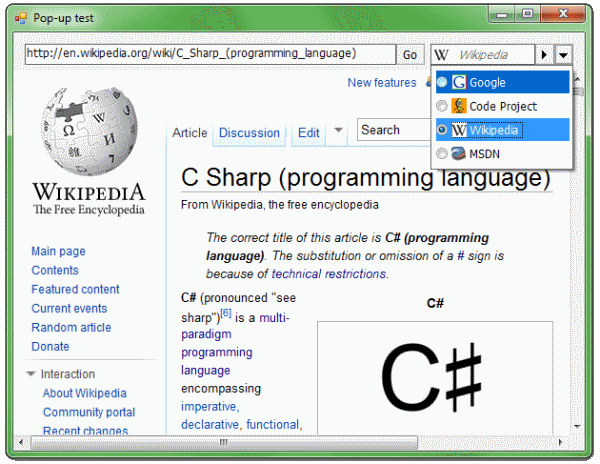
Another application using a custom tooltip...

... and a more complex popup that can be resized:
Tracking popup opening below the specified part of a control:
Cascade of popup controls:
Introduction
Popup windows are everywhere. Each tooltip is a popup window; each combobox has its popup list; many advertisements are also shown in popup windows.
How to Create a Popup Control in .NET?
At first, we might choose the Form class as a base class for our popup control. Unfortunately, it is a bad choice because when we show our popup form, the parent form loses its focus. A popup window should not cause that. Luckily, there is a class that does not cause loss of focus. We can use it as a base class for our popup control. It is the ToolStripDropDown class.
How to Use the ToolStripDropDown Class?
This would be the simplest way, without deriving from that class:
ToolStripDropDown popup = new ToolStripDropDown();
popup.Margin = Padding.Empty;
popup.Padding = Padding.Empty;
ToolStripControlHost host = new ToolStripControlHost(content);
host.Margin = Padding.Empty;
host.Padding = Padding.Empty;
popup.Items.Add(host);
popup.Show(parentForm, location);
In this case, content is a control we want to show in a popup window. Of course, we have to remember to later dispose the popup window and its contents.
Popup Class
I wrote a Popup class that derives from ToolStripDropDown and simplifies the creating and managing of popup windows. The class calculates by itself where it should "pop" on the screen. It also disposes itself immediately after disposing the content control. To show a popup with a button, for example, we could write:
new Popup(new Button()).Show(someControl);
Here, someControl would be a control below which we want to show our popup.
Popup Resizing
To enable resizing for your popup, you must set the Resizable property to true and add the following code into your content control class:
protected override void WndProc(ref Message m)
{
    if ((Parent as Popup).ProcessResizing(ref m)) return;
    base.WndProc(ref m);
}
You also have to set the ResizeRedraw property of the content control to true.
Important!
To specify the minimum and maximum size of the content control, please use the following properties:
content.MinimumSize and content.MaximumSize only inside the constructor of the content control popup.MinimumSize and popup.MaximumSize elsewhere
ComboBox Class
The System.Windows.Forms.ComboBox class behaves in a strange way when it is on a popup control. It closes the popup control when the user clicks on a part of the combobox's dropdown that sticks out of a popup. So, I have created a PopupControl.ComboBox class that behaves properly.
PopupComboBox Class
This is a base class for comboboxes that can have a custom dropdown attached.
Animation Support
Animation is enabled by default. To change it, set the AnimationDuration, HidingAnimation, and ShowingAnimation properties.
Popup Members
Properties
AcceptAlt — Gets or sets a value indicating whether pressing the Alt key should close the popup. AnimationDuration — Determines the duration of the animation. Content — Gets the content of the popup. FocusOnOpen — Gets or sets a value indicating whether the content should receive the focus after the popup has been opened. HidingAnimation — Determines which animation to use while hiding the popup window. MaximumSize — Gets or sets a maximum size of the popup. MinimumSize — Gets or sets a minimum size of the popup. NonInteractive — Gets or sets a value indicating whether the popup acts like a transparent windows; e.g., it cannot be clicked (note — it does not affect child controls). Resizable — Gets or sets a value indicating whether the popup is resizable. ShowingAnimation — Determines which animation to use while showing the popup window.
Constructor
Popup(Control content) — Initializes a new instance of the Popup class.
Methods
void PaintSizeGrip(PaintEventArgs e) — Paints the sizing grip. bool ProcessResizing(ref Message m) — Processes the resizing messages. void Show(Control control) — Shows the popup window below the specified control. void Show(Control control, Rectangle area) — Shows the popup window below the specified area of the specified control.
TODO
- Base class for custom tooltips.
- Office 2007-like tooltip class.
History
- 1.5 (20.10.2010) — Important! This is the last “standalone” version of the control. The next version is included in a new project hosted at CodePlex.
- Added the
NonInteractive property to the Popup class. - Fixed resizing on DualView/multi monitor systems.
- Popup is now always shown on top of other windows (previously the popup could be shown below its parent during the animation process).
PopupComboBox didn’t properly set focus to its dropdown on Windows 7. - Improved compatibility with Mono.
- Uses C# 3.0 syntax (auto-properties, lambdas).
- Signed binaries for both .NET 2.0 and .NET 4.0 are available.
- Solution upgraded to the Visual C# 2010 format.
- License changed to LGPL 3.0.
- 1.4 (16.01.2009)
- Added the
DroppedDown property, and the DropDown, DropDownClosed events to the PopupComboBox class. - Fixed resizing of a popup when the
MaximumSize property of the content control is not set.
- 1.3.1 (20.09.2008)
- Tab-key properly transfers the focus between controls contained in a popup window.
- Minor bugs fixed.
- 1.3 (04.05.2008)
- Added the
AnimationDuration, HidingAnimation, and ShowingAnimation properties. - Removed the
UseFadeEffect property. - Popup control can animate now even when the
FocusOnOpen property is set to false.
- 1.2.5 (24.01.2008)
- Fixed “Alt+F4” bug.
- Fixed drawing the sizing grip.
- Minor bugs fixed.
- 1.2 (24.07.2007)
- Added animation support.
- Added
AcceptAlt property. - Clicking on the non-client area bug fixed.
- Minor bugs fixed.
- 1.1 (05.07.2007)
- Added XML documentation.
- "Fixed" the
ComboBox class, so it can be used inside a popup. - Added base class for a combobox that can have a custom dropdown,
PopupComboBox. - The sizing grip is automatically drawn if a popup is resizable.
- Added support for a minimum and maximum size of a resizable popup.
- Minor bugs fixed.
- 1.0
- 08.06.2007 – Added resizing support and capability for using cascading pop-ups.
- 06.02.2007 – Added keyboard and custom region support, and the
ShowForControl method name changed to Show. - 03.02.2007 – First version.



 General
  News
News  Suggestion
  Question
  Bug
Bug  Answer
  Joke
Joke  Praise
  Rant
Rant  Admin
Admin 


 Submit an article or tip


