Click here to Skip to main content
Licence CPL
First Posted 19 Feb 2007
Views 467,379
Downloads 5,491
Bookmarked 545 times

Creating a Glass Button using GDI+

By Lukasz Swiatkowski | 5 Nov 2008
How to create an animating glass button using only GDI+ (and not using WPF)
Prize winner in Competition "Best C# article of Jan 2007"
4 votes, 2.2%
1
3 votes, 1.7%
2
2 votes, 1.1%
3
18 votes, 9.9%
4
154 votes, 85.1%
5
4.86/5 - 182 votes
9 removed
μ 4.72, σa 1.34 [?]

Screenshots

Sample application using a standard glass button with image.
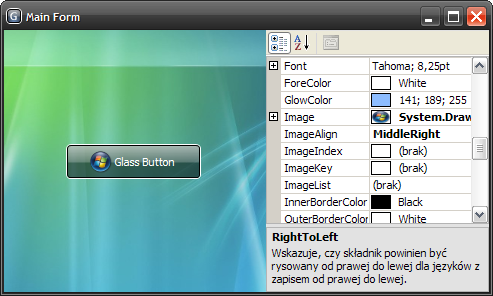
Sample application using a standard glass button with image.

The same application, but this time it has a customized glass button.

Sample application using a customized glass button.

MFC application which hosts four glass buttons.

MFC application which hosts four glass buttons.

Introduction

I bet you have already seen animated task buttons in Windows Vista. I have. I was wondering how to create a similar control. Fortunately, I found a web page which describes how to do that using the Microsoft Expression Blend (Creating a Glass Button: The Complete Tutorial). The glass button (and thus the whole application) created with the Microsoft Expression Blend requires .NET Framework 3.0 to run. Because some people cannot or do not want to use .NET Framework 3.0 yet, I have decided to rewrite that cool control using only GDI+ so it would work with .NET Framework 2.0.

"Converting" XAML to C# (GDI+)

The tutorial from the page mentioned above was easy to complete, and the generated XAML code was so understandable that there were no big issues with a "conversion."

For example, I have translated the following code:

<Border HorizontalAlignment="Stretch" 
        Margin="0,0,0,0" x:Name="shine" 
        Width="Auto" CornerRadius="4,4,0,0">

  <Border.Background>
    <LinearGradientBrush EndPoint="0.494,0.889" 
                         StartPoint="0.494,0.028">
      <GradientStop Color="#99FFFFFF" Offset="0" />

      <GradientStop Color="#33FFFFFF" Offset="1" />
    </LinearGradientBrush>
  </Border.Background>

</Border>

into:

using (GraphicsPath bh = CreateTopRoundRectangle(rect2, 4))
{
  int opacity = 0x99;
  if (isPressed) opacity = (int)(.4f * opacity + .5f);
  using (Brush br = new LinearGradientBrush(rect2, 
                          Color.FromArgb(opacity, shineColor),
                          Color.FromArgb(opacity / 3, shineColor),
                          LinearGradientMode.Vertical))
  {
    g.FillPath(br, bh);
  }
}

(This is only a fragment of the DrawButtonBackground method.)

Even the animation of a hovered button was easily obtained by using the Timer class. Unfortunately, an animation is not quite smooth when a glass button is quite big.

How to use the GlassButton class?

The GlassButton class derives from the Button class so it can be used in the same way. Displaying an image on a glass button is also supported now. Even the guidelines work fine in the Visual Studio's form designer.

History

  • 1.3.2 (02.11.2008)
    • Fixed a bug that caused the button's image to be disposed in certain situations.
  • 1.3.1 (27.10.2008)
    • The source code is now available both in C# and VB.NET.
    • Minor bugs fixed.
  • 1.3 (19.11.2007)
    • The image is grayed when the button is disabled.
    • Added property 'FadeOnFocus'.
    • Improved performance.
    • Minor bugs fixed.
  • 1.2 (31.03.2007)
    • The 'disabled' look differs from the 'enabled' one.
    • Added some 'PropertyChange' events.
    • Improved performance.
    • Splitted source code from compiled library and demo application.
    • Added MFC demo application.
    • Added toolbox bitmap.
    • Minor bugs fixed.
  • 1.1.1 (22.02.2007)
    • Minor bugs fixed.
  • 1.1 (21.02.2007)
    • Added images support.
  • 1.0 (19.02.2007)
    • First version.

License

This article, along with any associated source code and files, is licensed under The Common Public License Version 1.0 (CPL)

About the Author

Lukasz Swiatkowski

Software Developer

Poland Poland

Member
I am a graduate of Wroclaw University of Technology, Poland.
 
My interests: reading, programming, drawing, Japan, yoga, tai-chi.
 
My website: www.lukesw.net
My blog: blog.lukesw.net

Sign Up to vote   Poor Excellent
Add a reason or comment to your vote: x
Votes of 3 or less require a comment

Comments and Discussions

 
You must Sign In to use this message board. (secure sign-in)
 
Search this forum  
 FAQ
    Noise  Layout  Per page   
  Refresh
Questionhow did you change form colour to black Pinmembersamit19841:06 25 Nov '11  
AnswerRe: how did you change form colour to black PinmemberLukasz Swiatkowski1:42 25 Nov '11  
QuestionHow to set image in MFC using resource Icons? PinmemberChandrak Baxi21:19 10 Apr '11  
AnswerRe: How to set image in MFC using resource Icons? PinmemberLukasz Swiatkowski22:09 10 Apr '11  
GeneralMy vote of 5 Pinmemberdrummerboy051110:39 24 Mar '11  
GeneralMy vote of 5 Pinmembercsrss10:02 21 Dec '10  
GeneralBrilliant :) PinmemberAnt210012:21 3 Sep '10  
GeneralMy vote of 5 Pinmemberlastrebel14:24 2 Sep '10  
GeneralThank You PinmemberTim Grindley2:27 2 Mar '10  
GeneralRounded Corners Pinmemberedurveda10:18 18 Nov '09  
Generalback color transparency PinmemberMember 39534800:46 8 Jul '09  
GeneralRe: back color transparency PinmemberLukasz Swiatkowski4:16 8 Jul '09  
JokeThank you PinmemberMr_Coder19:50 18 Mar '09  
Generalits some how good Pinmemberzanzona0:07 12 Jan '09  
GeneralUsing a GlassButton as the appearance for a RadioButton PinmemberMeestor_X11:59 28 Nov '08  
GeneralRe: Using a GlassButton as the appearance for a RadioButton PinmemberLukasz Swiatkowski12:49 12 Jan '09  
QuestionRe: Using a GlassButton as the appearance for a RadioButton Pinmemberhimoobd2:39 14 May '09  
QuestionImage Animation PinmemberDanish Sultan21:46 9 Nov '08  
I found this control really wonderful. Thanks for that. I wanted to ask if there is a way to Fade in and out Images on roll over and away events.
 
Lets say if I want the image in the 'BackgroundImage' property to be faded into 'Image' property when the mouse enters (animation starts) and revert back to the background image when the mouse leaves.
May be this may cause the control to be a bit slow, but this is an effect I have been looking for quite a time.
 
If you can help in this regard, I will be very grateful.
thank you.
AnswerRe: Image Animation PinmemberLukasz Swiatkowski12:13 12 Jan '09  
General[Message Removed] PinmemberKatekortez9:56 25 Oct '08  
GeneralExcellent! Pinmembergrt3kl12:27 19 Aug '08  
GeneralRe: Excellent! PinmvpLukasz Swiatkowski9:17 2 Sep '08  
GeneralVB Version Pinmemberraing314:42 25 Jun '08  
GeneralRe: VB Version PinmvpLukasz Swiatkowski0:47 26 Jun '08  
GeneralAwesome Button! PinmemberEngr4869:22 7 Jun '08  

General General    News News    Suggestion Suggestion    Question Question    Bug Bug    Answer Answer    Joke Joke    Rant Rant    Admin Admin   

Use Ctrl+Left/Right to switch messages, Ctrl+Up/Down to switch threads, Ctrl+Shift+Left/Right to switch pages.

Permalink | Advertise | Privacy | Mobile
Web02 | 2.5.120210.1 | Last Updated 5 Nov 2008
Article Copyright 2007 by Lukasz Swiatkowski
Everything else Copyright © CodeProject, 1999-2012
Terms of Use
Layout: fixed | fluid
