
Contents
- Introduction
- Features
- What is HTML Help?
- Installing HTML Help workshop
- Creating your own photo album
- The album source files
- encode.bat and srcenc.exevv
Introduction
Finally some fun with HTML Help! This little project demonstrates
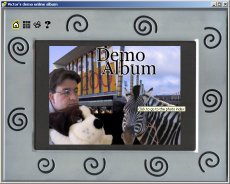
that you can do more with HTML Help than online help... The screenshots
above shows the demo album, implemented using Microsoft's HTML Help. In just one
CHM file, you can distribute a complete photo album with your photos.
When I bought my first digital camera
in 1999, I needed a decent way to distribute my photos in an album like manner.
With this electronic photo album you yourself can easily construct your own
album using your own photos and give the album to your family and friends.
Anyone running Windows and Internet Explorer 4 (or later) can easily view it.
The album in the source code download contains all the logic, just add water, eh, photos.
The demo album is composed of photos that I shot during TechEd 2001 (Barcelona),
my 2001 vacation trip in South Africa and some pictures from an "I-am-not-in-my-right-state-of-mind" website of mine (webknuffels.nl).
Features
- fixed size window with an image of an photo frame,
designed for at least an 800 by 600 screen,
- a little 'control panel' on each page: go to front page, go to index
page, do slide show
and go to legend page.
- a front page or title page (with for example a
composition of some of the photos),
- an automatic index page of the photos in the album,
- show a particular photo with a click on the index
page,
- slide show all photos,
- a legend/about page,
- previous/next photo arrows,
- very easy to construct your own album: prepare your
photos (JPGs), register every JPG in photos.js, make up a title for each
photo, compile and presto! (Well, almost).
This article is mostly about how you can use the album with your own
photos and not how the album is technically constructed. If you're interested,
take a look at the internals of the album in the HTML pages and in the .js
files. I can be persuaded to do an article about the technical part... Some of the technical features:
- Passing parameters to another page inside the CHM using
bookmark ("#") notation in the URL, instead of not-working search
("?") notation! Now information can be passed from one page to
another, like the last viewed photo so any page change can react appropriately to
it.
- Prepared for encoding the scripts (see "encode.bat and
srcenc.exevv" later) to prevent tampering to the album.
- Buffered image loading to overcome an IE4 image resizing DHTML 'bug'.
What is HTML Help?
Microsoft HTML Help is the successor to WinHelp and is used for Windows Help
systems since Internet Explorer 4 and Windows 2000. The HTML Help files typically use the .CHM extension and
consists of several HTML files, JPG/GIF images and scripts. A CHM file is
actually like a complete website compressed into one file: 'CHM' is short for
'Compiled HTML' . Additionally, with a table of contents, index and full text
search, a complete help system is created.
Using the HTML Help
compiler (see later) from the Microsoft's HTML Help workshop, the
album's files are compiled into a single .CHM file. This album in particular uses 4 HTML files,
several GIFs and the photo JPGs to make up the album.chm.
We're not going to use the HTML Help contents, index and full text search
tab with the HTML Help photo album.
Installing HTML Help workshop
To compile the files into the .CHM file, you'll need to install Microsoft's
HTML Help Workshop, which contains the compiler. Download the workshop using the
link above and install it.
Creating your own photo album
In just 6 steps you construct your own album using the album source code
(which you can download through the link at the top of this article):
- Extract the album source from the source zip file into a folder of your choosing and delete all the
(demo) JPG files in the "photos400x300" folder. I've summed up the files
further below.
- Select the photos you want in the album, resize them to at most 300
pixels high and at most 450 pixels wide using a image
editor like PhotoShop or PaintShop Pro and save the files into the "photos400x300" folder.
- Next we need to create the photo for the start page of
the album; it's called
composition.jpg and
must be saved in the "photos400x300" folder. I usually create a
composition from some of the photos (hence the
name) and add some text like the
album's title. I find the composition for the demo album fairly successful.
- Edit photos.js to 'register' your photos:
- Replace the registration of the demo photos with your own at
aPhotos = new Array(
"yourphoto1.jpg",
    "Title of photo 1",
"yourphoto2.jpg", "Title of photo 2",
"yourphoto3.jpg", "Title of photo 3"
}
- For every photo, store a filename-title pair:
"yourphoto1.jpg",
"Title of photo 1", making up a JavaScript array
of these pairs. Note that you have to use a comma's between and after the
pair, but leave out the trailing comma after the last pair or a syntax
error is yours!
- Edit album.hhp (HTML Help compiler project file) to change the
compilation output and album title:
- Change "Compiled file" (the name of the resulting .CHM
file), from
Compiled file=victorsdemoalbum.chm
to something like
Compiled file=vacation2001.chm
- Change the album's title by changing "
Victor's demo photo
        album"
in
[WINDOWS]
main="Victor's demo photo album",,,,,,,,,,,0x0,[16,0,717,560],0x0,0x0,,0,0,0,0
to something like
[WINDOWS]
main="Vacation 2001",,,,,,,,,,,0x0,[16,0,717,560],0x0,0x0,,0,0,0,0
- Start the Microsoft HTML Help Workshop and open album's HTML Help project
file album.hhp. Choose
File | Compile and let the Workshop compile the
album. Presto! That's it! The album is created!
The album source files
These are the files in the album:
| photos400x300\ | folder that holds the photos and
composition.jpg |
| images\ | album images |
| start.htm | Start page of the album |
| thumbpic.htm | Index/thumbnail page of the album |
| pic.htm | normal pic/slideshow page |
| about.htm | About/Legend page |
| album.css | album's style sheet |
| album.js | Album's JavaScript code |
| lang.js | Tooltip texts |
| langen.js | Tooltip texts English (copy over lang.js) |
| langnl.js | Tooltip texts Dutch (copy over lang.js) |
| photos.js | Registration of the photos |
| Album.hhp | HTML Help project file |
| encode.bat | Encoding the album's scripts |
| SCRENC.EXEVV | Microsoft script
encoder |
encode.bat and
srcenc.exevv
encode.bat is just an easy calling mechanism for
encoding the scripts (HTML and .JS files) in the album using the Microsoft
Script Encoder SRCENC.EXE. Now only Internet Explorer (actually: the Microsoft
Scripting Engines) can decode and understand the scripting. It's a convenient
method to protect the album from tampering: the scripts are no
longer human readable!
The idea is to encode the scripts just before you compile the files into the
.CHM (step 6 above).
Now why did I add the two 'V's to the script encoder's filename? Because
encoding is pretty irreversible and you better do the encoding process on
a copy of the album folder! When you've copied the album, remove the
double 'V's from the encoder's filename and execute encode.bat to encode the
album's files. Then perform step 6 of "Creating your own album".
Example from an encoded photos.js:
//**Start Encode**#@~^OwcAAA==@#@&@#@&Jz,Ktb/,Wk^+~mKxOCbx/,CV^PY4n~w4WDWdPCU9P^
laOkKxd~K0@#@&&JPOtbd,wCMYbmE^lM~l^4;:c@#@&@#@&zz,j+DPY4n~w4WDW~Nr.mOWMz@#@&/P4
!:4UCbVjk.nhtGDWkSW1lDrW	PxJatGOK/FZT6F*zrI@#@&kHNrEhjbynn4GYK/JG1lYrG
P~P,xrw4KYK/cZ!Xf!ZzEi@#@&&&krDTrxmV?b"nn4WDWdSG^mYrW	~P,'E24WYGd8!+cX{+%&ri@#@&
@#@&zJ~?Y~Y4+~ObYV~W6PY4n~l^4!:@#@&d)^4;::rY^+~x,J.r^DW.Bk~9+hKPmV4!:rI@#@&@#@&
zJP9n6kx~Y4+Pa4GYK/c@#@&lK4KYG/,xP	+A~zDDCzv@#@&zJEwksxm:+r~,EZmwOkKxES@#@&JZT
...
License
This package is published under the Artistic
license.
Change log
26 jan 2002 - Initial publication
20 feb 2002 - added light src download (with only two photos) and added usage
license.
07 nov 2002 - Removed the dead HtmlHelp workshop exe link and clarified some
things.
Victor is consulting in The Netherlands.
His interests include Windows and web application development using .NET technologies and even some Apache/PHP/MySQL...



 General
  News
News  Suggestion
  Question
  Bug
Bug  Answer
  Joke
Joke  Praise
  Rant
Rant  Admin
Admin 


 Submit an article or tip


 Great tool!
![Rose | [Rose]](https://codeproject.global.ssl.fastly.net/script/Forums/Images/rose.gif)

