|
|
|
 |
|
 |
Hi..
Im vinay.. I Need to Draw a sine wave on the form based on the X and Y values..I have stored those values in List variable..
How can i draw a sine wave using GDI+ using C#
|
|
|
|
 |
|
 |
Hi Jack,
When Jasper Johns made his 'Flag' painting in the fifties, some debated
wether this 'was' the American flag with all its meaning and symbolism.
Thanks for rephrasing the questions in a new virtual context.
However I bookmark your article as 'Drawing with polygons sample (!!)'
for future use.
Thanks again
|
|
|
|
 |
|
 |
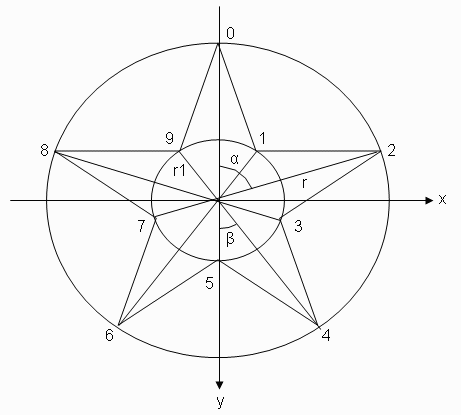
This is a alternate method to do the stars. It has two important differences.
Only the points are computed in the same order you draw them on a paper with only 5 strokes. (0,4,8,2,6)
The second difference is the FillMode. Using the Winding fill method it becomes aware of the line crossings and what is 'inside' all of the borders. the default FillMode is Alternate.
This way you don't even have to compute the 'inner' circle.
private void DrawStar( Graphics g, float r, float xc, float yc ) {
int xp = 0;
float radian72 = (float) ( (float) Math.PI * (float) 4.0 ) / (float) 5.0;
PointF[] pts = new PointF[ 5 ];
for ( xp = 0; xp < 5; xp++ ) {
pts[ xp ] = new PointF( xc + r * (float) Math.Sin( xp * radian72 ), (float) yc - r * (float) Math.Cos( xp * radian72 ) );
}
g.FillPolygon( Brushes.White, pts, FillMode.Winding);
}
|
|
|
|
 |
|
 |
Hi Jack:
I am Eduardo, writing from Peru (Lima) and the author of program Secciones (http://sourceforge.net/projects/secciones/) developed with .NET 2 and CSharp and i realize that you have experience with graphics management, viewpoints, viewports, etc. and I was wondering if you can help me improve my little program Secciones.
If you have a look on my program, you will see that the graphics are poor and i need to improve them (now i am using ZedGraph). I would like to have a graphics interface like Autocad or any CAD Tools (maybe not so advanced), with the following features:
* Allow me to see the Polygons and 2d figures defined by (x,y) points in their real form (Scale on X = Scale on Y).
* Zooming functions (In / Out / Rectangular area)
* Panning
* Grids with points
* Able to have "sensible" areas, like the tag <MAP> of html.
* Obviously FREE or Open Source !!!
Is there any way to do this? Can you help on that, giving some directions or related information?
pd. Sorry for my bad english.
Thanks in advance.
Regards
Saludos,
Eduardo Rivera Alva
Teléfono: (51-1) 226-1440 (Oficina)
Celular : (51-1) 9-506-9736 (Móvil)
Email 1 : eriveraa@gmail.com
Email 2 : eriveraa@hotmail.com
Lima - Perú
|
|
|
|
 |
|
|
 |
|
|
 |
|
 |
Hi, Eric,
Thank you for your interest in my work.
I notice that the price seems little bit high. However you should know that the book is not simply a tutorial. Most of the book content is from my original work. It took me a lot of effort and time to write such a book. In this book, I emphasize the practical usefulness for .NET developers who want to create real-world C# applications. Some examples in the book are actually powerful 2D and 3D chart and graphics packages, which can be directly used in your C# applications. You will find that these example chart and graphics packages alone will be worth much more than the cost of the book.
Best.
Jack
Dr. Jack Xu has a Ph.D in theoretical physics. He has over 15 years programming experience in Basic, FORTRAN, C, C++, Matlab, and C#.
|
|
|
|
 |
|
 |
Indeed, your skill set is hard to find in the .NET world. And these graphics can also be used in ASP.NET by creating bitmapped images, and then streaming them directly to the browser. That way the image never needs to get saved in a hard disk file.
There's a lot of good graphics code on Code Project, but it takes a long time to go through it all and make it useful. And most of the graphics code on Code Project comes with very little explanation of how it works. Judging from what I've seen so far, it looks like you do explain your code.
As I said, I'll order my book tonight, and I hope you write a sequel someday!
|
|
|
|
 |
|
 |
So what is up with your publisher? it cannot simply meet the demand. I ordered a copy more than 2 weeks ago on Amazon.com, but it is still no shipped and Amazon.com claims the problem is with their supplier!
It will have being better if you simply did, a PDF e-book.
Best regards,
Paul.
Jesus Christ is LOVE! Please tell somebody.
|
|
|
|
 |
|
 |
Hi, Paul,
Sorry to hear that. I contacted to the publisher and they told me that the first run of the book copies were sold out in few days mainly due to the bulk purchases from book resellers. Now they got second run out a week ago, so the book is available in stock. They also told me that they have completed all orders for amazon except for orders placed after April 18. They don't know why amazon takes so long to ship your book. You need to ckeck with amazon again because this is not due to the publisher for the delay.
Hope you can get your book soon.
Jack
Dr. Jack Xu has a Ph.D in theoretical physics. He has over 15 years programming experience in Basic, FORTRAN, C, C++, Matlab, and C#.
|
|
|
|
 |
|
 |
I got this from the link you posted.
Not Found
The requested URL /~jack_xu/TableContents.htm was not found on this server.
Additionally, a 404 Not Found error was encountered while trying to use an ErrorDocument to handle the request.
Apache/1.3.37 Server at authors.unicadpublish.com Port 80
Thanks and Regards,
Michael Sync ( Blog: http://michaelsync.net)
If you want to thank me for my help, please vote my message by clicking one of numbers beside "Rate this message". Why vote? Plz Read it here. Thank you.
|
|
|
|
 |
|
|
 |
|
 |
Here's a more generic function for drawing a star. You supply the center point, inner radius, radius, how many spokes, and the angle of rotation (in degrees, because my mind doesn't like radians).
This is probably slower (I haven't tested for speed), but it's more flexible.
private const double DEGREE = 0.017453292519943295769236907684886;
public static GraphicsPath Star(int c_x, int c_y, int inner_radius, int radius, int n, int rot)
{
rot %= 360;
Point[] points = new Point[n*2];
byte[] types = new byte[n*2];
int index = 0;
for (int a = rot; a < 360+rot; a += 180/n)
{
if (index >= points.Length) break;
points[index] = new Point(
c_x + (int)(((index % 2 == 0) ? radius : inner_radius) * Math.Cos(DEGREE * a)),
c_y + (int)(((index % 2 == 0) ? radius : inner_radius) * Math.Sin(DEGREE * a)));
types[index] = (byte)PathPointType.Line;
index++;
}
types[0] = (byte)PathPointType.Start;
return new GraphicsPath(points, types);
}
Example usage:
protected override void OnPaint(PaintEventArgs e)
{
base.OnPaint(e);
GraphicsPath star = Star(110, 110, 40, 100, 5, 270);
e.Graphics.SmoothingMode = SmoothingMode.AntiAlias;
e.Graphics.FillPath(Brushes.Black, star);
}
|
|
|
|
 |
|
 |
Nice, you can get ride of the the "types" to make it a bit more efficient...
GraphicsPath path = new GraphicsPath();
path.AddPolygon(points);
return path;
BTW, what ratio of inner_radius to radius gives the "best" or "standard" apperance?
Best regards,
Paul.
Jesus Christ is LOVE! Please tell somebody.
|
|
|
|
 |
|
 |
Hi, paul
Thank you for your comment.
The ratio of inner_radius to outer_radius is fixed:
inner_radius = outer_radius *cos(72/180)/cos(36/180)
This means only one radius is enough for the problem. I used two radii here only for saving the typing.
Jack
Dr. Jack Xu has a Ph.D in theoretical physics. He has over 15 years programming experience in Basic, FORTRAN, C, C++, Matlab, and C#.
|
|
|
|
 |
|
 |
Are you sure there is no mistake in the code? I have just tried it and it is not working. Or this refers to your own code not the one give in this thread?
You still have not answered my earlier post...how do we buy the book it seems not available for sale on your link.
Best regards,
Paul.
Jesus Christ is LOVE! Please tell somebody.
|
|
|
|
 |
|
 |
Paul,
You mean my code does not work on your computer? I tested it again. It works fine on my VS 2005.
The book will come out next week. You can order it from Amazon and book stores such as Borders or Barnes & Noble.
We will accept direct order from our website that will setup soon. Then you will get 20% discount if you order it directly from publisher.
Thank you very much for your interest in my work.
Jack
Dr. Jack Xu has a Ph.D in theoretical physics. He has over 15 years programming experience in Basic, FORTRAN, C, C++, Matlab, and C#.
|
|
|
|
 |
|
 |
Jack JH Xu wrote: You mean my code does not work on your computer? I tested it again. It works fine on my VS 2005.
No not your codes, I mean DigitalKing's code with your suggestion for calculating the inner radius.
Jack JH Xu wrote: The book will come out next week. You can order it from Amazon and book stores such as Borders or Barnes & Noble.
I will be looking forward to it - thanks for your work.
Best regards,
Paul.
Jesus Christ is LOVE! Please tell somebody.
|
|
|
|
 |
|
 |
I coded it without the types at first, but it wouldn't compile (I'm using .net 2).
I tested a few ratios, and 3/8 (inner to outer) looks nice.
|
|
|
|
 |
|
 |
If you wish to pass the points in the constructor, there is no such contructor and even if you pass a null it will throw exception, so just create an empty path and add a polygon, which the points defined. It works in both .NET 1x/2.
DigitalKing wrote: I tested a few ratios, and 3/8 (inner to outer) looks nice.
I will try it.
Best regards,
Paul.
Jesus Christ is LOVE! Please tell somebody.
|
|
|
|
 |
|
 |
The last parameter (Graphics g) to Star isn't used, is it?
--
Time you enjoy wasting is not wasted time - Bertrand Russel
|
|
|
|
 |
|
 |
The "DrawShape.NStar" in the uses shows he is copying and pasting from his project, which might have had some defined interface - my guess
Best regards,
Paul.
Jesus Christ is LOVE! Please tell somebody.
|
|
|
|
 |
|
 |
You're entirely correct. I was a little sloppy. I've made the proper corrections. I'm just used to including Graphics g as an argument to all of my graphics functions because I like having the drawing methods and measuring functions available for use.
|
|
|
|
 |
|
 |
Dude,
You forgot the star for the states of Israel and Iraq
Gerard
|
|
|
|
 |