Introduction
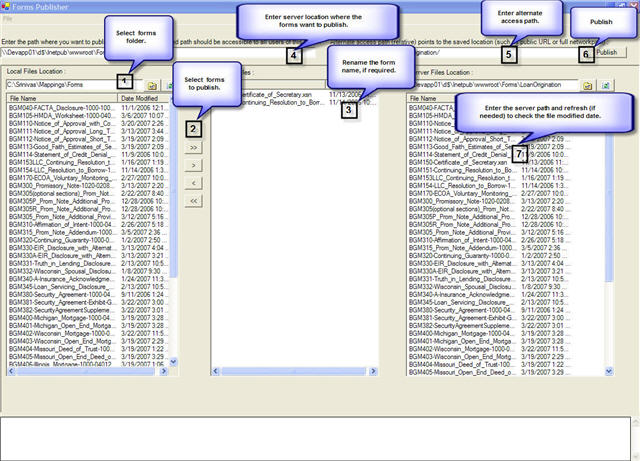
Do you have several InfoPath forms and deployed to one location (Server)? Do you want to move them to another location? It is a pain, don't you think?? Here is the tool to deploy the InfoPath forms to any other network location.
Background
I know, some one might be thinking why we need several forms; can't you have multiple views in one form and deploy that form to server? Here is the problem we had with multiple views sharing the one data source. If you have a data field that is shared by multiple views and each view use that field differently, if one view changes the field value the other views will also affect with the change. So we decided to go with different forms for each view. The next hectic job is deploying them. Especially when you have multiple environments like development, QA and production, it is very tough to publish manually to each environment. I found an article on Microsoft site to automate the forms publishing. Unfortunately the code was in Jscript, and then I decided to develop a tool.
Using the code
Sub FixupXSN(ByVal xsnInputPath As String, ByVal xsnOutputPath As String, ByVal publishUrl As String)

Try

If Not File.Exists(xsnInputPath) Then

MessageBox.Show("File does not exist: " + xsnInputPath)

Exit Sub

End If

' Create temporary folder and explode the XSN

'Dim tempFolderPath = Directory.CreateDirectory(PathCombine(Path.GetTempPath, Path.GetTempFileName)).FullName

Dim tempFolderPath = PathCombine(Path.GetTempPath, Path.GetFileNameWithoutExtension(Path.GetTempFileName))

tempFolderPath = Directory.CreateDirectory(tempFolderPath).FullName

ExtractFilesFromXSN(xsnInputPath, tempFolderPath)

' Modify the XSF in place

Dim xsfPath As String = PathCombine(tempFolderPath, "manifest.xsf")

Dim hsAttributesAndValues As New Hashtable

hsAttributesAndValues.Add("publishUrl", publishUrl)

hsAttributesAndValues.Add("publishSaveUrl", xsnOutputPath)

' Generate the new XSN

CreateXSNFromFiles(tempFolderPath, "manifest.xsf", xsnOutputPath)

' Cleanup

'File.Delete(tempFolderPath)

Catch ex As Exception

ShowMessage(ex.Message)

Trace(ex.StackTrace)

End Try

End Sub
Points of Interest
I learned how to use the CABSDK tool in this development process.
References
http://msdn2.microsoft.com/en-us/library/aa192521(office.11).aspx
History
4/20/2007 Created.
This member has not yet provided a Biography. Assume it's interesting and varied, and probably something to do with programming.



 General
  News
News  Suggestion
  Question
  Bug
Bug  Answer
  Joke
Joke  Praise
  Rant
Rant  Admin
Admin 


 Submit an article or tip


