Click here to Skip to main content
Licence 
First Posted 17 Feb 2002
Views 91,823
Bookmarked 22 times

WTL Wizard for Visual Studio .NET

By | 17 Feb 2002 | Article
An App-Wizard which creates template WTL apps.

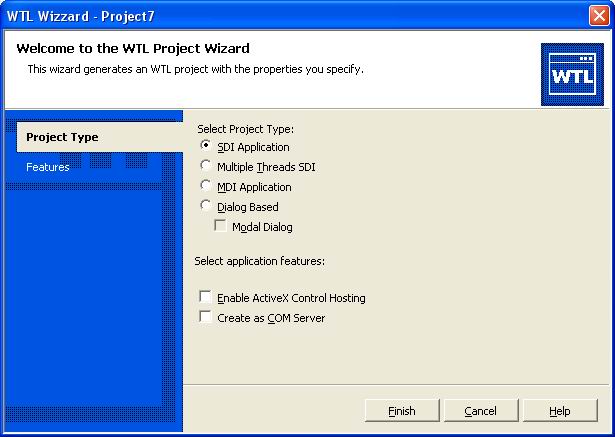
Sample image - WTL Wizard

Introduction

This is a Visual Studio .NET wizard ready to generate WTL projects.

Installation procedure

To properly install this wizard you must follow these steps:

  1. The ZIP file contains two files and a folder. You must copy both files to Project folder for Visual C++ 7 inside .NET main installation folder ( [Root]:\[Program Files Folder]\VC7\VCProjects ). These are the two files:
    • WTL Wizard.vsz
    • WTL Wizard.ico

  2. The folder named "WTL Wizard" and all its content must be copied to ( [Root]:\[Program Files Folder]\VC7\VCWizards )

In order to get this wizard working in debug mode, a change must be made in WTL 3.1 header file atlapp.h. You must comment out the following line:

//
// atlapp.h
//
enum wtlTraceFlags
{
//    atlTraceUI = 0x10000000
};

The next time you create a new project in VC++, you'll see a new WTL Wizard

Note: We've set as default the "Detect 64-bit Portability Issues" option in the pre-processor.

License

This article has no explicit license attached to it but may contain usage terms in the article text or the download files themselves. If in doubt please contact the author via the discussion board below.

A list of licenses authors might use can be found here

About the Author

Armando Pajuelo


Spain Spain

Member


Sign Up to vote   Poor Excellent
Add a reason or comment to your vote: x
Votes of 3 or less require a comment

Comments and Discussions

 
You must Sign In to use this message board. (secure sign-in)
 
Search this forum  
 FAQ
    Noise  Layout  Per page   
  Refresh
GeneralCan't download a valid archieve Pinmemberdmacedo@genius.org.br10:13 4 May '04  
Generalfailure on calling WTL Wizard in VS.NET 2003 Pinmemberalvin_tyl23:31 4 Aug '03  
Questionhow to change the language of the resource.. PinmemberYu_Matrix23:50 6 Jul '03  
QuestionHow about Visual Studio .Net 2003 Pinmemberjaguar17:24 8 Jun '03  
AnswerRe: How about Visual Studio .Net 2003 Pinmemberjaguar17:36 8 Jun '03  
GeneralRe: How about Visual Studio .Net 2003 Pinmemberjaguar17:39 8 Jun '03  
GeneralRe: How about Visual Studio .Net 2003 Pinmemberthelazydogsback6:22 25 Sep '03  
GeneralRe: How about Visual Studio .Net 2003 Pinmembernalenb13:10 26 Nov '03  
GeneralCannot download source files PinsussAnonymous13:09 11 Apr '03  
GeneralWTL and Visual Studio .NET PinmemberRemon Spekreijse23:20 24 Mar '02  
GeneralHaving problems with SINK_ENTRY PinmemberEllBoy00720:55 11 Mar '02  
GeneralWrong #include PinmemberS van Leent9:40 9 Mar '02  
GeneralGreat job PinmemberRama Krishna14:25 2 Mar '02  
GeneralUnable to link after removal of enum to work in Debug mode PinmemberAnonymous15:49 23 Feb '02  
GeneralRe: Unable to link after removal of enum to work in Debug mode PinmemberAnonymous4:08 25 Feb '02  
GeneralBug found PinmemberThomas Freudenberg5:59 18 Feb '02  
GeneralRe: Bug found PinmemberArmando Pajuelo6:17 18 Feb '02  
GeneralThank you, Armando, PinmemberThomas Freudenberg5:37 18 Feb '02  
GeneralRe: Thank you, Armando, PinmemberAnonymous8:11 20 Feb '02  

General General    News News    Suggestion Suggestion    Question Question    Bug Bug    Answer Answer    Joke Joke    Rant Rant    Admin Admin   

Use Ctrl+Left/Right to switch messages, Ctrl+Up/Down to switch threads, Ctrl+Shift+Left/Right to switch pages.

Permalink | Advertise | Privacy | Mobile
Web01 | 2.5.120517.1 | Last Updated 18 Feb 2002
Article Copyright 2002 by Armando Pajuelo
Everything else Copyright © CodeProject, 1999-2012
Terms of Use
Layout: fixed | fluid
