Click here to Skip to main content

Advanced UxTheme wrapper

By , 13 Jul 2007
 

Downloads

Sample application using custom controls (Button, CheckBox, RadioButton, ProgressBar, etc.) drawn with the wrapper.
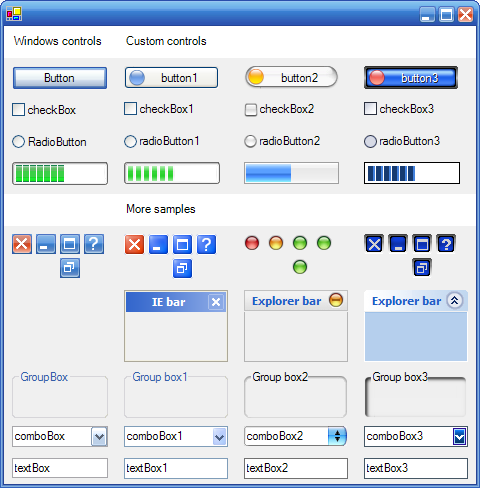
Screenshot - uxthemeSample.jpg

Introduction

It's been a long time since I became a member of The Code Project. I've learned a lot and it's time for me to share my knowledge.

I think this is not the first time you are reading an article on an uxtheme wrapper. Like me, you have probably done a lot of Googling, seeking information and C# samples about uxtheme (also known as Visual Styles or Windows themes) and found nothing that matches what you want.

However, there are many great articles on The Code Project, like "A Managed C++ Wrapper Around the Windows XP Theme API" by Don Kackman or "Add XP Visual Style Support to OWNERDRAW Controls" by David Zhao and "Themed Windows XP style Explorer Bar" by Mathew Hall, which describe visual styles and provide useful tips. But, in my point of view, they were not designed for a generic C# usage and they don't offer a simple way to use visual styles in our applications.

I wanted to have a way to enumerate and switch between available themes on a computer, so I decided to make my own C# wrapper.

The article

So, how does this work?

I've split this artcile in three parts:

  • a quick explanation about uxtheme,
  • the visual style format in which you'll find what .theme and .msstyles files hide,
  • and the wrapper design in which I'll describe how to use it.

Background needs

Here are the features I wanted to find in a wrapper:

  • Windows XP theme support - even on pre XP versions,
  • A simple and generic C# wrapper,
  • Enumerate available/installed themes on a computer,
  • Analyse and decrypt .msstyles files to use them as I want,
  • Use a theme's data to switch the look and feel of custom components,
  • Provide a way to share a theme's data among custom controls.

Features

What you will find in this sample:

  • Theme support even for pre XP versions (normal),
  • A "ready to use" C# uxtheme wrapper (with many comments),
  • A way to get information about the current used theme,
  • A way to enumerate visual styles on your computer,
  • A way to get all the information about a visual style,
  • A way to save .ini files embedded in .msstyles files,
  • A way to save bitmaps embedded in .msstyles files,
  • A specific PE file reader which will help you to extract a theme's data,
  • Samples of custom controls with their own renderer implementation.

You will also find custom Designers/Editors if you want to learn how to create your own design-time support.

I - Visual Style and UxTheme.dll

I will not explain how the uxtheme.dll works, I do not have enough space in this article (an I'm not going to rewrite the msdn).

The interesting thing is how to write a C# wrapper. The principle is quite simple: find the dll (or module) you want to handle, seek its function's signatures, and then write them in a C# equivalent form.

The uxtheme function's signatures are defined in the uxtheme.h file, and enumerations/constants in the tmschema.h file. Those files are located in "C:\Program Files\Microsoft Visual Studio .NET 2003\Vc7\PlatformSDK\Include" directory if you're using VS 2003.

In uxtheme.h, you'll find something like:

    //-----------------------------------------------------------------------
    //  DrawThemeText()     - draws the text using the theme-specified
    //                        color and font for the "iPartId" and
    //                        "iStateId".
    //
    //  hTheme              - theme data handle
    //  hdc                 - HDC to draw into
    //  iPartId             - part number to draw
    //  iStateId            - state number (of the part) to draw
    //  pszText             - actual text to draw
    //  dwCharCount         - number of chars to draw (-1 for all)
    //  dwTextFlags         - same as DrawText() "uFormat" param
    //  dwTextFlags2        - additional drawing options
    //  pRect               - defines the size/location of the part
    //-----------------------------------------------------------------------
    THEMEAPI DrawThemeText(HTHEME hTheme, HDC hdc, int iPartId,
        int iStateId, LPCWSTR pszText, int iCharCount, DWORD dwTextFlags,
        DWORD dwTextFlags2, const RECT *pRect);

The next step is to write the C# equivalent method. For example, the DrawThemeText() function can be translated as:

    
/// <summary>
    /// Draws text using the color and font defined by the visual style.
    /// </summary>
    /// <param name="hTheme">Handle to a window's specified 
    ///     theme data.</param>
    /// <param name="hdc">Handle to a device context (HDC) used for 
    ///     drawing the theme-defined background image.</param>
    /// <param name="iPartId">Value that specifies the part to draw.</param>
    /// <param name="iStateId">Value that specifies the state of the 
    ///     part to draw.</param>
    /// <param name="pszText">Pointer to a string that contains the text 
    ///     to draw.</param>
    /// <param name="iCharCount">Value that contains the number of 
    ///     characters to draw. If the parameter is set to -1, all 
    ///     the characters in the string are drawn.</param>
    /// <param name="dwTextFlags">A bitwise combination 
    ///     of <see cref="TextFormatFlags"/> values to specify the text 
    ///     formatting.</param>
    /// <param name="dwTextFlags2">Not used. Set to 0.</param>
    /// <param name="pRect">Pointer to a RECT structure that contains 
    ///     the rectangle, in logical coordinates, in which the text 
    ///     is to be drawn.</param>
    [DllImport("UxTheme.dll", CharSet=CharSet.Unicode, SetLastError=true)]
    public static extern System.Int32 DrawThemeText(
        IntPtr hTheme,
        IntPtr hdc,
        UInt32 iPartId,
        UInt32 iStateId,
        String pszText,
        Int32 iCharCount,
        UInt32 dwTextFlags,
        UInt32 dwTextFlags2,
        ref RECT pRect
        );

When translating a function, you need to use the DllImport attribute setting the name of the module (or the absolute path) you're going to import as the first parameter.

There are many other optional parameters for the DllImport attribute (look at its description at msdn), but you should always use SetLastError set to true. This parameter indicates the callee to call the SetLastError function and advise the runtime marshaler to keep a copy of the last win32 error (it's very usefull when you don't know if a function call has succeed or not).

To get the last win32 error, you can use the following code sample:

    //using System.Runtime.InteropServices;
    //using System.ComponentModel;

    //...

    // call an imported function using SetLastError=true before 
    // using this piece of code
    int errorCode = Marshal.GetLastWin32Error();
    Console.WriteLine("The last win32 error code was: "+errorCode);

    // depends on the called function's error codes
    if(errorCode < 0) throw new Win32Exception(errorCode);

The next table provides quick equivalents between c++ types and C# :

C++ C#
BOOL System.Boolean or bool
BYTE byte
CSize System.Drawing.Size or System.Drawing.SizeF
CString, LPCWSTR string or System.String
DWORD System.UInt32 or uint
HBITMAP System.IntPtr or System.Drawing.Bitmap
HBRUSH System.IntPtr
HDC System.IntPtr or System.Drawing.Graphics
HPEN System.IntPtr
LONG System.Int32 or int
WORD System.UInt16 or ushort

Most of the other c++ types can be translated as System.IntPtr, except for structs which have to be defined in C#.

II - Visual Style philosophy

A Theme can be defined as UI properties grouped by a "Color scheme" and a "Size scheme". Then, a theme is retrieved by its color and size scheme.

Those properties are dispatched into three files:

  • the .theme file : in which you will find a reference to the .msstyles file
  • the .msstyles file : which is an old fashioned PE file (eg. like a DLL file) embedding .ini files and bitmaps
  • the shellstyle.dll files : which extend the theme's properties for Explorer (eg. explorer bar bitmaps, etc...)

Theme's folder tree

Basically, available themes are located in "%windir%\Resources\Themes" directory, as shown below :

Screenshot - themeTree.jpg

Each .theme file has its own directory, and a .msstyles file with the same name (eg. panther.theme has its .msstyles file in the directory named panther).

You will also find inside the theme's directory a folder named shell, which has a folder for each theme's scheme.

Finally, scheme's directory contains a shellstyle.dll. You can also find bitmaps (like wallpapers) or other resources referenced by the shellstyle.dll in this directory.

.theme file

A .theme file is an initialization file, with sections and key/value pairs defining many informations. The following sample shows the content of a .theme file.

    [Theme]

    ; Recycle Bin
    [CLSID\{645FF040-5081-101B-9F08-00AA002F954E}\DefaultIcon]
    full=%SystemRoot%\SYSTEM32\shell32.dll,32
    empty=%SystemRoot%\SYSTEM32\shell32.dll,31

    [Control Panel\Desktop]
    Wallpaper=%WinDir%Resources\Themes\Panther\Wallpaper\Aqua_Blue.jpg
    TileWallpaper=0
    WallpaperStyle=2
    Pattern=
    ScreenSaveActive=0

    [boot]
    SCRNSAVE.EXE=%WinDir%system32\logon.scr

    [VisualStyles]
    Path=%ResourceDir%\Themes\Panther\Panther.msstyles
    ColorStyle=NormalColor
    Size=NormalSize

    [MasterThemeSelector]
    MTSM=DABJDKT
    ThemeColorBPP=4

The interesting section is [VisualStyles]. You'll find in it three important tips : the relative path to the .msstyles file (Path), the color scheme used by the theme (ColorStyle) and the size behavior (Size).

Note: if you don't have the %ResourceDir% defined in the environment variables, you can use the sample code below :

    System.Collections.IDictionary vars = 
        System.Environment.GetEnvironmentVariables();

    // extract the "Path" value
    System.Text.StringBuilder val = 
        new System.Text.StringBuilder(MAX_PATH); // MAX_PATH = 255
    Kernel32.GetPrivateProfileString(sectionName, keyName, "", val, 
        MAX_PATH, iniFile); // MAX_PATH = 255

    // remove comments
    String path = val.ToString();
    if(path.IndexOf(";") != -1) path = path.Substring(0, 
        result.IndexOf(";"));

    path = path.Replace("%WinDir%", @"%windir%\");
    path = path.Replace(@"\\", @"\");
    path = path.Replace("%ResourceDir%", @"%windir%\Resources");
    path = path.Replace("%windir%", Convert.ToString(vars["windir"]));

.msstyles file

A .msstyles file is basically a PE file (eg. a DLL). What we are looking for is in the resource section, under the TEXTFILE and BITMAP resource directories.

Note: You can use a software like ResEdit to explore your .msstyles file.

Screenshot - resourceTree.png

The most important file is THEME_INI. It gives use :

  • the documentation properties of the theme (eg. Author, DisplayName, etc.),
  • the color schemes of the theme,
  • the size schemes of the theme,
  • the prefix name to extract bitmaps,
  • the name of the .ini file which contains the theme datas for the current color scheme and size.

If we use the informations

    [VisualStyles]
    Path=%ResourceDir%\Themes\Panther\Panther.msstyles
    ColorStyle=NormalColor
    Size=NormalSize    

specified in the .theme file, we will find our reference tips into the section named [File.]["color scheme"]["theme name"] like

    [File.Normalpanther]
    ColorSchemes = panther
    Sizes = NormalSize    

In our example, the .ini file which contains the theme datas is named NORMALPANTHER_INI and the prefix value is set in the ColorSchemes key (the bitmap's names will start with PANTHER).

The theme data initialization file

These files contain informations for each class and parts of the visual style.

After reading numerous of this kind of file, section's rules seem to be :

  • A standard section have the format [ClassName].[ClassPart][(ClassPartState)]
  • A class section defines the default ui values
  • A class section with a state defines ui values for this state
  • A special section have the format [ClassName]::[ClassName].[ClassPart][(ClassPartState)]
  • [ClassPart] and [(ClassPartState)] are optional
  • The section names (and key names) are not case sensitive

Then, if you want the checkbox data you will have to look in the section [Button.Checkbox] or [button.checkbox].

shellstyle.dll

The article of Mathew Hall describes the internals of this file. If you are interested in understanding it, look "Themed Windows XP style Explorer Bar" his article in The Code Project.

III - The wrapper

The following figure describes how the wrapper is designed :

Screenshot - uxthemeOM.gif

A quick description :

  • The UxTheme class is the generic wrapper. It is used by VisualStyleInformation and VisualStyleRenderer to get property values or to draw a specific control with the current theme's data.
  • The main classes are VisualStyleInformation, VisualStyleRenderer, and VisualStyleFile.
    • VisualStyleInformation provides access to the current theme information, like the theme's author or the copyright.
    • VisualStyleRenderer is used to paint controls. It calls the UxTheme wrapper functions for the current visual style, and VisualStyleFile to handle other themes.
    • VisualStyleFile handle theme's datas. You can use it to extract bitmaps, or just to get a component properties.
  • The MemoryIniFile is used to map into memory .ini files embedded in the .msstyles theme's file.
  • The PEFile is used to read a .msstyles file, and to access its resource section.

I'm not going to enumerate all the methods provided by each classes because it's not the topic. I will focus on VisualStyleFile and its associated classes/structs.

VisualStyleFile

This class is the more important one : its role is to provide an object representation of a Theme. It's also a component that can be shared among your custom controls.

It retrieves the visual style's information through a .theme file, eg. it retrieves the theme's .mssstyles, maps the used .ini files and then maps the theme's properties into eight structures :

  • VisualStyleDocumention which provides basic information about the documentation specified in a visual style file,
  • VisualStyleMetrics which provides basic information about colors, fonts, sizes specified in a visual style file,
    • VisualStyleMetricColors for the system colors defined in the visual style, like ActiveCaption
    • VisualStyleMetricFonts for the system fonts defined in the visual style, like CaptionFont
    • VisualStyleMetricSizes for the system sizes defined in the visual style, like CaptionBarHeight
  • VisualStyleProperties which maps properties for a given component (eg. class+part+state),
  • VisualStyleScheme which maps properties for a given color scheme,
  • VisualStyleSize which maps properties for a given size scheme.

So, if you want to access a Theme's raw information/data, you just have to create an new VisualStyleFile and get what you want as shown below :

    // create a new VisualStyleFile
    String themeFile = @"C:\WINDOWS\Resources\Themes\Luna.theme";
    using(VisualStyleFile theme = new VisualStyleFile(themeFile))
    {
        // get the documentation informations
        VisualStyleDocumention doc = theme.Documentation;
        Console.WriteLine(doc.Author + " - " + doc.Copyright);

        // get the color/size scheme
        Console.WriteLine("Color scheme: "+theme.ThemeSchemeName);
        Console.WriteLine("Size scheme: "+theme.ThemeSizeName);

        // get the properties of a component
        VisualStyleProperties buttonProps = theme.GetElementProperties(
            "BUTTON", (uint)ButtonPart.PushButton);
        Console.WriteLine(
            "Button is transparent : "+buttonProps.Transparent);
        Console.WriteLine("Background image: "+buttonProps.ImageFile);

        // etc...
    }

Using the code

I know, it is quite tedious. But the good news are that all you've read is implemented in this sample. I built this part as an FAQ, maybe you'll find what you want to know.

How to enumerate installed theme files

String[] themes = VisualStyleInformation.GetThemeFiles();

foreach(String theme in themes)
{
    Console.WriteLine(theme);
}

How to get a theme information

If you want the current visual style information :

// Documentation properties
Console.WriteLine(
    "Current theme file: "+VisualStyleInformation.CurrentThemeFileName);
Console.WriteLine(
    "Application themed? "+VisualStyleInformation.IsApplicationThemed);
Console.WriteLine("Current theme author: "+VisualStyleInformation.Author);
Console.WriteLine("Current theme company: "+VisualStyleInformation.Company);
// etc...

// Theme raw properties for a "Button"
VisualStyleRenderer renderer = VisualStyleRenderer("BUTTON",
    (uint)ButtonPart.PushButton, (uint)PushButtonState.Normal);
// bool properties
bool isButtonTransparent = renderer.GetBoolean(BooleanProperty.Transparent);
bool isBacgroundFilled = renderer.GetBoolean(BooleanProperty.BackgroundFill);

// Color properties
Color borderColor = renderer.GetColor(ColorProperty.BorderColor);
Color fillColor = renderer.GetColor(ColorProperty.FillColor);
Color textColor = renderer.GetColor(ColorProperty.TextColor);

// String properties
String backgroundImage = GetFilename(FilenameProperty.ImageFile);
String glyph = GetFilename(FilenameProperty.GlyphImageFile);// for combo or
                                                           // caption button

// etc...

If you want the properties for a specific theme (not the current one) :

String themeFile = @"C:\WINDOWS\Resources\Themes\Luna.theme";
using(VisualStyleFile theme = new VisualStyleFile(themeFile))
{
    // get the documentation informations
    VisualStyleDocumention doc = theme.Documentation;
    Console.WriteLine(doc.Author + " - " + doc.Copyright);

    // get the color/size scheme
    Console.WriteLine("Color scheme: "+theme.ThemeSchemeName);
    Console.WriteLine("Size scheme: "+theme.ThemeSizeName);

    // get the properties of a component
    VisualStyleProperties buttonProps = theme.GetElementProperties("BUTTON",
       (uint)ButtonPart.PushButton);
    Console.WriteLine("Button is transparent : "+buttonProps.Transparent);
    Console.WriteLine("Background image: "+buttonProps.ImageFile);

    // etc...
}

Note: Even for the current theme, my preference is the second solution.

How to extract a theme .ini files

// save the .ini files of a specific theme
String themeFile = @"C:\WINDOWS\Resources\Themes\Luna.theme";
String savePath = Environment.CurrentDirectory + @"\inifiles\";
using(VisualStyleFile theme = new VisualStyleFile(themeFile))
{
    theme.SaveIniFiles(savePath);
}

How to get a theme's bitmap

// gets an identified bitmap
String themeFile = @"C:\WINDOWS\Resources\Themes\Luna.theme";
String savePath = Environment.CurrentDirectory;

using(VisualStyleFile theme = new VisualStyleFile(themeFile))
{
    // gets the properties
    VisualStyleProperties buttonProps = theme.GetElementProperties("BUTTON",
        (uint)ButtonPart.PushButton);

    // save the bitmap to disk
    using(Bitmap bmp = theme.GetBitmap(buttonProps.ImageFile))
    {
        bmp.Save(savePath+@"\buttonBitmaps.bmp");
    }
}

How to share a theme among your custom controls

How to use a theme's data (not the current one) with your custom control?

You just have to add a VisualStyleFile to your form via the designer, and update/set its ThemeFile property.

Screenshot - visualstylefile_step1.png

Screenshot - visualstylefile_step2.png

Then, set the VisualStyleFile property of your custom control with the new VisualStyleFile.

Screenshot - visualstylefile_step3.png

How to create your custom renderer

Implementation is up to you : it depends on what you want to paint (eg. a listview header, a button, a scrollbar, a caption, etc.). The tip is to clearly separate the painting behavior from the component logic. My point of view is to create your custom controls as a "bean" which computes the right values (bounds, sizes, etc.) and pass them as parameters to your renderer methods.

Let's have a 15 minutes tutorial : create a renderer for a window's caption button.

  1. The first step is to look into the uxtheme's files where you have the window button's list and their possible states : you'll find WindowPart and WindowButtonState enumerations.

The WindowPart contains a lot of values, so the best way to use only the window's button values is to create an enumeration like :

public enum WindowButtonType : int
{
    CloseButton = (int)WindowPart.CloseButton,
    MaxButton = (int)WindowPart.MaxButton,
    MinButton = (int)WindowPart.MinButton,
    HelpButton = (int)WindowPart.HelpButton,
    RestoreButton = (int)WindowPart.RestoreButton,
    SysButton = (int)WindowPart.SysButton
};
  1. Create a basic renderer copying one of the sample renderers (RadioButtonRenderer for example), and remove unusefull methods.
/// <summary>
/// Provides methods for drawing a WindowButton control (eg. Help, Close, 
/// Minize, etc.).
/// </summary>
public sealed class WindowButtonRenderer
{
    /// <summary>
    /// Gets a value indicating whether the WindowButtonRenderer class 
    /// can be used to draw a window button control with visual styles.
    /// </summary>
    public static bool IsSupported
    {
        get
        {
            return VisualStyleInformation.IsApplicationThemed;
        }
    }

    private WindowButtonRenderer(){ }

    // ...
}
  1. Write in it simple methods that will be called by your component (DrawButton methods) and remember that your renderer will use a Graphics object and will need your component bounds and type.
/// <summary>
/// Provides methods for drawing a WindowButton control (eg. Help, Close, 
/// Minize, etc.).
/// </summary>
public sealed class WindowButtonRenderer
{
    /// <summary>
    /// Gets a value indicating whether the WindowButtonRenderer class 
    /// can be used to draw a window button control with visual styles.
    /// </summary>
    public static bool IsSupported
    {
        get
        {
            return VisualStyleInformation.IsApplicationThemed;
        }
    }

    private WindowButtonRenderer(){ }

    #region Methods

    #region Misc
    /// <summary>
    /// Gets a VisualStyleRenderer for the specified button state.
    /// </summary>
    /// <param name="button">The button type.</param>
    /// <param name="state">The button state.</param>
    private static VisualStyleRenderer GetButtonRenderer(
        WindowButtonType button, WindowButtonState state)
    {
        switch(state)
        {
            case WindowButtonState.Normal:
                if(button == WindowButtonType.CloseButton)        
                    return new VisualStyleRenderer(
                        VisualStyleElement.Window.CloseButton.Normal);
                else if(button == WindowButtonType.MaxButton)    
                    return new VisualStyleRenderer(
                        VisualStyleElement.Window.MaxButton.Normal);
                else if(button == WindowButtonType.MinButton)    
                    return new VisualStyleRenderer(
                        VisualStyleElement.Window.MinButton.Normal);
                else if(button == WindowButtonType.HelpButton)    
                    return new VisualStyleRenderer(
                        VisualStyleElement.Window.HelpButton.Normal);
                else return new VisualStyleRenderer(
                    VisualStyleElement.Window.RestoreButton.Normal);
            case WindowButtonState.Hot:
                if(button == WindowButtonType.CloseButton)        
                    return new VisualStyleRenderer(
                        VisualStyleElement.Window.CloseButton.Hot);
                else if(button == WindowButtonType.MaxButton)    
                    return new VisualStyleRenderer(
                        VisualStyleElement.Window.MaxButton.Hot);
                else if(button == WindowButtonType.MinButton)    
                    return new VisualStyleRenderer(
                        VisualStyleElement.Window.MinButton.Hot);
                else if(button == WindowButtonType.HelpButton)    
                    return new VisualStyleRenderer(
                        VisualStyleElement.Window.HelpButton.Hot);
                else return new VisualStyleRenderer(
                    VisualStyleElement.Window.RestoreButton.Hot);
            case WindowButtonState.Pushed:
                if(button == WindowButtonType.CloseButton)    
                    return new VisualStyleRenderer(
                        VisualStyleElement.Window.CloseButton.Pressed);
                else if(button == WindowButtonType.MaxButton)    
                    return new VisualStyleRenderer(
                        VisualStyleElement.Window.MaxButton.Pressed);
                else if(button == WindowButtonType.MinButton)    
                    return new VisualStyleRenderer(
                        VisualStyleElement.Window.MinButton.Pressed);
                else if(button == WindowButtonType.HelpButton)    
                    return new VisualStyleRenderer(
                        VisualStyleElement.Window.HelpButton.Pressed);
                else return new VisualStyleRenderer(
                    VisualStyleElement.Window.RestoreButton.Pressed);
            case WindowButtonState.Disabled:
            default:
                if(button == WindowButtonType.CloseButton)   
                    return new VisualStyleRenderer(
                        VisualStyleElement.Window.CloseButton.Disabled);
                else if(button == WindowButtonType.MaxButton)    
                    return new VisualStyleRenderer(
                        VisualStyleElement.Window.MaxButton.Disabled);
                else if(button == WindowButtonType.MinButton)    
                    return new VisualStyleRenderer(
                        VisualStyleElement.Window.MinButton.Disabled);
                else if(button == WindowButtonType.HelpButton)    
                    return new VisualStyleRenderer(
                        VisualStyleElement.Window.HelpButton.Disabled);
                else return new VisualStyleRenderer(
                    VisualStyleElement.Window.RestoreButton.Disabled);
        }
    }
    /// <summary>
    /// Gets a <see cref="VisualStyleRenderer"> for the specified 
    /// button state.
    /// </summary>
    /// <param name="style">The visual style file to use.</param>
    /// <param name="button">The button type.</param>
    /// <param name="state">The button state.</param>
    private static VisualStyleRenderer GetButtonRenderer(
        VisualStyleFile style, WindowButtonType button, 
        WindowButtonState state)
    {
        if(button == WindowButtonType.CloseButton)        
            return new VisualStyleRenderer(
                VisualStyleElement.Window.CloseButton.GetElement(
                style, state));
        else if(button == WindowButtonType.MaxButton)    
            return new VisualStyleRenderer(
                VisualStyleElement.Window.MaxButton.GetElement(
                style, state));
        else if(button == WindowButtonType.MinButton)    
            return new VisualStyleRenderer(
                VisualStyleElement.Window.MinButton.GetElement(
                style, state));
        else if(button == WindowButtonType.HelpButton)    
            return new VisualStyleRenderer(
                VisualStyleElement.Window.HelpButton.GetElement(
                style, state));
        else return new VisualStyleRenderer(
            VisualStyleElement.Window.RestoreButton.GetElement(
            style, state));
    }
    #endregion

    #region Drawing
    public static void DrawButton(Graphics g, Rectangle bounds, 
        WindowButtonType button, WindowButtonState state)
    {
        if(!IsSupported) throw new InvalidOperationException();

        VisualStyleRenderer renderer = GetButtonRenderer(button, state);
        if(renderer != null) renderer.DrawBackground(g, bounds);
    }

    /// <summary>
    /// Draws a window Close button control in the specified state 
    /// and bounds.
    /// </summary>
    /// <param name="g">The Graphics used to draw the button.</param>
    /// <param name="bounds">The button bounds.</param>
    /// <param name="state">One of the WindowButtonState values that 
    ///                     specifies the visual state of the button.</param>
    public static void DrawCloseButton(Graphics g, Rectangle bounds, 
        WindowButtonState state)
    {
        DrawButton(g, bounds, WindowButtonType.CloseButton, state);
    }

    /// <summary>
    /// Draws a window Help button control in the specified state and bounds.
    /// </summary>
    /// <param name="g">The Graphics used to draw the button.</param>
    /// <param name="bounds">The button bounds.</param>
    /// <param name="state">One of the WindowButtonState values that 
    /// specifies the visual state of the button.</param>
    public static void DrawHelpButton(Graphics g, Rectangle bounds, 
        WindowButtonState state)
    {
        DrawButton(g, bounds, WindowButtonType.HelpButton, state);
    }

    /// <summary>
    /// Draws a window Minize button control in the specified state 
    /// and bounds.
    /// </summary>
    /// <param name="g">The Graphics used to draw the button.</param>
    /// <param name="bounds">The button bounds.</param>
    /// <param name="state">One of the WindowButtonState values that 
    ///                     specifies the visual state of the button.</param>
    public static void DrawMinizeButton(Graphics g, Rectangle bounds, 
        WindowButtonState state)
    {
        DrawButton(g, bounds, WindowButtonType.MinButton, state);
    }
    /// <summary>
    /// Draws a window Maximize button control in the specified state 
    /// and bounds.
    /// </summary>
    /// <param name="g">The Graphics used to draw the button.</param>
    /// <param name="bounds">The button bounds.</param>
    /// <param name="state">One of the WindowButtonState values that 
    ///                     specifies the visual state of the button.</param>
    public static void DrawMaximizeButton(Graphics g, Rectangle bounds, 
        WindowButtonState state)
    {
        DrawButton(g, bounds, WindowButtonType.MaxButton, state);
    }

    /// <summary>
    /// Draws a window Restore button control in the specified state 
    /// and bounds.
    /// </summary>
    /// <param name="g">The Graphics used to draw the button.</param>
    /// <param name="bounds">The button bounds.</param>
    /// <param name="state">One of the WindowButtonState values that 
    ///                     specifies the visual state of the button.</param>
    public static void DrawRestoreButton(Graphics g, Rectangle bounds, 
        WindowButtonState state)
    {
        DrawButton(g, bounds, WindowButtonType.RestoreButton, state);
    }
    #endregion
    #endregion
}
</see>
  1. Add VisualStyleFile support to your renderer
/// <summary>
/// Provides methods for drawing a WindowButton control (eg. Help, Close, 
/// Minize, etc.).
/// </summary>
public sealed class WindowButtonRenderer
{
    /// <summary>
    /// Gets a value indicating whether the WindowButtonRenderer class 
    /// can be used to draw a window button control with visual styles.
    /// </summary>
    public static bool IsSupported
    {
        get
        {
            return VisualStyleInformation.IsApplicationThemed;
        }
    }

    private WindowButtonRenderer(){ }

    #region Methods

    #region Misc
    /// <summary>
    /// Gets a VisualStyleRenderer for the specified button state.
    /// </summary>
    /// <param name="button">The button type.</param>
    /// <param name="state">The button state.</param>
    private static VisualStyleRenderer GetButtonRenderer(
        WindowButtonType button, WindowButtonState state)
    {
        switch(state)
        {
            case WindowButtonState.Normal:
                if(button == WindowButtonType.CloseButton)        
                    return new VisualStyleRenderer(
                       VisualStyleElement.Window.CloseButton.Normal);
                else if(button == WindowButtonType.MaxButton)    
                    return new VisualStyleRenderer(
                       VisualStyleElement.Window.MaxButton.Normal);
                else if(button == WindowButtonType.MinButton)    
                    return new VisualStyleRenderer(
                       VisualStyleElement.Window.MinButton.Normal);
                else if(button == WindowButtonType.HelpButton)    
                    return new VisualStyleRenderer(
                       VisualStyleElement.Window.HelpButton.Normal);
                else return new VisualStyleRenderer(
                       VisualStyleElement.Window.RestoreButton.Normal);
            case WindowButtonState.Hot:
                if(button == WindowButtonType.CloseButton)
                    return new VisualStyleRenderer(
                        VisualStyleElement.Window.CloseButton.Hot);
                else if(button == WindowButtonType.MaxButton)    
                    return new VisualStyleRenderer(
                        VisualStyleElement.Window.MaxButton.Hot);
                else if(button == WindowButtonType.MinButton)    
                    return new VisualStyleRenderer(
                        VisualStyleElement.Window.MinButton.Hot);
                else if(button == WindowButtonType.HelpButton)    
                    return new VisualStyleRenderer(
                        VisualStyleElement.Window.HelpButton.Hot);
                else return new VisualStyleRenderer(
                    VisualStyleElement.Window.RestoreButton.Hot);
            case WindowButtonState.Pushed:
                if(button == WindowButtonType.CloseButton)        
                    return new VisualStyleRenderer(
                        VisualStyleElement.Window.CloseButton.Pressed);
                else if(button == WindowButtonType.MaxButton)    
                    return new VisualStyleRenderer(
                        VisualStyleElement.Window.MaxButton.Pressed);
                else if(button == WindowButtonType.MinButton)    
                    return new VisualStyleRenderer(
                        VisualStyleElement.Window.MinButton.Pressed);
                else if(button == WindowButtonType.HelpButton)    
                    return new VisualStyleRenderer(
                        VisualStyleElement.Window.HelpButton.Pressed);
                else return new VisualStyleRenderer(
                    VisualStyleElement.Window.RestoreButton.Pressed);
            case WindowButtonState.Disabled:
            default:
                if(button == WindowButtonType.CloseButton)        
                    return new VisualStyleRenderer(
                        VisualStyleElement.Window.CloseButton.Disabled);
                else if(button == WindowButtonType.MaxButton)    
                    return new VisualStyleRenderer(
                        VisualStyleElement.Window.MaxButton.Disabled);
                else if(button == WindowButtonType.MinButton)    
                    return new VisualStyleRenderer(
                        VisualStyleElement.Window.MinButton.Disabled);
                else if(button == WindowButtonType.HelpButton)    
                    return new VisualStyleRenderer(
                        VisualStyleElement.Window.HelpButton.Disabled);
                else return new VisualStyleRenderer(
                    VisualStyleElement.Window.RestoreButton.Disabled);
        }
    }
    /// <summary>
    /// Gets a <see cref="VisualStyleRenderer"> for the specified 
    /// button state.
    /// </summary>
    /// <param name="style">The visual style file to use.</param>
    /// <param name="button">The button type.</param>
    /// <param name="state">The button state.</param>
    private static VisualStyleRenderer GetButtonRenderer(
        VisualStyleFile style, WindowButtonType button, 
        WindowButtonState state)
    {
        if(button == WindowButtonType.CloseButton)        
            return new VisualStyleRenderer(
                VisualStyleElement.Window.CloseButton.GetElement(
                style, state));
        else if(button == WindowButtonType.MaxButton)    
            return new VisualStyleRenderer(
                VisualStyleElement.Window.MaxButton.GetElement(
                style, state));
        else if(button == WindowButtonType.MinButton)    
            return new VisualStyleRenderer(
                VisualStyleElement.Window.MinButton.GetElement(style,state));
        else if(button == WindowButtonType.HelpButton)    
             return new VisualStyleRenderer(
               VisualStyleElement.Window.HelpButton.GetElement(style,state));
        else return new VisualStyleRenderer(
            VisualStyleElement.Window.RestoreButton.GetElement(style,state));
    }
    #endregion

    #region Drawing
    public static void DrawButton(Graphics g, Rectangle bounds, 
        WindowButtonType button, WindowButtonState state)
    {
        if(!IsSupported) throw new InvalidOperationException();

        VisualStyleRenderer renderer = GetButtonRenderer(button, state);
        if(renderer != null) renderer.DrawBackground(g, bounds);
    }

    public static void DrawButton(VisualStyleFile style, Graphics g, 
        Rectangle bounds, WindowButtonType button, WindowButtonState state)
    {
        if(!IsSupported) throw new InvalidOperationException();

        VisualStyleRenderer renderer = GetButtonRenderer(style, button, 
            state);
        if(renderer != null) renderer.DrawBackground(g, bounds);
    }

    /// <summary>
    /// Draws a window Close button control in the specified state 
    /// and bounds.
    /// </summary>
    /// <param name="g">The Graphics used to draw the button.</param>
    /// <param name="bounds">The button bounds.</param>
    /// <param name="state">One of the WindowButtonState values that 
    ///                     specifies the visual state of the button.</param>
    public static void DrawCloseButton(Graphics g, Rectangle bounds, 
        WindowButtonState state)
    {
        DrawButton(g, bounds, WindowButtonType.CloseButton, state);
    }
    /// <summary>
    /// Draws a window Close button control in the specified state 
    /// and bounds.
    /// </summary>
    /// <param name="style">The visual style file to use.</param>
    /// <param name="g">The Graphics used to draw the button.</param>
    /// <param name="bounds">The button bounds.</param>
    /// <param name="state">One of the WindowButtonState values that 
    ////                    specifies the visual state of the button.</param>
    public static void DrawCloseButton(VisualStyleFile style, Graphics g, 
        Rectangle bounds, WindowButtonState state)
    {
        DrawButton(style, g, bounds, WindowButtonType.CloseButton, state);
    }


    /// <summary>
    /// Draws a window Help button control in the specified state and bounds.
    /// </summary>
    /// <param name="g">The Graphics used to draw the button.</param>
    /// <param name="bounds">The button bounds.</param>
    /// <param name="state">One of the WindowButtonState values that 
    ///                     specifies the visual state of the button.</param>
    public static void DrawHelpButton(Graphics g, Rectangle bounds, 
        WindowButtonState state)
    {
        DrawButton(g, bounds, WindowButtonType.HelpButton, state);
    }
    /// <summary>
    /// Draws a window Help button control in the specified state and bounds.
    /// </summary>
    /// <param name="style">The visual style file to use.</param>
    /// <param name="g">The Graphics used to draw the button.</param>
    /// <param name="bounds">The button bounds.</param>
    /// <param name="state">One of the WindowButtonState values that 
    ///                     specifies the visual state of the button.</param>
    public static void DrawHelpButton(VisualStyleFile style, Graphics g, 
        Rectangle bounds, WindowButtonState state)
    {
        DrawButton(style, g, bounds, WindowButtonType.HelpButton, state);
    }


    /// <summary>
    /// Draws a window Minize button control in the specified 
    /// state and bounds.
    /// </summary>
    /// <param name="g">The Graphics used to draw the button.</param>
    /// <param name="bounds">The button bounds.</param>
    /// <param name="state">One of the WindowButtonState values that 
    ///                     specifies the visual state of the button.</param>
    public static void DrawMinizeButton(Graphics g, Rectangle bounds, 
        WindowButtonState state)
    {
        DrawButton(g, bounds, WindowButtonType.MinButton, state);
    }
    /// <summary>
    /// Draws a window Minize button control in the specified state 
    /// and bounds.
    /// </summary>
    /// <param name="style">The visual style file to use.</param>
    /// <param name="g">The Graphics used to draw the button.</param>
    /// <param name="bounds">The button bounds.</param>
    /// <param name="state">One of the WindowButtonState values that 
    ///                     specifies the visual state of the button.</param>
    public static void DrawMinizeButton(VisualStyleFile style, Graphics g, 
        Rectangle bounds, WindowButtonState state)
    {
        DrawButton(style, g, bounds, WindowButtonType.MinButton, state);
    }


    /// <summary>
    /// Draws a window Maximize button control in the specified state 
    /// and bounds.
    /// </summary>
    /// <param name="g">The Graphics used to draw the button.</param>
    /// <param name="bounds">The button bounds.</param>
    /// <param name="state">One of the WindowButtonState values that 
    ///                     specifies the visual state of the button.</param>
    public static void DrawMaximizeButton(Graphics g, Rectangle bounds, 
        WindowButtonState state)
    {
        DrawButton(g, bounds, WindowButtonType.MaxButton, state);
    }
    /// <summary>
    /// Draws a window Maximize button control in the specified state and 
    /// bounds.
    /// </summary>
    /// <param name="style">The visual style file to use.</param>
    /// <param name="g">The Graphics used to draw the button.</param>
    /// <param name="bounds">The button bounds.</param>
    /// <param name="state">One of the WindowButtonState values that 
    ///                     specifies the visual state of the button.</param>
    public static void DrawMaximizeButton(VisualStyleFile style, Graphics g, 
        Rectangle bounds, WindowButtonState state)
    {
        DrawButton(style, g, bounds, WindowButtonType.MaxButton, state);
    }

    /// <summary>
    /// Draws a window Restore button control in the specified 
    /// state and bounds.
    /// </summary>
    /// <param name="g">The Graphics used to draw the button.</param>
    /// <param name="bounds">The button bounds.</param>
    /// <param name="state">One of the WindowButtonState values that 
    ///                     specifies the visual state of the button.</param>
    public static void DrawRestoreButton(Graphics g, Rectangle bounds, 
        WindowButtonState state)
    {
        DrawButton(g, bounds, WindowButtonType.RestoreButton, state);
    }
    /// <summary>
    /// Draws a window Restore button control in the specified 
    //// state and bounds.
    /// </summary>
    /// <param name="style">The visual style file to use.</param>
    /// <param name="g">The Graphics used to draw the button.</param>
    /// <param name="bounds">The button bounds.</param>
    /// <param name="state">One of the WindowButtonState values that 
    ///                     specifies the visual state of the button.</param>
    public static void DrawRestoreButton(VisualStyleFile style, Graphics g, 
        Rectangle bounds, WindowButtonState state)
    {
        DrawButton(style, g, bounds, WindowButtonType.RestoreButton, state);
    }
    #endregion
    #endregion
}
</see>
  1. Create your WindowButton component, just like the renderer (copy the CustomRadioButton component for example, and remove unusefull fields and methods).
    6 - After cleaning, add your fields like WindowButtonState and WindowButtonType and change the renderer in the OnPaint() event with your brand new WindowButtonRenderer.
    7 - Add your own component behavior and, in the end, you will have something like the sample code below :
public class WindowButton : System.Windows.Forms.Control, 
    IVisualStyleSwitchable
{
    /// <summary>Event fired when a control's property changes.</summary>
    [Category("Action"), Description(
        "Occurs when a control's property changes."),]
    public event EventHandler PropertyChanged = null;

    #region Fields
    private System.ComponentModel.IContainer components = null;

    private WindowButtonType type = WindowButtonType.CloseButton;
    private WindowButtonState state = WindowButtonState.Normal;
    private Color backColor;
    private Rectangle realBounds = Rectangle.Empty;
    private Size realSize = Size.Empty;
    private VisualStyleFile file = null;

    #endregion

    #region Accessors

    #region Runtime
    /// <summary>
    /// Gets or sets the button state.
    /// </summary>
    private WindowButtonState State
    {
        get
        {
            return this.state;
        }
        set
        {
            if(this.state == value) return;
            this.state = value;

            OnPropertyChanged();
        }
    }
    /// <summary>
    /// Get the control real size.
    /// </summary>
    [Browsable(false),]
    [DesignerSerializationVisibility(
        DesignerSerializationVisibility.Hidden),]
    private Size RealSize
    {
        get
        {
            if(this.realSize==Size.Empty) realSize = Size;
            return this.realSize;
        }
        set
        {
            this.realSize = value;
        }
    }
    /// <summary>
    /// Get the control bound's rectangle.
    /// </summary>
    [Browsable(false),]
    [DesignerSerializationVisibility(
        DesignerSerializationVisibility.Hidden),]
    public new Rectangle ClientRectangle
    {
        get
        {
            if(this.realBounds.Width != RealSize.Width || 
                this.realBounds.Height != RealSize.Height)
            {
                this.realBounds = new Rectangle(0, 0, RealSize.Width, 
                    RealSize.Height);
            }

            return this.realBounds;
        }
    }
    #endregion

    #region Appearance
    /// <summary>
    /// Gets or sets the visual style to use.
    /// </summary>
    [Browsable(true), Category("Appearance"),]
    [DefaultValue(null),]
    public Devcorp.Controls.VisualStyles.VisualStyleFile VisualStyle
    {
        get
        {
            return this.file;
        }
        set
        {
            if(this.file == value) return;

            if(this.file != null) this.file.ThemeFileChanged -= 
                new EventHandler(file_ThemeFileChanged);
            this.file = value;
            if(this.file != null) this.file.ThemeFileChanged += 
                new EventHandler(file_ThemeFileChanged);

            OnPropertyChanged();
        }
    }
    /// <summary>
    /// Gets or sets the visual style to use.
    /// </summary>
    [Browsable(true), Category("Appearance"),]
    [DefaultValue(typeof(WindowButtonType),"CloseButton"),]
    public WindowButtonType Type
    {
        get
        {
            return this.type;
        }
        set
        {
            if(this.type == value) return;
            this.type = value;

            OnPropertyChanged();
        }
    }

    /// <summary>
    /// Gets or sets the background color.
    /// </summary>
    [Browsable(true), Category("Appearance"),]
    [DefaultValue(typeof(Color), "Control"),]
    public new Color BackColor
    {
        get
        {
            return this.backColor;
        }
        set
        {
            if(this.backColor == value) return;

            this.backColor = value;
            base.BackColor = value;

            OnPropertyChanged();
        }
    }

    #endregion
    #endregion

    #region Constructor(s)
    /// <summary>
    /// Default constructor.
    /// </summary>
    public WindowButton()
    {
        SetStyle(ControlStyles.UserPaint, true);
        SetStyle(ControlStyles.AllPaintingInWmPaint, true);
        SetStyle(ControlStyles.DoubleBuffer, true);
        SetStyle(ControlStyles.ResizeRedraw, true);
        SetStyle(ControlStyles.SupportsTransparentBackColor, true);
        SetStyle(ControlStyles.Selectable, true);

        InitializeComponent();
    }
    /// <summary>
    /// Default constructor.
    /// </summary>
    public WindowButton(System.ComponentModel.IContainer container) : this()
    {
        container.Add(this);
    }

    #endregion
    #region Methods

    #region VS generated code
    /// <summary>Clean up any resources being used.</summary>
    protected override void Dispose( bool disposing )
    {
        if( disposing )
        {
            if (components != null)
            {
                components.Dispose();
            }
        }
        base.Dispose( disposing );
    }

    /// <summary>
    /// Required method for Designer support - do not modify
    /// the contents of this method with the code editor.
    /// </summary>
    private void InitializeComponent()
    {
        //
        // WindowButton
        //
        this.Size = new System.Drawing.Size(20, 20);

    }

    #endregion
    #region Drawing
    /// <summary>
    /// Handles Onpaint event.
    /// </summary>
    protected override void OnPaint(PaintEventArgs e)
    {
        base.OnPaint(e);

        if(!Disposing && !Parent.Disposing)
        {
            if(this.file != null && this.file.StyleFile!=String.Empty)
            {
                WindowButtonRenderer.DrawButton(this.file, e.Graphics, 
                   ClientRectangle, this.type, this.state);
            }
            else
            {
                WindowButtonRenderer.DrawButton(e.Graphics, 
                    ClientRectangle, this.type, this.state);
            }
        }
    }

    #endregion

    #region Events
    private void file_ThemeFileChanged(object sender, EventArgs e)
    {
        Invalidate();
    }
    /// <summary>
    /// Fires the PropertyChange event.
    /// </summary>
    protected virtual void OnPropertyChanged()
    {
        if(PropertyChanged!=null) PropertyChanged(this, EventArgs.Empty);

        Invalidate();
    }
    /// <summary>
    /// Handles WM messages to set the right button states.
    /// </summary>
    /// <param name="m"></param>
    protected override void WndProc(ref Message m)
    {
        base.WndProc(ref m);

        if(m.HWnd == Handle)
        {
            switch(m.Msg)
            {
                case (int)Messages.WM_NCCALCSIZE:
                    if(m.WParam==IntPtr.Zero || m.WParam==new IntPtr(1))
                    {
                        NCCALCSIZE_PARAMS csp = (
                            NCCALCSIZE_PARAMS)Marshal.PtrToStructure(
                            m.LParam, typeof(NCCALCSIZE_PARAMS));

                      RealSize = new Size((csp.rgrc1.Right-csp.rgrc1.Left),
                            (csp.rgrc1.Bottom-csp.rgrc1.Top));
                        Marshal.StructureToPtr(csp, m.LParam, false );
                    }
                    break;
                case (int) Messages.WM_CREATE:
                    this.state = (Enabled)? WindowButtonState.Normal: 
                        WindowButtonState.Disabled;
                    break;
                case (int)Messages.WM_LBUTTONDBLCLK:
                case (int)Messages.WM_LBUTTONDOWN:
                    if(Enabled)
                    {
                        if(!Focused) Focus();
                        State = WindowButtonState.Pushed;
                    }
                    break;
                case (int)Messages.WM_LBUTTONUP:
                    if(Enabled)
                    {
                        State = WindowButtonState.Hot;
                    }
                    break;
                case (int)Messages.WM_MOUSEHOVER:
                case (int)Messages.WM_MOUSEMOVE:
                    if(Enabled)
                    {
                        if(this.state != WindowButtonState.Pushed) State = 
                            WindowButtonState.Hot;
                    }
                    break;
                case (int)Messages.WM_MOUSELEAVE:
                case (int)Messages.WM_KILLFOCUS:
                    if(Enabled)
                    {
                        State = WindowButtonState.Normal;
                    }
                    break;
                case (int)Messages.WM_SETFOCUS:
                case (int)Messages.WM_ENABLE:
                    if(Enabled)
                    {
                        State = WindowButtonState.Normal;
                    }
                    else
                    {
                        State = WindowButtonState.Disabled;
                    }
                    break;
            }
        }
    }
    #endregion
    #endregion
}

Omedeto! Your custom WindowButton is ready to use! (Hoops! You should add it on your form before)

Note: I've included four more renderers in the sample (a ButtonRenderer, a CheckboxRenderer, a RadioButtonRenderer and a ProgressBarRenderer). You can use them to create your own renderers (or ask me if I've already implement what you need).

Known issues

  • I've not created a renderer for all the visual style parts, so you can find bugs (or a lack of function support) during your own implementation.
  • Using current active theme data in a VisualStyleFile can cause your application to crash : don't associate this kind of VisualStyleFile to your custom controls.
  • Using too much VisualStyleFiles in your project will cause your form(s) to flicker when loading (I'm working on a way to throw an event when all of a theme's data would have been populated)
  • Using too much VisualStyleFiles in your project will cause a high memory usage (because we are in a managed environment of course)
  • Renderer implementation is quite annoying : you should copy/modify the sample renderers to make your own.

If you find a bug or an incoherence, don't be afraid to tell me. I'll fix it and update this article.

Points of Interest

Maybe the first interesting point is the wrapper itself. The more complicated part is bitmap drawing and stretch operations. You can look at the DrawBackground() methods in the VisualStyleRenderer class and StretchBitmap() methods in VisualStyleHelper class.

Implementing a PE file reader is quite a hard task. I you want to build your own PE file reader, you can read the PECOFF format specification, or you can use/extend the PEFile class of the sample. Another idea, you can extend the PEFile class to create a resource editor like ResEdit.

While I was doing a lot a refactoring and performance tests, I've implemented a fast .ini file memory mapper. The aim target was to avoid working with backep-up files (the .ini embedded in the .msstyles) which involved a lot of I/O (and to use win32 Kernel functions). You will find it as the MemoryIniFile and MemoryIniSection classes.

Another interesting thing is the wrapper design. For those who are still using .NET 1.1 and are going to use .NET 2.0 (or 3.0), it will be quite easy because they will find exactly the same classes (but with less possibilities). Converting their projects will be as simple as rename references to the namespace "Devcorp.Controls.VisualStyles" to "System.Windows.Forms.VisualStyles" and copy missing classes.

History

  • 13 May 2007 - Version 0.85
    • Remove MemoryIniHelper (redundant duplicated methods).
    • Added filled background (non bitmap) support in VisualStyleRenderer.DrawBackground().
    • Added full visual style property inheritance (see VisualStyleProperties).
    • Added GroupBoxRenderer.
    • Added ComboBoxRenderer.
    • Added TextBoxRenderer.
    • Some bug fixes and few optimizations.
  • 9 May 2007 - just corrections of the article (orthography)
  • 6 May 2007 - Version 0.82
    • Fixed lost 1px width/height when drawing stretched bitmaps.
    • Fixed VisualStyleFile support in GetBackgroundContentRectangle() method.
    • Added partial VisualStyleFile support in DrawEdge() method.
    • Added ExplorerBarRenderer renderer (and its sample).
    • Added IEBarRenderer renderer (and its sample).
    • Some bug fixes.
  • 01 May 2007 - Version 0.81
    • Fixed parsing error in MemoryIniFile : some lines with key/value and a comment were not computed.
    • Fixed drawing incoherence for components with a glyph.
    • Fixed high memory usage when using more than three VisualStyleFile.
    • Added real support of theme's sizing rules.
    • Added WindowButton and WindowButtonRenderer in the sample.
    • Some bug fixes.
  • 29 April 2007 - Version 0.8 (posted on The Code Project)
    • Added .ini file memory mapper.
    • Added embedded theme's .ini files save support.
    • Added stand-alone renderers as samples.
    • Lot of design refactoring and optimization.
    • Some bug fixes.
  • 20 November 2005 - Initial project release.

License

This article, along with any associated source code and files, is licensed under The Code Project Open License (CPOL)

About the Author

Guillaume Leparmentier
Engineer
France France
IT consultant and Project Manager in Paris, specialized in software engineering/design.
 
He spends most of his time in meetings Smile | :)
He would love to have more time to develop all those ideas/concepts he has in mind.

Sign Up to vote   Poor Excellent
Add a reason or comment to your vote: x
Votes of 3 or less require a comment

Comments and Discussions

 
You must Sign In to use this message board.
Search this forum  
    Spacing  Noise  Layout  Per page   
GeneralApply theme to any existing controlmemberErichero10-Feb-09 10:26 
I've enjoyed working with your framework! You've done a lot of hard work and I'm very impressed.
 
I'm trying to skin a WinForms app from a theme file and was disappointed that it seemed you needed to create all your own custom controls. Isn't there a simpler way to take an existing control and apply a theme onto it?
 
For instance, I took a Button and pulled the Fore colour, Back colour and image out of the msstyle and applied it using the Control properties. However, I realised there's a lot more logic that goes in, like how to break a button image into its different parts for edge and for fill. I suspected that parts of your framework might be able to do all that hard work for me.
 
Couldn't I do something like reassign the paint event on a control?
GeneralWindows XP Style Very Easymemberalanguslive20-Apr-08 2:02 
To activate the Windows XP Style, it's very easy, add the 2 Application lines :
 
static void Main()
   {
         Application.EnableVisualStyles();
         Application.SetCompatibleTextRenderingDefault(false);
//         Application.Run(new Form1());
   }
AnswerRe: Windows XP Style Very EasymemberMathiasW15-Jan-09 2:27 
GREAT! Working for me. I always thought there has to be such an easy solution. Pity that Microsoft still does not include this as standard behaviour as of VS2005 SP2.
GeneralVS2003-Win2KmemberWyleCoyote19-Dec-07 8:52 
This is an amazing article with a wealth of information. I am, however, a newbie programmer, which means that I am obviously missing something. I am unable to get any example to run on Windows 2000 using VS2003. Can you point me to another article or site that contains more information about the requirements to incorporate this functionality into my own projects?
 
Thanks for your help.
QuestionWill this work with C# VS 2005 Express?membershea85130-Oct-07 11:16 
Will it work? I downloaded the themes and project, converted the project, and tried to build it but unfortunately it returned a ton of errors and would not build.
 
Also, where should the seperate theme pack zip file be extracted to?
QuestionHow to extract ready to use images from a theme?memberMillionsterNutzer21-Aug-07 3:57 
Hi!
 
You already described how to extract bitmaps from a theme by using your explanatory code for example like this:

VisualStyleFile vsf = new VisualStyleFile();
VisualStyleRenderer vsr = new VisualStyleRenderer("EXPLORERBAR", (uint)ExplorerBarPart.SpecialGroupCollapse, (uint)ExplorerBarState.Normal);
VisualStyleProperties buttonProbs = vsf.GetElementProperties("EXPLORERBAR", (uint)ExplorerBarPart.SpecialGroupCollapse , (uint)ExplorerBarState.Normal);
Bitmap bmp = vsf.GetBitmap(buttonProbs.ImageFile);

But when I use this code then I do not get a simple bmp which can be just assigned to an own user control´s image property. Instead I get a picture that contains several pictures of the needed glyph.
 
Is there any simple way to get the needed glyp/icon/picture just ready to use?
 
Regard MillionsterNutzer
AnswerRe: How to extract ready to use images from a theme?memberGuillaume Leparmentier23-Aug-07 9:42 
Hi MillionsterNutzer,
 
Getting a multipart-bitmap when you just want to extract a simple image is normal. The fact is there is only one bitmap by control embedded in a visual style file (in common cases, not the special ones). To get each state's "image", you must split it as you can see it in the bitmap rendering of a simple button (see DrawImageBackground() method in the VisualStyleRenderer class).
 
The way you can achieve it is quite simple. You have two properties in a VisualStyleProperties instance: one named ImageCount for the number of bitmaps that will be found in the extracted one, and one named ImageLayout which tell us how the bitmaps are laid (horizontally or vertically).
 
Once you get those, it's a simple task to split the extracted bitmap:
-> bitmaps are laid horizontally, a single bitmap size is .Width/ImageCount * .Height
-> bitmaps are laid vertically, a single bitmap size is .Width * .Height/ImageCount
 
You can use VisualStyleHelper.SplitVertical() and VisualStyleHelper.SplitHorizontal() methods to do this without wondering if there is another things to know.
 
Hope this helps Smile | :) , G.
QuestionRe: How to extract ready to use images from a theme?memberMillionsterNutzer10-Oct-07 21:38 
Hi G!
 
Sorry for my late response. Thanks for your answer, now I´m able to extract the pictures correctly - only one thing remains: How can I find out the color of the backgroud that should be made transparent. I found out that in all of my themes some kind of purple color (RGB 256,0,256) is used as backgroud in the pics that can be made transparent via Bitmap.MakeTransparent(). But I guess this color is not fix...
 
How can I find out the color that is used in the theme´s images as background?
 
Regards
 
Ralf
QuestionDefault constructor VisualStyleFile: null reference exception?memberMillionsterNutzer21-Aug-07 3:40 
Hi!
 
When I first tried to get bitmaps from my actual applied theme I got an exception when creating an VisualStyleFile with its default constructor:
 
VisualStyleFile vst = new VisualStyleFile();
 
The error occured in the GetClassProperties()-Method in the VisualStyleFile.cs, because the StyleIni-Property was still null.
 
I fixed this Problem by changing the default constructor of the VisualStyleTheme to:
 
public VisualStyleFile()
{
this.properties = new Hashtable();
 
InitializeComponent();
 
this.usedSizeName = VisualStyleInformation.Size;
this.usedSchemeName = VisualStyleInformation.ColorScheme;
this.msstyle = VisualStyleInformation.CurrentThemeFileName;
this.peFile = new PEFile(this.msstyle);
}

 
This fix seems to work for me, but what do you think of it? I´m surprised that I could not get the VisualStyleFile for my actual theme with the default constructor - I just want to use this object to get some default bmp and colors for my own user controls.
 
Regards
 
MillionsterNutzer
AnswerRe: Default constructor VisualStyleFile: null reference exception?memberGuillaume Leparmentier23-Aug-07 9:56 
MillionsterNutzer wrote:
I´m surprised that I could not get the VisualStyleFile for my actual theme with the default constructor

 
I don't intend to use VisualStyleFile as the base entry to paint my controls with the current theme. I've preferred to use the default uxtheme.dll functions to achieve it.... that's why the default VisualStyleFile contructor don't point to the current theme's datas.
 

MillionsterNutzer wrote:
public VisualStyleFile()
{
this.properties = new Hashtable();
 
InitializeComponent();
 
this.usedSizeName = VisualStyleInformation.Size;
this.usedSchemeName = VisualStyleInformation.ColorScheme;
this.msstyle = VisualStyleInformation.CurrentThemeFileName;
this.peFile = new PEFile(this.msstyle);
}

 
Your fix seems to be fine, but I fear that you will get an exception when you'll draw a simple button. On my laptop I'd done something like that (with a custom button and a standard one on the same form), and windows wipe me out numerous time because uxtheme already locked the .mssstyles file.
 
I don't find a solution for this issue (and I have not work on this project for a long time Smile | :) ). If you find one, I'll be very glad if you tell me.
 
G.

QuestionLicense?memberMillionsterNutzer16-Aug-07 6:41 
Hi Guillaume!
 
Your Wrapper is excactly what I was looking for Big Grin | :-D . Can I also use it for commerical use? Any license or restrictions?
 
Regars
 
MillionsterNutzer
QuestionPre XP Support?memberGeorgi Atanasov24-Jul-07 5:39 
Hi,
 
Thanks for the great article, there is so much one can learn from it!
 
One thing though - as far as I can see from a first glance you are using interop and native UxTheme.dll API calls. Well, this library is avialable on Windows XP and later, so it will not run on pre-XP versions. Am I missing something?
 
Thanks,
Georgi

AnswerRe: Pre XP Support? [modified]memberGuillaume Leparmentier24-Jul-07 7:48 
Hi Georgi!
 
Yes you're missing a little little thing. The fact is the wrapper must be seen as two :
- there is the standard wrapper which is using UxTheme.dll API,
- and the second which is directly using the .theme and .msstyle files.
 
The first one is interesting if you just want to use the "current" theme's display in your custom controls. It's true that it can only work on Windows XP, and not on Win2k (hummm... I think I've forgot to check something in that case... will see it later)
 
With the second one, you can use it even on win95 if you've got a .theme file with its .msstyle file Smile | :)
 
Hope this help, G.
 

-- modified at 15:41 Tuesday 24th July, 2007
GeneralTab Controls, Tool BarmemberDomiOh24-Jul-07 4:25 
It's a pity, that there is no tab control and no tool bar in theme-style.
And ListView and TreeView also.


GeneralRe: Tab Controls, Tool BarmemberGuillaume Leparmentier24-Jul-07 7:40 
Hi DomiOh!
 
You're right, it would have been greater if I'd put a tab or treeview sample. But I've got not enough time to write, code, cook and work Wink | ;)
 
Anyway, I have to rewrite this article to split it in two parts: one for the format and one for the controls. It will be more readable.
 
I will also add more custom controls, and probably tab and treeview ones.
 
To be continued, G.

GeneralRe: Tab Controls, Tool BarmemberNightjar15-Aug-07 21:39 
I really like what you've done here, it's a great piece of work, and a great amount of potential: Skinnable applications using Windows Visual Styles without being limited to the current windows 'theme'. The problem is that it is difficult to implement controls outside of your examples (treeview, listview, tab, toolbar, title/caption bar). Either it's difficult to find, or there is not a lot of info out there(e.g. MS says call DrawBackrgound and you're done, but your custom controls point out it's not that basic). I truly think you are onto a brilliant idea here, you're just missing a complete standard control library. I've been trying to implement a TreeView, without much luck, but then again there doesn't seem to be a lot of examples of how to draw a tree this way. You're article has a great caption button example...but how would one use that button in their application? Communities such as CodeProject can help with the code to complete the library, but info is the key, you can provide us with working controls, or give us a better idea of how we might implement them so we all can contribute. Either way kudos on what you've done!!
QuestionQuestion ?memberdreidemy16-Jul-07 22:38 
Thank you for this nice article. Big Grin | :-D
I'm searching for a long time the way to change the windows theme (on windows XP) using dotnet.
Is it possible to use the uxtheme.dll for that ?
In our compagny, the theme is locked on the windows classic theme (by a special policy I think) and I would like to activate the luna theme by a simple C# or VB.Net app. Have an idea ?
 
Dred
AnswerRe: Question ?memberGuillaume Leparmentier24-Jul-07 8:01 
Hi dreidemy,
 
Sorry to reply to your answer a little late. I just leave my cave Smile | :)
 
The answer to your first question is no. As far as I know, there is no way to use uxtheme.dll to switch from one theme to another, even if you're using an ordinal interop access to hidden functions. uxtheme.dll has no switching support.
 
But, I know that there's something you can change in the registry to define that the current theme should be Luna. But I don't remender the keys to change. You should do a little googling with this tip, and I will search in my cave where do I hide the docs in which I've read it...
 
If I find it, I will post a solution.
 
G.

AnswerRe: Question ?memberdreidemy24-Jul-07 21:32 
Hi Guillaume,
 
Thank you for your comment.
In fact, I allready succeed in switching the theme using uxtheme.dll with this short piece of code in VB:
 
Imports System.Runtime.InteropServices
Module Module1
     
      <DllImport("UxTheme.DLL", BestFitMapping:=False, CallingConvention:=CallingConvention.Winapi, CharSet:=CharSet.Unicode, EntryPoint:="#65")> _
      Function SetSystemVisualStyle(ByVal pszFilename As String, ByVal pszColor As String, ByVal pszSize As String, ByVal dwReserved As Integer) As Integer
      End Function
     
      Sub Main()
            SetSystemVisualStyle("C:\WINXP\Resources\Themes\Luna\Luna.msstyles", "NormalColor", "NormalSize", 0)
      End Sub
End Module
 
If you have enough time to try it, you will see that the only problem is that the header of the forms is a little bit different from the original one (it is a few thinner). It seems that when I switch from the classical theme to the luna, the size of the header is not well adjusted.
 
Once again, thank you for your excellent article and for your help.

 
Dred
GeneralRe: Question ?memberGuillaume Leparmentier24-Jul-07 21:53 
Interesting function... but it seems to work only on XP-sp2 (and later).
 
Thanks for the tip, G.
GeneralAwesomememberPaul Conrad14-Jul-07 8:09 

I really liked this article and found it to be very informative Big Grin | :-D
 
Job well done.
 
"Any sort of work in VB6 is bound to provide several WTF moments." - Christian Graus

QuestionPadding margin = Padding.Empty;memberSuha14-Jul-07 2:12 
hi
 
Error Static member 'System.Windows.Forms.Padding.Empty' cannot be accessed with an instance reference; qualify it with a type name instead
 
...\uxthemesample_src\Devcorp.Controls.VisualStyles.Sample\components\CustomRadioButton.cs 201 22 Devcorp.Controls.VisualStyles.Sample
 
Solution?
 
Aslanlar tarihcilerine kavusuncaya kadar, Kitaplar avcilari ovecektir.

AnswerRe: Padding margin = Padding.Empty;memberSuha14-Jul-07 2:14 
Solution;
Devcorp.Controls.VisualStyles.Padding.Empty;
 
okSmile | :)
 
Aslanlar tarihcilerine kavusuncaya kadar, Kitaplar avcilari ovecektir.

GeneralRe: Padding margin = Padding.Empty;memberPaul Conrad14-Jul-07 8:09 

Cool | :cool:
I had the same problem but I used new Padding() instead of the Padding.Empty, and it worked fine.
 
"Any sort of work in VB6 is bound to provide several WTF moments." - Christian Graus

GeneralGreat!memberosirisgothra1-Jul-07 11:43 
Hey, I really like the approach.. this article answers many of my questions I have been trying to find in one place, finally this is it. I am working on a similar project that helps people design their forms with visual style elements right in the form designer, ever since I saw some company _charging_ for a similar library, I thought I would help out - glad to see I'm not the only one that believes that good code and knowledge shouldn't be bought and sold, but shared...


-Gabriel
 
http://paradisim.net
GeneralUXTheme in C#.Net 2005memberZahrashahla13-Jun-07 2:33 
this project is not executed in c#.Net 2005 .
how can we do it?
GeneralImplementing Form Renderer? [modified]memberGsaikrishna13-Jun-07 0:32 
Thank u for providing such a nice article on visual themes. I have a form which will be having a custom title bar. Can i use the Themes in that place. Thanks in advance
 

-- modified at 5:18 Friday 15th June, 2007
GeneralRe: Implementing Form Renderer?memberGuillaume Leparmentier24-Jul-07 8:12 
Hi Gsaikrishna,
 
I'm sorry to reply to your answer a little late. You're not the only one in that case Smile | :)
 
Well! Yes! you can use theme with your custom Title Bar. You should use VisualStyleElement.Window.Caption, or create a "window" element with the class name "WINDOW" and the window's part 1, which is the caption (if I remember what I've done D'Oh! | :doh: ).
 
It's quite easy to do. Maybe I can do it for you, it won't take me many time.
 
Hope this helps, G.
GeneralRe: Implementing Form Renderer?memberGsaikrishna25-Jul-07 19:10 
Thank U Guillaume Leparmentier, I am waiting for u reply only. I too working on it but got confused on all the windows frames all that stuff.
 
Thank in advance Guillaume.
GeneralnicememberSacha Barber13-May-07 1:58 
like it
 
Sacha Barber
A Modern Geek - I cook, I clean, I drink, I Program. Modern or what?
 
My Blog : sachabarber.net

GeneralRe: nicememberGuillaume Leparmentier13-May-07 11:44 
Thanks Big Grin | :-D
 
But it's not already finished.
GeneralThemes and VistamemberGary Noble1-May-07 9:53 

Problem When Running Vista - Vista Doesn't Recognise The Theme Files.
You Get An Error. 'Incombatible Or Wrong Type Of Theme File'
 

GeneralRe: Themes and Vista [modified]memberGuillaume Leparmentier1-May-07 11:57 
It's right! I have not already add Vista support to the wrapper Sigh | :sigh: (just because I've not already reverse ingineered a Vista theme).
 
It will be my next exercise Cool | :cool:
 

-- modified at 18:12 Tuesday 1st May, 2007
GeneralRe: Themes and VistamemberThe_Mega_ZZTer6-May-07 18:32 
XP Themes use BMPs, Vista's use PNGs. Thus they are not compatible. Frown | :(
GeneralRe: Themes and VistamemberGuillaume Leparmentier7-May-07 7:43 
It's true that Vista use PNGs instead of Bitmaps... but it's not the problem, PNG can be extracted easily.
The fact is Vista's .msstyle files have a totally different design (you can use ResEdit to have a look of .msstyle file internals).
 
I've start reverse engineering those files and (maybe soon Big Grin | :-D ) I will add Vista support to the wrapper.
General.theme files [modified]memberGary Noble1-May-07 2:58 
Where are they, they are not in the zip file, just the theme folders.D'Oh! | :doh:
 

-- modified at 9:06 Tuesday 1st May, 2007
GeneralRe: .theme filesmemberGuillaume Leparmentier1-May-07 6:37 
Sorry Big Grin | :-D , I've forgot to include the .theme files in the zip. The file is updated now.
GeneralSuperbememberPeter Wone30-Apr-07 14:34 
Very instructive. I wish more articles were like this: you made no assumptions about application of the technology and instead you explained everything that's not in or not obvious from msdn. This will be incredibly useful whenever I have to implement custom rendering either for owner-draw or for new components.
 
PeterW
--------------------
If you can spell and use correct grammar for your compiler, what makes you think I will tolerate less?

GeneralRe: SuperbememberGuillaume Leparmentier1-May-07 6:40 
Thank you very much Big Grin | :-D , but the wrapper is not bug free yet.
GeneralRe: SuperbememberPeter Wone1-May-07 12:40 
Le logiciel n'est jamais complètement sans paille. N'importe quel imbécile peut faire la programmation, c'est votre perspicacité dans le mécanisme des thèmes qui sont rares et très.
 
PeterW
--------------------
If you can spell and use correct grammar for your compiler, what makes you think I will tolerate less?

General General    News News    Suggestion Suggestion    Question Question    Bug Bug    Answer Answer    Joke Joke    Rant Rant    Admin Admin   

Permalink | Advertise | Privacy | Mobile
Web02 | 2.6.130617.1 | Last Updated 13 Jul 2007
Article Copyright 2007 by Guillaume Leparmentier
Everything else Copyright © CodeProject, 1999-2013
Terms of Use
Layout: fixed | fluid
