Introduction
Problem
I was writing some custom installer code for a Visual Studio installer project and had to display messages to the user in my custom installer class. The problem was that when using the standard System.Windows.Forms.MessageBox.Show method the message box was appearing behind the main installer window. There are no options on the MessageBox class to alter this behavior. I could just see the support lines lighting up with calls of the install hanging.
Solution
The solution was to make the window owning the MessageBox a TopMost window. One difficulty with that was that the custom installer class does not have a reference to the main installer window and has no UI of its own. So, a new form had to be created within my custom installer class which could be the owner of the MessageBox. Setting this form as a TopMost window causes the MessageBox to be a TopMost window as well. Thus, the messages displayed by my custom installer would always be visible. Special actions are taken to ensure this new form is not visible since it would merely be a distraction to the user.
This solution was packaged into a wrapper class called TopMostMessageBox.
Using the code
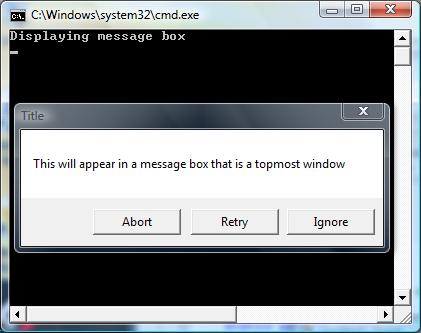
Here is how you could use the TopMostMessageBox in your code.
TopMostMessageBox.Show(
    "This will appear in a message box that is a topmost window",
    "Title", MessageBoxButtons.AbortRetryIgnore);
Here is the declaration of the TopMostMessageBox class.
static public class TopMostMessageBox
{
static public DialogResult Show(string message)
{
return Show(message, string.Empty, MessageBoxButtons.OK);
}
static public DialogResult Show(string message, string title)
{
return Show(message, title, MessageBoxButtons.OK);
}
static public DialogResult Show(string message, string title,
MessageBoxButtons buttons)
{
Form topmostForm = new Form();
topmostForm.Size = new System.Drawing.Size(1, 1);
topmostForm.StartPosition = FormStartPosition.Manual;
System.Drawing.Rectangle rect = SystemInformation.VirtualScreen;
topmostForm.Location = new System.Drawing.Point(rect.Bottom + 10,
rect.Right + 10);
topmostForm.Show();
topmostForm.Focus();
topmostForm.BringToFront();
topmostForm.TopMost = true;
DialogResult result = MessageBox.Show(topmostForm, message, title,
buttons);
topmostForm.Dispose();
return result;
}
}
Points of Interest
- I tried to make this wrapper mimic the existing
MessageBox.Show method, but many overrides of this method are not included in this simple wrapper. However, they can easily be added if you need them. - The hidden form is created off the visible screen to prevent any flickering. This is done by finding the size of the virtual desktop and positioning the hidden form just off past the right side of it. I do not use the physical screen size to account for multiple monitors.
- The combination of
Focus(), BringToFront(), and TopMost seemed to be needed to get the MessageBox to show up properly and have input focus. - To clean up the hidden form completely I call
Dispose on the form.
Other Options
I could have used the MessageBoxIndirect function to accomplish the same thing. However, this is a bit simpler as it does not involve reproducing any Win32 structures.
History
1.0 - 21 Apr 07 - First Posting
I have been developing .NET applications since 2001 and have been working in software development since 1989.



 General
  News
News  Suggestion
  Question
  Bug
Bug  Answer
  Joke
Joke  Praise
  Rant
Rant  Admin
Admin 


 Submit an article or tip


