Introduction
While I was working on the update for my Hyperlink control I faced with the
problem of automatically creating a grayscale icon when the control is in disabled state. I searched on CodeProject and found the CreateGrayscaleIcon by Davide Calabro but I noticed that it doesn't support 32bpp icons. In addition, it s resource usage was a little too heavy in my opinion. So I decided to write one on my own and here's the result.
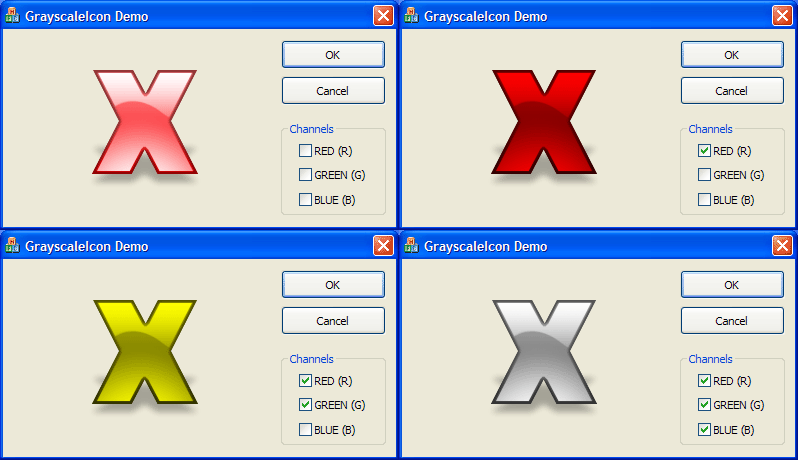
Curiously enough, I found that simply changing the palette filling loop a bit could create any channel scale icon, so I've re-written the function and overloaded it to support a custom palette parameter which lets you to make custom replacement. Look at the demo project to understand what I'm talking about. If you want to use this function in C programs, simply change the overloaded version with a default parameter one.
Using the code
The function is very simple to use. Just call CreateGrayscaleIcon passing your HICON and the function will return the new gray scale icon.
HICON myIcon = (HICON)::LoadImage(
        AfxFindResourceHandle(MAKEINTRESOURCE(ICON_ID), RT_GROUP_ICON),
        MAKEINTRESOURCE(ICON_ID), IMAGE_ICON, 0, 0, 0);

HICON grayIcon = CreateGrayscaleIcon(myIcon);
If you want to use the overloaded version simply create a palette and pass it to the function, like this:
COLORREF palette[256];

for(int i = 0; i < 256; i++)
{
    palette[i] = RGB(255-i, 255-i, 255-i);
}

HICON myIcon = (HICON)::LoadImage(
        AfxFindResourceHandle(MAKEINTRESOURCE(ICON_ID), RT_GROUP_ICON),
        MAKEINTRESOURCE(ICON_ID), IMAGE_ICON, 0, 0, 0);

HICON grayIcon = CreateGrayscaleIcon(myIcon,palette);
This will create a grayscale icon, like the default not overloaded CreateGrayscaleIcon.
Notes
I found that icon on my hard drive but sincerely don't know where does it come from, so if it is copyrighted material and the owner of the rights doesn't want to let me use it, just let me know and I will replace it with something else.
Conclusion
So, that's all, I think. If you have problems or questions don't hesitate to post.



 General
  News
News  Suggestion
  Question
  Bug
Bug  Answer
  Joke
Joke  Praise
  Rant
Rant  Admin
Admin 


 Submit an article or tip


