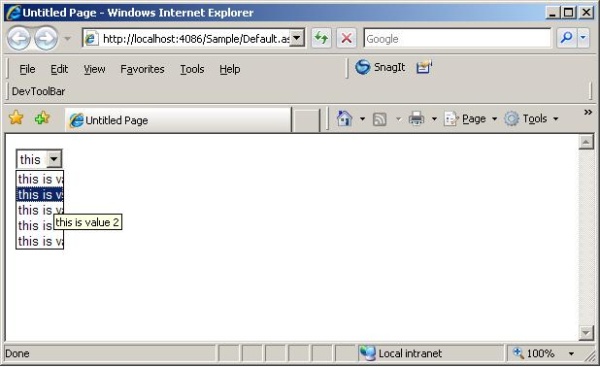
 |
|
 |
pretty simple & really need
|
|
|
|
 |
|
 |
It is not working in IE for me . Please suggest alternate solution.
|
|
|
|
 |
|
 |
It is not working in IE for me . Please suggest alternate solution.
|
|
|
|
 |
|
 |
It doesn't work in IE 6. Plenty of solutions are presented here for IE6 in different threads. You can follow any one of them as per your requirement.
Regards
Mansoor Sarfraz
Business Development Manager
VEB Technologies
http://www.vebtech.com
|
|
|
|
 |
|
 |
It's Very good article with good example of the article.
It's working fine.
|
|
|
|
 |
|
 |
Very good, it helped me a lot, but it isn't the best way to implement, because if the system look at every component on a big page the load time could increase.
I recomend for the users insert the text of the tooltip only where you need.
|
|
|
|
 |
|
 |
It was a nice article ., It is working in developer environment but it is showing warning will it effect after integration of project . After looking at it i feel that it will not., but to make sure i am asking ..
|
|
|
|
 |
|
 |
| Whats the warning ? Regards
Mansoor Sarfraz
Business Development Manager
VEB Technologies
http://www.vebtech.com
|
|
|
|
 |
|
|
 |
|
 |
this code did not worked for me. no tool tip visible
hemant basvapattan
|
|
|
|
 |
|
 |
when i use this for 2 separate drop down lists it clears the first ddl when i call it for the second ddl
|
|
|
|
 |
|
 |
Please share the code.
Regards
Mansoor Sarfraz
Business Development Manager
VEB Technologies
http://www.vebtech.com
|
|
|
|
 |
|
 |
Add the following lines to the head of the page:
<script type="text/javascript" language="javascript" src="jquery-1.3.min.js"></script>
<script type="text/javascript">
$(function(){
$("select > option").each(function(){
var obj = $(this);
obj.attr("title", obj.attr("value"));
});
});
</script>
That's it!
|
|
|
|
 |
|
 |
After missing the tooltip text attribute for a list item, i want to add it per script and by the way find your tip. Unfortunately, it is NOT work any way! Searching after Attributes.Add() on MSDN you will get following:
[BrowsableAttribute(false)] public AttributeCollection Attributes { get; }
It means, the attributes of those (drop down) list item is just readable and NOT setable.
Best Regards!
P/S: But it would be fine, if the tooltip text attribute were implemented for the next version!-)
DJINGES
|
|
|
|
 |
|
 |
This code did not work for me
|
|
|
|
 |
|
 |
| Will you please explain the problem that you encountered. And if possible you can share your code for problem description. Regards
Mansoor Sarfraz
Business Development Manager
VEB Technologies
http://www.vebtech.com
|
|
|
|
 |
|
 |
The code you have provided is not working
I am using it in SQL server 2005 .net framework 2.0
|
|
|
|
 |
|
 |
It doesn't matter which .net framework or data source are you using. The point is how you bind the data and which version of IE are you using.
Will you please explain the problem that you encountered. And if possible you can share your code for problem description.Regards
Mansoor Sarfraz
Business Development Manager
VEB Technologies
http://www.vebtech.com
modified on Sunday, February 21, 2010 3:06 AM
|
|
|
|
 |
|
 |
Very good article. helped me lot
|
|
|
|
 |
|
 |
I was able to get tooltip for all listboxes but it did not work for listboxes inside the gridview control. Any idea why it is not working?
Thanks,
Trilok.
|
|
|
|
 |
|
 |
Hi Trilok,
I have tested the code with a listbox in the gridview and it worked fine. It will help us to understand the problem if you explain that how you binded the data with listbox and how you binded the tooltip with gridview.Regards
Mansoor Sarfraz
Business Development Manager
VEB Technologies
http://www.vebtech.com
|
|
|
|
 |
|
 |
Hi All,
Know it's been a while since this was last posted to, but I am just now working on a web project where I have run into this problem of the dropdown list not having the onmouseover event to use in the VB code behind. Since my dropdowns always have a label beside them - I compromised by attaching the tooltip containing the selected item to the label. The project requires me to use VB .NET and IE 6 - and I prefer to use codebehind instead of adding javascript when possible. It works as below where DropDownList is named myDropDown and the Label beside it is lblMyDropDown
VB .NET
Protected Sub myDropDown_SelectedIndexChanged(ByVal sender As Object, ByVal e As System.EventArgs) Handles myDropDown.SelectedIndexChanged
' Do some stuff if needed
'This makes the selection text the tooltip text on the label
lblMyDropDown.ToolTip = myDropDown.SelectedItem.Text
End Sub
C#
protected void myDropDown_SelectedIndexChanged(object sender, System.EventArgs e)
{
// Do some stuff if needed
//This makes the selection text the tooltip text on the label
lblMyDropDown.ToolTip = myDropDown.SelectedItem.Text;
}
This is pretty basic, but showing the entire entry as a tooltip was not a high priority in the work I am now doing - so if you need something quick and dirty - here it is. Enjoy!
hground
modified on Thursday, August 7, 2008 2:43 PM
|
|
|
|
 |
|
 |
Hello , I get it worked using javascript function
this works for all dropdownlists in the page
I put it in masterpage , and it's great
<script type="text/javascript">
/***********TODO:Make Tips For DropDownLists****************/
function tipDrp(drp)
{
for (var ddlCount = 0 ; ddlCount < drp.options.length ; ddlCount++)
{
drp.options[ddlCount].title=drp.options[ddlCount].text
}
}
/*now calling it 'onload'*/
window.onload = function(){
var theform=document.forms['aspnetForm'];
for (i=0; i
{
if (theform.elements[i].type=="select-one" || theform.elements[i].type=="select-multiple")
{
tipDrp(theform.elements[i]);
}
}
}
</script>
Hope it's good for you
|
|
|
|
 |
|
 |
Hi just wondering if it works for asp.net drop down lists and normal html drop downlists <select>
|
|
|
|
 |
|
 |
your function is not working for me! please help...
|
|
|
|
 |
