Click here to Skip to main content

CButton with icon

By , 12 Aug 2002
 

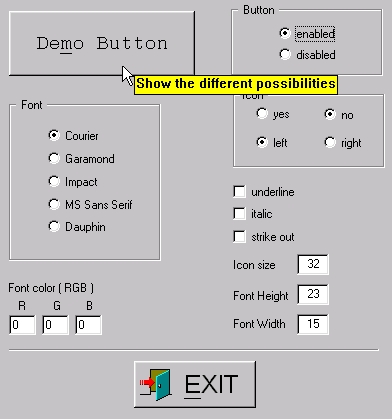
Sample Image - iconbutton.jpg

Introduction

The idea was to have a small piece of code which makes it easy to create a button with an icon on it. I saw a lot of great code, but it was not exactly what I want. So I decided to create my own CIconButton-class. This class makes it easy to set an icon on a button.

  1. Simply add a button to your dialog.
  2. Set the button style "ownerdraw", otherwise the code doesn't work.
  3. Then generate a member variable with the class-wizard.
  4. Change the class name from CButton to CIconButton (make sure you have include the "iconbutton.h" file and add the "iconbutton.cpp" file to your project)
  5. Create an icon in the resource manager.
  6. Set the icon to the button, set the font, the font size, etc

Last version

It´s possible to give the button a tool tip text. You can do this by calling the function SetTipText ( "tooltip-text" );

For more details look in the demo-project

Methods

void SetIconID ( const UINT nID )	
void SetTextColor ( const COLORREF color )	
void SetItalic ( bool bVal = true )
void SetUnderline ( bool bVal = true )	
void SetStrikeOut ( bool bVal = true )	
void SetFaceName ( const CString &sVal )
void SetWeight ( const int nVal )	
void SetHeight ( const int nVal)
void SetWidth ( const int nVal)	
void SetIconSize ( const int x, const int y )	
void SetIconRight ( bool bVal = true ) 
void SetTipText ( const CString &sTxt )  new

void Disable ( void );
void Enable ( void );

Note

I think this is the last enhancement, otherwise the "small piece of code" is going to get a big hunk ;-))

License

This article, along with any associated source code and files, is licensed under The Code Project Open License (CPOL)

About the Author

Alexander Kloep
Software Developer www.auteq.com
Germany Germany
Member
Working as software engineer since 2001 at www.auteq.com.
 
In my spare time i love playing with my two kids.

Sign Up to vote   Poor Excellent
Add a reason or comment to your vote: x
Votes of 3 or less require a comment

Comments and Discussions

 
Hint: For improved responsiveness ensure Javascript is enabled and choose 'Normal' from the Layout dropdown and hit 'Update'.
You must Sign In to use this message board.
Search this forum  
    Spacing  Noise  Layout  Per page   
QuestionAbout FontmemberNANA@12318 Mar '13 - 23:44 
QuestionAwsome WorkmemberAhmedShinwari5 Feb '13 - 16:06 
QuestionCompile with VS2010 [modified]membermerano24 Oct '11 - 10:15 
AnswerRe: Compile with VS2010memberAlexander Kloep24 Oct '11 - 19:56 
AnswerRe: Compile with VS2010memberAHTOXA5 Jun '12 - 22:56 
GeneralThanksmemberMember 108540218 Sep '10 - 9:34 
QuestionCan I use this code in commercial programmemberhp15619 Sep '09 - 16:57 
AnswerRe: Can I use this code in commercial program [modified]memberAlexander Kloep20 Sep '09 - 4:42 
GeneralThanksmembernobihai26 Oct '08 - 4:25 
GeneralRe: ThanksmemberAlexander Kloep26 Oct '08 - 21:23 
GeneralChanging ToolTipsmemberRedFraggle10 Jun '06 - 12:03 
Thanks a lot for your class!
 
The only thing i do not like so much is the Tooltips. They come too soon (no delay) and look a littlebit 'fat'
I would prefer standard tooltip control...
 

I found an easy way to change that (i took this code out of a class found on codeguru,
http://www.codeguru.com/article.php/c2241 Chart Drawing Solution by Massimo Colurcio)
 
In the header, add/or change:
 
void SetTipText ( const CString &sTxt ) ;
bool ActivateToolTip(bool bActivate);
protected:
bool InitToolTip();
//{{AFX_MSG(CIconButton)
virtual BOOL PreTranslateMessage(MSG* pMsg);
//}}AFX_MSG
private:
CToolTipCtrl m_tt;

 
and in the cpp implement:

void CIconButton::SetTipText ( const CString &sTxt )
{
InitToolTip();
// If there is no tooltip defined then add it
if (m_tt.GetToolCount() == 0)
{
CRect rect;
GetClientRect(rect);
m_tt.AddTool(this, sTxt, rect, 1);
}
m_tt.UpdateTipText(sTxt, this, 1);
m_tt.Activate(sTxt.IsEmpty()?false:true);
return ;
};
BOOL CIconButton::PreTranslateMessage(MSG* pMsg)
{
InitToolTip();
m_tt.RelayEvent(pMsg);
return __super::PreTranslateMessage(pMsg);
}
 
bool CIconButton::InitToolTip()
{
if (m_tt.m_hWnd == NULL) {
m_tt.Create(this);
m_tt.Activate(true);
m_tt.SendMessage(TTM_SETMAXTIPWIDTH, 0, 400);
}
return true;
}
 
bool CIconButton::ActivateToolTip(bool bActivate)
{
if (m_tt.GetToolCount() == 0)
return false;
 
// Activate tooltip
m_tt.Activate(bActivate);
 
return true;
}


you also have to throw away all the old tooltip drawing, just search for 'tip' in the code
GeneralRe: Changing ToolTipsmemberAlexander Kloep11 Jun '06 - 20:44 
GeneralNice onememberJaiju jacob9 Sep '05 - 0:14 
Questionhow to make colorful button such as red ,blue not graymembervividtang3 Apr '04 - 12:59 
AnswerRe: how to make colorful button such as red ,blue not graymembermerano24 Oct '11 - 10:39 
GeneralQmemberdeven chin15 Jan '04 - 1:43 
GeneralNice, but click speed is poormemberC++ Hacker16 Nov '03 - 22:55 
GeneralSize of classmemberLapompe25 Jun '03 - 15:00 
QuestionHasn't this been done before?memberEmcee Lam20 Dec '02 - 14:33 
AnswerRe: Hasn't this been done before?editorNishant S20 Dec '02 - 15:11 
GeneralRe: Hasn't this been done before?memberEmcee Lam20 Dec '02 - 16:35 
GeneralRe: Hasn't this been done before?memberRubyist8 Aug '07 - 21:51 
GeneralRe: Hasn't this been done before?memberEmcee Lam13 Aug '07 - 16:36 
Generalgoodmemberyary19 Dec '02 - 1:48 
GeneralNice butt i got a problemmemberDosK19 Nov '02 - 23:18 

General General    News News    Suggestion Suggestion    Question Question    Bug Bug    Answer Answer    Joke Joke    Rant Rant    Admin Admin   

Permalink | Advertise | Privacy | Mobile
Web02 | 2.6.130516.1 | Last Updated 13 Aug 2002
Article Copyright 2002 by Alexander Kloep
Everything else Copyright © CodeProject, 1999-2013
Terms of Use
Layout: fixed | fluid
