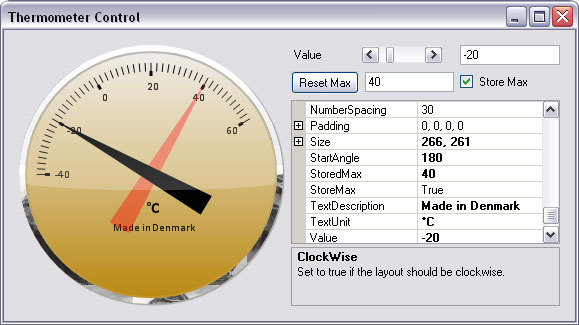
 |
|
 |
i use it for winding.but still i have a little problem. i can not turn it to 0 -- 360
you know the wind ,i just north east west ...东南西北 风只是四个方向
|
|
|
|
 |
|
 |
Nice,
You should modify the PaintNumbers method and omit the last number to prevent overlapping (0 & 360).
[With best regards ]
[Niel M. Thomas ]
|
|
|
|
 |
|
 |
yes! that is right .i use vc6 before ,but i find "visual ctrl " is so useful.
thanks a lot !ha
|
|
|
|
 |
|
 |
Good example and code for customizable control
|
|
|
|
 |
|
 |
Hats off to you. This is very well written. Very succinct.
Regards,
Jon Sigler
|
|
|
|
 |
|
 |
Can this .dll be used with VC++ 6.0? If so, how?
Thanks,
Eric
|
|
|
|
 |
|
 |
No, it can only be used by a .NET Framework 2.0 application or higher. (which VS version is 2005)
Chuck Norris has the greatest Poker-Face of all time. He won the 1983 World Series of Poker, despite holding only a Joker, a Get out of Jail Free Monopoloy card, a 2 of clubs, 7 of spades and a green #4 card from the game UNO. In the movie "The Matrix", Chuck Norris is the Matrix. If you pay close attention in the green "falling code" scenes, you can make out the faint texture of his beard. Chuck Norris actually owns IBM. It was an extremely hostile takeover.
|
|
|
|
 |
|
 |
Hello,
First I have to say that I couldn't test your Control, cause I have only .Net1.1 running.
But I looked threw it and I think you did a very good job!
My suggestions:
1)
You are mixing up the initialization of your private fields for the properties, which makes it difficult to read the code.
For example you sometimes initialize directly in the decleration (which I would prevere), and sometimes in the constructor.
As I could read in the responses to your article, this behavior made you a problem, because you forgot to initialize a field.
You also use const members and sometimes not for the initialization.
2)
The connection to a delegate of the base class is bad style:
Resize += new EventHandler(Termometer_Resize);
You simply could override the method which calls the event (Which I would also suggest for you custom events, as you are firing the events in the setter of the properties):protected override void OnResize(EventArgs e)
{
base.OnResize (e);
}
3)
Naming a private member of a property 'value' (this.value = value; ), is more than confusing.
4)
I would allways use a "!="-check in the setter of a property before doing stuff (performance reason).
if(value != storeMax)
{
storeMax = value
}
5)
Resources issues:
5.1)
Your thermometer class should implement a dispose method which disposes the class field:
private Brush textureBrush;
5.2)
It seems that you prevent to use a "using" block inside a "using" blockGraphicsPath path = new GraphicsPath();
path.AddLine(p1, p2);
path.AddLine(p2, p3);
using (Brush b = new SolidBrush(c))
{
g.FillPath(b, path);
}
path.Dispose();No reason for that, I think:using (GraphicsPath path = new GraphicsPath())
{
path.AddLine(p1, p2);
path.AddLine(p2, p3);
using (Brush b = new SolidBrush(c))
{
g.FillPath(b, path);
}
}
6)
private void InitializeComponent()
{
Name = "Termometer"; //Thermometer
All the best,
Martin
|
|
|
|
 |
|
 |
Thanks for your suggestions, Martin
I'll probably fix the spelling error at some point.(Was Danish for Thermometer).
[With best regards ]
[Niel M. Thomas ]
|
|
|
|
 |
|
 |
Hello Niel,
Niel M.Thomas wrote: Thanks for your suggestions, Martin
No problem!
Hope they help.
Niel M.Thomas wrote: I'll probably fix the spelling error at some point.(Was Danish for Thermometer).
That one was really more a Joke than pointing out a spelling error.
But I have one more suggestion.
I saw that you sometimes do a validation in the setter of the properties, and if the value is out of some range, you leave it like it was. In some cases you set up a debug message in some nothing. I would suggest a messagebox whixh shows the user the limits.
All the best,
Martin
|
|
|
|
 |
|
 |
about using- you wrote:
using (GraphicsPath path = new GraphicsPath())
{
path.AddLine(p1, p2);
path.AddLine(p2, p3);
//Fill the arrow
using (Brush b = new SolidBrush(c))
{
g.FillPath(b, path);
}
}
however you can do even better:
using (GraphicsPath path = new GraphicsPath())
using (Brush b = new SolidBrush(c))
{
path.AddLine(p1, p2);
path.AddLine(p2, p3);
//Fill the arrow
g.FillPath(b, path);//save two lines - no braces
}
Michał Bryłka
Theory is when you know something, but it doesn't work.
Practice is when something works, but you don't know why.
Programmers combine theory and practice: Nothing works and they don't know why.
|
|
|
|
 |
|
 |
I should write an article so that I could get these sort of "suggestions", they are brilliant
|
|
|
|
 |
|
 |
Thanks for your nice words
All the best,
Martin
|
|
|
|
 |
|
 |
Hi,
I built the DLL (Manometers.dll) from the demo project. I then added it to my toolbox in Visual Studio 2005, and tried to add it to a form.
VS2005 Hung, with CPU usage at 50% (on a dual core cpu), and didn't recover after 20 minutes or so - at which point, I killed VS.
Do you have any idea/suggestions as to why this may be?
Also, what's the copyright status of this control? It would be usefull in a number of my current projects, some of which are commercial/closed source - - I don't want to break any rules!
Thanks, Hope to hear from you soon.
Rob
|
|
|
|
 |
|
 |
Thanks for the follow up.
Parameter in base class was not initialized before accessing.
Please change: (under Members in ManometerBase.cs)
private float interval; --> private float interval = defaultInterval;
Did the job nicely
V impressed - thank you.
R.
|
|
|
|
 |
|
 |
When I try to drag the Thermometer control from the Toolbox to a form, devenv.exe pegs my cpu and I have to kill VS.
Is this related to not disposing the unmanaged objects? I tried to add dispose calls for the SolidBrush and GraphicsPath objects... but this didn't seem to make a difference.
Can somebody explain what is meant by "And it is easier to use "using" for this."
Love the control, this is exactly what I needed for my weather station app I made to talk to my Orgon Scientific WRM918. Also, this is a great example on how to create any type of nice looking control.
Cheers!
|
|
|
|
 |
|
 |
Hi, thanks for the info.
Parameter in base class was not initialized before accessing.
Please change: (under Members in ManometerBase.cs)
private float interval; --> private float interval = defaultInterval;
I'll make an update soon.
[With best regards ]
[Niel M. Thomas ]
|
|
|
|
 |
|
 |
The using statement is a more compact syntax for disposing of objects that implement the IDisposable interface. In order to guarantee a object is disposed you'd have to write something like this:
// Declare outside of try block so we can
// clean up in a finally block
SolidBrush b = null;
try
{
b = new SolidBrush(Color.Black);
// do something with the brush
}
finally
{
if (b != null)
{
b.Dispose();
b = null;
}
}
The using statement merely causes the compiler to inject a lot redundant code so all you have to write is:
using (SolidBrush b = new SolidBrush(Color.Black))
{
// do something with the brush
}
|
|
|
|
 |
|
 |
Does the job good!
namaste,
Nitin Koshy
...and I thought I knew
|
|
|
|
 |
|
 |
Looks great, and after adding the dispose/using statements, works great too
|
|
|
|
 |
|
 |
Nice looking control, but you made the same mistake prob. 90% of .NET devs do.
If you create something that uses unmanaged resources, use dispose on that, and don't forget
half of them
In your case you missed the SolidBrush, and the GraphicsPath.
And it is easier to use "using" for this.
Otherwise nice and clean solution.
|
|
|
|
 |
|
 |
SolidBrush and GraphicsPath are unmanaged resources?
How can you tell this? It is my understanding that since they are in the System.Drawing namespace they are managed code? Moreover, if you look in the SDK documentation, there is no mention of them being unmanaged, yet... they do call .Dispose() in the sample.
Thanks
The Marshal
"90% group dev trying to join the 10% crowd."
|
|
|
|
 |
|
 |
They are not unmanaged, they hold unmanaged resources, that's why they implement
IDisposable.
Also Brush and Graphics are in System.Drawing and all of them hold an unmanaged Handle.
This one has to be disposed, otherwise you run out of handles.
|
|
|
|
 |
|
 |
If they are managed components then it doesn't matter what they are holding on to because they are MANAGED. You don't need to worry about disposing them since they are MANAGED. Hello, McFly??
|
|
|
|
 |
|
 |
Please read about IDisposable and why it was invented.
Maybee than you realize why it is important to do that, and why
you have the wrong understanding of what i am talking about.
|
|
|
|
 |
