Introduction
The Microsoft Windows Forms Datagridview provided with the MS Visual Studio 2005 has got a lot new and good features which were missing in the datagrid control provided in the earlier versions of MS .Net. But still, many times the developers or I should say the functional need of the application require the filtering capabilities.
In this article, I am gonna explain the method by which we can add the filtering capabilities in the Datagridview header itself.
To just start with and summarize, it can be entirely customized through an xml file and decided to which of columns, the filtering capability is to be provided.
Unlike most of the filtering grids available, it allows you to apply filter on more than one filter at a time and in that too, you can select multiple values in a column. Thus extending the feature for searching/filtering or we should say minimizing the desired view of data to the bare minimum level. 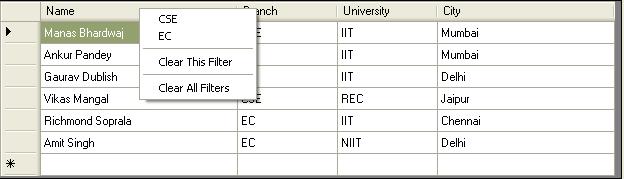

Using the code
FilterDataGridView is a fully customizable user control. As far as the developer's point of view is concerned. He will not have to make a single line of code change in his code and yet he can achieve the filtering capability. J
As many of the times, we don't want to give the filtering capability to all the columns that why FilterDataGridView reads the name of the columns from an xml file which have to be enabled for the filtering.
That means what all one developer has to do is to provide an xml file with the name of the columns to be filtered.
Below, I have mentioned what all steps would need to be taken if you want to replace the old Datagridview with the FilterDataGridView.
- Add a reference to the FilteredGridViewControl.dll in your project and also add it to your toolbar.
- Drag the FilteredGridView from your toolbar to the window form as you do with any other control.
- Add FilterGridView.xml to your application. In the compile property, set the Copy to Output folder option.
This xml should look like this:
<?xml version="1.0" encoding="utf-8" ?>
<ColumnsToBeFiltered>
<ColumnName>Branch</ColumnName>
<ColumnName>City</ColumnName>
</ColumnsToBeFiltered>
You can specify as many columns here which are to be filtered.
And here we go, all is set. Wasn't that simple?
How it works?
With FilteredGridView, when you right click on a header of a column which is there in the list of Columns to be filtered, it will list all the distinct rows. Now you can select any of the row it your grid will automatically be filtered with that value. FilteredGridView supports applying multiple filters on a single column. That means you can apply as many filters on a column and at the same time you can narrow the data by putting filters on other columns data too.
Assumptions
This version of FilterGridView only works when bound with a Data Source.



 General
  News
News  Suggestion
  Question
  Bug
Bug  Answer
  Joke
Joke  Praise
  Rant
Rant  Admin
Admin 


 Submit an article or tip


 kudos
kudos

 Anybody knows how to use it with two or more datagridviews?, I have a few problems with it.