 |
|
 |
Hi all,
If anyone have the code for the folder Browser Dialog for webbased application .Please suggest ..
Regards,
Selva.
|
|
|
|
 |
|
 |
i need this type of contol in my web application , can i use this in my form
|
|
|
|
 |
|
 |
no you can not ! use pure javascript to do this
|
|
|
|
 |
|
 |
Hi, I need a folder browser without the network folder. Can i do that with your control?
Thanks in advance
|
|
|
|
 |
|
 |
Its not possible with the FolderBrowserDialog. Instead try out FolderView from Shell MegaPack from http://www.ssware.com
Its a user control, so it can be put right inside your own forms and dialog.
-jmcc
|
|
|
|
 |
|
 |
Hi , i've put the Shell Folder browser component into my project, but i've some problems with sending messages to the dialog. Every message i send ( for example , using the method setSelection() or setOkButtonText() ) throws an "InvalidOperationException". I've tried to take a look to source code, and i've got that the demo .exe doesn't work...
someone can help me please?
|
|
|
|
 |
|
 |
Is it at all possible to add to the list of folders. I would like to add functionality to browse to an online storage location. I can write the code to hook up the the storage I just don't know if it's possible to add folders or links or anything else for that matter into the browser list. Is this possible?
|
|
|
|
 |
|
 |
Hi i need a folder Browser Dialog box like VS.Net.
Just right click the solution and choose Add-> New Project and then click on Browse button.The Dialog box pop up with tiltle Project Location.
Is there any way to use the Dialog box. or to create that particular dialog box.
Vikram
|
|
|
|
 |
|
 |
First it's not a Folder Browser dialog. So just create a user control. It's just a tree view with a list view a few labels and some text boxes. What are you going to use it for? There might be a better solution. There is another article here http://www.codeproject.com/cs/miscctrl/OpenFileDialogEx.asp that does a file open dialog, maybe that's more of what your looking for?
|
|
|
|
 |
|
 |
hi,
I could require a project where folder browser is used in Web Project.
So it could if anyone can help me out with this.
With Regards,
Jeevan Moses
I am Jeevan Moses working in the domain of ASP.Net and I am working in the field for nearly 2 years. I have the role of developing the Class files and back hand query.
|
|
|
|
 |
|
 |
This is a windows forms control and cannot be used in a web project.
Member in good standing - the great cult of Firefox at CP
|
|
|
|
 |
|
 |
I also need the Folder browser dialog for local system in webapplication.Have u got this ??
if u have means send the link ..
Thanks,
Selva.
|
|
|
|
 |
|
 |
In the previous comment you said that there was a folder browser component built into newer versions of .net. I have been looking for one in ASP.NET 2.0 where the user could select a folder in their local drives. I would really like to create a Save File As box where they could enter a filename too, but I would be happy if they could just select the file path. It would not even have to be their local drives, but on the files on the web server. (I would only allow them to store on the shared server drive the users and web browsers can see). If you could direct me to any useful websites or give me the actual component names, I would appreciate it. Thanks.
programmer new to .net
|
|
|
|
 |
|
 |
Half of it doesn't work correctly (ever bother to test it?) and the design is broken.
I have a more correct version which anyone can have by e-mailing me.
BTW, is this code a direct rip-off of:
http://www.gotdotnet.com/team/VB/[]
or did they mistakenly take your code?
Tom
(tomguinther@hotmail.com)
Tom Guinther
http://mothership.blogdns.net/cs/blog
|
|
|
|
 |
|
 |
Tom Guinther wrote:
http://www.gotdotnet.com/team/VB/[][^]
did they mistakenly take your code?
Wow it is a direct conversion of my C# code into VB. Including the namespace (CP i.e Code Project) and code comments.
BTW this article is quite old and was published for .NET 1.0. If you are using .NET 1.1 or .NET 2.0 there is a builtin folder browser component available.
|
|
|
|
 |
|
 |
Hi Rama,
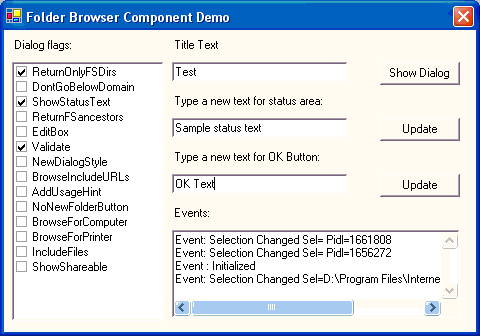
I'm just wondering what the use of the NoNewButtonFolder flag
is. I'm using Windows XP Service Pack 2 and it doesn't matter
if this flag is checked or not, the dialog won't show a "New
Folder" Button. Is this a bug or is it a missing feature?
Regards,
Josef
|
|
|
|
 |
|
 |
Josef Meile wrote: I'm just wondering what the use of the NoNewButtonFolder flag
is. I'm using Windows XP Service Pack 2 and it doesn't matter
if this flag is checked or not, the dialog won't show a "New
Folder" Button. Is this a bug or is it a missing feature?
Ok. I figured out that the button will only appear when
you check the NewDialogStyle.
Regards
Josef
|
|
|
|
 |
|
 |
Can i put a text box inside Shellbrowsedialog....
Or can i get what i typed in shellbrowserdialog browseflag=editbox
Mohan Kartha
|
|
|
|
 |
|
 |
When using this component, everything works fine except there is no text in the buttons or the Title area. This occurs both in a project I have included the component in, and in the demo project. Incidentally, in my own project, once another dialog (such as a standard Open File dialog) has been opened, the text is then visible if I open a Folder Browser dialog. I am running on Windows XP SP2,etc. Has anyone else experience anything similar or does anyone have any ideas?
Caleb
|
|
|
|
 |
|
 |
Replace Marshal.StringToHGlobalAuto with Marshal.StringToHGlobalAnsi
public void SetSelection(string newsel)
{
if (handle == IntPtr.Zero)
throw new InvalidOperationException();
int msg = (Environment.OSVersion.Platform == PlatformID.Win32NT) ? BFFM_SETSELECTIONA : BFFM_SETSELECTIONW;
//IntPtr strptr = Marshal.StringToHGlobalAuto(newsel);
IntPtr strptr = Marshal.StringToHGlobalAnsi(newsel);
UnManagedMethods.SendMessage(handle, msg, new IntPtr(1), strptr);
Marshal.FreeHGlobal(strptr);
}
|
|
|
|
 |
|
 |
I've looked into this a bit and I've decided that I really hate the FolderBrowserDialog because it doesn't support links or any of the other features of SaveFileDialog or OpenFileDialog.
Fortunately, although its not really a very neat solution, you can get the OpenFileDialog to browse for folders.
The key is setting CheckFileExists to false and setting the Filter to return no file results (by hacking it to look for "no.files"):
OpenFileDialog bob = new OpenFileDialog();
bob.InitialDirectory = txt_DirPath.Text;
bob.Title = "Please choose a folder";
bob.CheckFileExists = false;
bob.FileName = "[Get Folder...]";
bob.Filter = "Folders|no.files";
bob.ShowDialog();
string dir_path = Path.GetDirectoryName(bob.FileName);
if (dir_path != null && dir_path.Length > 0) {
txt_DirPath.Text = dir_path;
}
Note: there is a textbox on the form called "txt_DirPath" that is used to display the folder to which the user browsed.
|
|
|
|
 |
|
 |
This solution is far worse. You can not choose a directory with a subdirectory.
|
|
|
|
 |
|
 |
Works for me..Actually its just what I was looking for. As for selecting a directory which has subdirectories, the key is "NOT" to double click the folder but simply click "Open" while the folder is not selected.
Hamid
|
|
|
|
 |
|
 |
I've downloaded half a dozen solutions for this problem, each one more complicated than the previous one.
And then I found this one. It's simple and works fine!. Less is more!!
|
|
|
|
 |
|
 |
Well, it really won't work for me after all... The way to select a folder with subfolders is not really good. Nice try!
|
|
|
|
 |
