Introduction
I recently got a new notebook and was routinely transferring all of my old, favourite utilities to it when I found that NetStumbler would not work with Vista. I saw some references to a poor-man's version with the following command line:
netsh wlan show networks mode=bssid
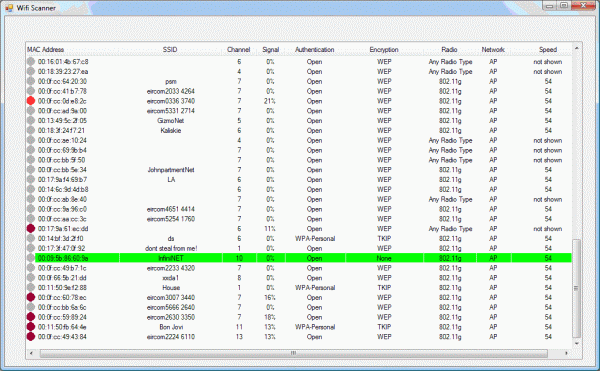
I decided to put it in a window, so here is my effort. For Microsoft documentation on netsh, see Windows Netsh.
The code
A timer on the Form calls the Scan() function every two seconds. The Scan() function first uses the Process() class to execute the netsh command with the command line parameters:
Process proc = new Process();
proc.StartInfo.CreateNoWindow = true;
proc.StartInfo.FileName = "netsh";
proc.StartInfo.Arguments = "wlan show networks mode=bssid";
proc.StartInfo.RedirectStandardOutput = true;
proc.StartInfo.UseShellExecute = false;
proc.Start();
output = proc.StandardOutput.ReadToEnd();
proc.WaitForExit();
The output is then parsed line-by-line to build an array of currently active networks. This is presented in a listView using the MAC Address as the item text with sub-items for the rest of the information. Discovered networks that are not already in the listView are found using:
ListViewItem SearchItem = new ListViewItem();
SearchItem = listView1.FindItemWithText(Networks[i, 0]);
if (SearchItem == null)
{
Any networks already in the listView are updated. The signal level icon is generated by bitmaps on the listView:
int SignalInt = Convert.ToInt32(Networks[i, 3].TrimEnd(' ').TrimEnd('%'));
if (SignalInt > 50) listView1.Items[listView1.Items.Count-1].ImageIndex = 0;
else . . .
The coloured icons represent the signal levels as:
 Greater than 50% Signal Level
41% to 50% Signal Level
31% to 40% Signal Level
21% to 30% Signal Level
1% to 20% Signal Level
No Signal
Points of interest
One annoyance with the listView control was flicker. Every Update() or Refresh() caused the whole list to be cleared and re-written. I used a tip from Don Koster and added his listViewNF class. Using this listViewNF class stopped the flicker by redrawing only the changed areas.
class ListViewNF : System.Windows.Forms.ListView
{
public ListViewNF()
{
this.SetStyle(ControlStyles.OptimizedDoubleBuffer |
ControlStyles.AllPaintingInWmPaint, true);
this.SetStyle(ControlStyles.EnableNotifyMessage, true);
}
protected override void OnNotifyMessage(Message m)
{
if (m.Msg != 0x14)
{
base.OnNotifyMessage(m);
}
}
Known issues
The netsh command can sometimes be slow at updating the real network state. If a network is connected, it seems that the signal level displayed by netsh is not updated. Being connected also seems to alter the signal level of the connected network and other networks. When a connected network is turned off, it can take more than a minute for netsh -- or possibly this is a driver issue -- to remove the network from the output. Turning the wireless off and back on seems to force a new signal level. Also, sometimes the netsh command seems to change signal levels at every update. Once it gets in this mode, it will update the signal level for every command when operating on main power, but if it's operating on battery power it doesn't! The normal signal update interval seems to be one minute. I tested this using a Dell 640m notebook with an Intel 3945ABG wireless adapter.
History
- June 23, 2007: New article.
- June 24, 2007: Whoops! Bitmaps were not included in the demo project. This is fixed now.
My first experiences with computing was with a Bendix G15 drum computer at Carnegie Mellon. More followed with CDC G20, IBM 360, Univac 1108, Apple II, and 386XXX. I have done microprocessor programming and design for 6502, Z80, and 8051. I have moved to C# now and am still struggling to understand this. My career has been in engineering starting with Texas Instruments and continuing with Becton Dickinson, Dataproducts, Hitachi Printing Solutions and now retired from Ricoh Printing Systems Europe.



 General
  News
News  Suggestion
  Question
  Bug
Bug  Answer
  Joke
Joke  Praise
  Rant
Rant  Admin
Admin 


 Submit an article or tip


 . Here is my autoit version.