Click here to Skip to main content
Licence CPOL
First Posted 13 Mar 2002
Views 137,349
Bookmarked 38 times

Setup a Tab Control Easily to Show and Hide Objects With STabCtrl

By | 13 Mar 2002 | Article
Set up a tab control easily to show and hide objects with STabCtrl

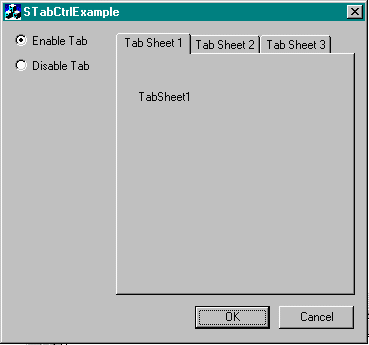
Sample Image - STabCtrl.gif

Introduction

I first submitted this code and article way back in Feb '99 and Jul '99 on the CodeGuru site. Wow, do the years go by fast! It's still there and going strong, and I still use the control today in newer projects that I've worked on since the one in whcih the control first turned up in. I've never had a need to change the code so far, but have decided to re-submit here on CodeProject.

Anyway, a lot of projects that I've working make use of tab controls, and on the tab pages there are typically up to 10 controls! And using the ON_NOTIFY(TCN_SELCHANGE... ) message, in the parent window becomes painful. 'Why not use property pages?' people ask. Sure that would make things easier, but the pages on property pages take up the entire parent window and we've got layouts that require any number of controls to not be on a page but around the tab control somewhere. To do that with property pages requires a bit of painful coding to get things where you want them, and if scaling of the page is involved it's even harder!

The STabCtrl, although very simple, I've found to be extremely useful. It implements a tab control that automatically handles the showing and hiding of objects attached to a tab's various pages, eliminating the need to do so via the ON_NOTIFY(TCN_SELCHANGE... ) message in a parent window.

To use the control:

  1. Simply replace any instance of a CTabCtrl with CSTabCtrl (remember to include the header file STabCtrl.h), initialize it as you would an MFC CTabCtrl.
  2. Use the AttachControlToTab member to attach you objects to the various available pages.
  3. Use the SetCurSel member to programmatically show a tab's particular page.

Note Steps 1, 2 & 3 are typically done in the parent dialogs ::OnInitDialog() member. Once done, the tab control will show and hide the attached objects depending on the users tab selection.

// file : SomeDialogClass.h 

class CSomeDialogClass : public CDialog 
{ 
    CSTabCtrl m_TabCtrl; 
    CTreeCtrl m_TreeCtrl; 
    CListCtrl m_ListCtrl; 
    CComboBox m_ComboCtrl; 

    virtual BOOL OnInitDialog(); 
}; 

// file : SomeDialogClass.cpp
BOOL CSomeDialogClass::OnInitDialog() 
{ 
    CDialog::OnInitDialog();

    //////////////////////////////////////////////////////// 
    // set up tabs. 

    PSTR pszTabItems[] = 
    { 
        "Tab Sheet 1 : Tree control", 
        "Tab Sheet 2 : List control", 
        "Tab Sheet 3 : Combobox control", 
        NULL 
    }; 

    TC_ITEM tcItem; 

    for(INT i = 0; pszTabItems[i] != NULL; i++) 
    { 
        tcItem.mask = TCIF_TEXT; 
        tcItem.pszText = pszTabItems[i]; 
        tcItem.cchTextMax = strlen(pszTabItems[i]); 
        m_TabCtrl.InsertItem(i,&tcItem); 
    } 

    // attach controls to tabs pages.
    // attach tree control to first page 
    m_TabCtrl.AttachControlToTab(&m_TreeCtrl,0); 
    // attach list control to second page 
    m_TabCtrl.AttachControlToTab(&m_ListCtrl,1); 
    // attach combo box control to third page
    m_TabCtrl.AttachControlToTab(&m_ComboCtrl,2); 

    // initialize tab to first page. 
    m_TabCtrl.SetCurSel(0); 

    //////////////////////////////////////////////////////// 
}

Anyway...hope this is of use to everyone!

License

This article, along with any associated source code and files, is licensed under The Code Project Open License (CPOL)

About the Author

Parko

Web Developer

Australia Australia

Member

Parko, aka Simon Parkinson-Bates, spends his days cutting code, his evenings chasing after his 5.5 year old daughter and cleaning up after his 3.5 year old son, and his nights cutting code.

Sign Up to vote   Poor Excellent
Add a reason or comment to your vote: x
Votes of 3 or less require a comment

Comments and Discussions

 
You must Sign In to use this message board. (secure sign-in)
 
Search this forum  
 FAQ
    Noise  Layout  Per page   
  Refresh
QuestionIt couldn't work under SDI? PinmemberSyouki_kou17:15 6 May '08  
AnswerRe: It couldn't work under SDI? PinmemberMember 31950354:31 19 Jan '09  
GeneralUsing CSTabCtrl without a resource entry PinmemberMichael Farrugia11:00 11 Jun '07  
QuestionXP static background issue PinmemberCASILASI0:29 16 Apr '06  
GeneralRe: XP static background issue PinmemberDouglas Fraser3:50 28 Apr '08  
QuestionIs it possible to do multiline (stacked ) tabs with STabCtrl? PinmemberJimatKC16:05 28 Mar '06  
AnswerRe: Is it possible to do multiline (stacked ) tabs with STabCtrl? PinmemberParko17:26 28 Mar '06  
GeneralRe: Is it possible to do multiline (stacked ) tabs with STabCtrl? PinmemberJimatKC20:22 28 Mar '06  
General'AttachControlToTab' : is not a member of 'CTabCtrl' Pinmemberpepeyman2:58 19 Apr '05  
GeneralRe: 'AttachControlToTab' : is not a member of 'CTabCtrl' PinmemberParko12:11 19 Apr '05  
GeneralSTabCtrl without resource PinmemberFred_12320:23 23 Jan '03  
GeneralRe: STabCtrl without resource Pinmembermatlin12311:06 29 Mar '05  
GeneralRe: STabCtrl without resource PinmemberParko14:48 29 Mar '05  
QuestionResource View?? Pinsussanonymous9:46 26 Sep '02  
AnswerRe: Resource View?? PinmemberParko1:52 27 Sep '02  
One way around it which I use to avoid control mania is to use the tab control to manage the display of different CDialog derived Windows (pages). These dialogs I create as you normally would via the resource editor, then in the OnInitDialog code of the CDialog that is using the CSTabCtrl, I "Create" the "pages", position them, and then attach them into the CSTabCtrl.
 
Glad you like the code...
 
Big Grin | :-D
GeneralRe: Resource View?? Pinmemberstealth kid22:49 31 Aug '03  
QuestionPaint? PinmemberTobias3:12 1 Jul '02  

General General    News News    Suggestion Suggestion    Question Question    Bug Bug    Answer Answer    Joke Joke    Rant Rant    Admin Admin   

Use Ctrl+Left/Right to switch messages, Ctrl+Up/Down to switch threads, Ctrl+Shift+Left/Right to switch pages.

Permalink | Advertise | Privacy | Mobile
Web03 | 2.5.120604.1 | Last Updated 14 Mar 2002
Article Copyright 2002 by Parko
Everything else Copyright © CodeProject, 1999-2012
Terms of Use
Layout: fixed | fluid
