Introduction
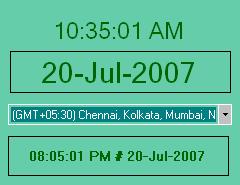
The custom clock is an application which reads the TimeZone information from the registry and starts the application. Based upon the selection by user, the display below the combobox displays the current time for the selected time zone.
Background
I was looking for a code snippet to fetch TimeZone information in C#. I did not find one which satisfies my needs. So I wrote this application.
Using the Code
The code basically depends upon the information stored in registry for different TimeZones.
The following function fetches the data from registry and creates a table for this information:
private DataTable LoadTimeZones()
{
DataTable dtTimeZoneInfo = new DataTable();
dtTimeZoneInfo.Columns.Add("Display", typeof(string));
dtTimeZoneInfo.Columns.Add("Dlt", typeof(string));
dtTimeZoneInfo.Columns.Add("Std", typeof(string));
dtTimeZoneInfo.Columns.Add("MapID", typeof(string));
dtTimeZoneInfo.Columns.Add("Index", typeof(string));
dtTimeZoneInfo.Columns.Add("TZI", typeof(byte[]));
dtTimeZoneInfo.Columns.Add("TIME_ZONE_INFORMATION", typeof(TIME_ZONE_INFORMATION));
RegistryKey registryTimeInfo = Registry.LocalMachine.OpenSubKey
(@"SOFTWARE\Microsoft\Windows NT\CurrentVersion\Time Zones");
foreach (string strTimeInfo in registryTimeInfo.GetSubKeyNames())
{
RegistryKey registryZoneKey = registryTimeInfo.OpenSubKey(strTimeInfo);
DataRow drTz = dtTimeZoneInfo.NewRow();
foreach (string specificInfo in registryZoneKey.GetValueNames())
{
object obValue = registryZoneKey.GetValue(specificInfo);
drTz[specificInfo] = obValue;
}
drTz["TIME_ZONE_INFORMATION"] = CreateStructure((byte[])drTz["TZI"]);
dtTimeZoneInfo.Rows.Add(drTz);
}
return dtTimeZoneInfo;
}
The following structure is used to store the Binary registry data for TimeZone. We use the BitConverter class to convert available bits into specific data types.
public struct TIME_ZONE_INFORMATION
{
public int Bias;
public int StandardBias;
public int DaylightBias;
public SYSTEMTIME StandardDate;
public SYSTEMTIME DaylightDate;
}
public struct SYSTEMTIME
{
public ushort wYear;
public ushort wMonth;
public ushort wDayOfWeek;
public ushort wDay;
public ushort wHour;
public ushort wMinute;
public ushort wSecond;
public ushort wMilliseconds;
}
For more information on TimeZone structure, you can refer to this MSDN link.
Points of Interest
The application also uses the NotifyIcon class for placing a SystemTray icon. It can be a sample for developers who want to have an idea on how to place an icon in system tray. Do remember the class is only available in .NET 2.0 or higher versions.
It also implements the moving of form by grabbing any part of form. This might be helpful to some developers.
History
- 20th July, 2007: First version of the application submitted
Ideas are welcome and you are free to use the code anywhere as per your requirement.
Started carreer with CEERI, Delhi, India as a C Programmer in 2004 and migrated my learning experiance to C#.Net in 2005 with DIGISIGN Noida, Joined Bally in 2006, worked with JK Technosoft since Jun 2007 till Apr 2009, joined back Bally in June 2009 and joined Misys in June 2010. Worked in different domains such as Casino Management, Digital Signage, and Medical and currently working M*Modal as Lead - Product Development.



 General
  News
News  Suggestion
  Question
  Bug
Bug  Answer
  Joke
Joke  Praise
  Rant
Rant  Admin
Admin 


 Submit an article or tip

