Click here to Skip to main content
Licence GPL3
First Posted 23 Jul 2007
Views 67,527
Downloads 513
Bookmarked 61 times

Mapping Images on Spherical Surfaces Using C#

By andalmeida | 10 Aug 2007
Mapping images on spherical surfaces using C#
1 vote, 3.7%
1

2
1 vote, 3.7%
3
2 votes, 7.4%
4
23 votes, 85.2%
5
4.95/5 - 27 votes
2 removed
μ 4.66, σa 1.52 [?]

See sample

Introduction

This article describes how to map a flat 2D image (JPG, BMP, or GIF) on a sphere by using basic algebra.

The process is very simple where the x axis of the image will be mapped on sphere longitudes and the y axis of the image will be mapped on sphere latitudes.

The process of mapping is similar to proportion equations x-x0/y-y0 = px-x0/py-y0

public static double MapCoordinate(double i1, double i2, double w1,
    double w2, double p)
{
    return ((p - i1) / (i2 - i1)) * (w2 - w1) + w1;
}
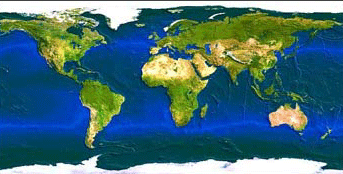
Screenshot - worldmap4.gif
Original image

Screenshot - mapping.png
Resulting image

Background

A Sphere Can Be Represented by Spherical Coordinates in R3

  • radius
  • phi (latitude angle)
  • theta (longitude angle)

Image 2

  • Where radius is a constant, phi=[-PI/2,PI/2], and theta=[0,2*PI]

To Find the Cartesian Coordinates from Spherical Coordinates

  • x = radius * sin(phi) * cos(theta)
  • y = radius * sin(phi) * sin(theta)
  • z = radius * cos(theta)
double phi0 = 0.0;
double phi1 = Math.PI;
double theta0 = 0.0;
double theta1 = 2.0*Math.PI;

The Code

At first we code the image loading

System.Drawing.Image image1 = new Bitmap(Server.MapPath(
    "./images/worldmap4.gif"));
Bitmap imgBitmap = new Bitmap(image1);

Now we make a loop through the 2 dimensions of the image, map phi and theta angles from image coordinates, get the cartesian 3D coordinates from phi and theta, provide some rotation to the obtained 3D points and plot them with respective image color:

for (int i = 0; i < imgBitmap.Width; i++)
     {
     for (int j = 0; j < imgBitmap.Height; j++)
          {
          // map the angles from image coordinates
          double theta = Algebra.MapCoordinate(0.0, imgBitmap.Width - 1,
              theta1, theta0, i);
          double phi = Algebra.MapCoordinate( 0.0, imgBitmap.Height - 1,phi0,
              phi1, j);
          // find the cartesian coordinates
          double x = radius * Math.Sin(phi) * Math.Cos(theta);
          double y = radius * Math.Sin(phi) * Math.Sin(theta);
          double z = radius * Math.Cos(phi);
          // apply rotation around X and Y axis to reposition the sphere
          RotX(1.5, ref y, ref z);
          RotY(-2.5, ref x, ref z);
          // plot only positive points
          if (z > 0)
               {
               Color color = imgBitmap.GetPixel(i, j);
               Brush brs = new SolidBrush(color);
               int ix = (int)x + 100;
               int iy = (int)y + 100;
               graphics.FillRectangle(brs, ix, iy, 1, 1);
               brs.Dispose();
              }
          }
     }

The Rotation Functions [almost forgot]

Actually I made a 3D Math class, but here you will need only these functions

public static void RotX(double angle, ref double y, ref double z)
     {
     double y1 = y * System.Math.Cos(angle) - z * System.Math.Sin(angle);
     double z1 = y * System.Math.Sin(angle) + z * System.Math.Cos(angle);
     y = y1;
     z = z1;
     }
public static void RotY(double angle, ref double x, ref double z)
     {
     double x1 = x * System.Math.Cos(angle) - z * System.Math.Sin(angle);
     double z1 = x * System.Math.Sin(angle) + z * System.Math.Cos(angle);
     x = x1;
     z = z1;
     }
public static void RotZ(double angle, ref double x, ref double y)
     {
     double x1 = x * System.Math.Cos(angle) - y * System.Math.Sin(angle);
     double y1 = x * System.Math.Sin(angle) + y * System.Math.Cos(angle);
     x = x1;
     y = y1;
     }

See sample

License

This article, along with any associated source code and files, is licensed under The GNU General Public License (GPLv3)

About the Author

andalmeida

Product Manager
TIHunter
Brazil Brazil

Member
Started programming in 1990 at Navy officers graduation course.
Studied mathematics and computer science with specialization in IT management.
 
Founder of TIHunter Vagas de TI
 
Linkedin Profile

Sign Up to vote   Poor Excellent
Add a reason or comment to your vote: x
Votes of 3 or less require a comment

Comments and Discussions

 
You must Sign In to use this message board. (secure sign-in)
 
Search this forum  
 FAQ
    Noise  Layout  Per page   
  Refresh
QuestionAny ideas to make it faster? PinmemberTiramisung17:16 1 Apr '10  
AnswerRe: Any ideas to make it faster? Pinmemberandalmeida4:55 2 Apr '10  
GeneralRe: Any ideas to make it faster? PinmemberTiramisung23:07 4 Apr '10  
GeneralI really upset! PinmemberMr. Cencious0:28 13 Nov '07  
GeneralRe: I really upset! Pinmemberandalmeida1:56 13 Nov '07  
GeneralRe: I really upset! PinmemberMr. Cencious17:15 15 Nov '07  
GeneralRe: I really upset! PinmemberMr. Cencious21:41 29 Nov '07  
GeneralRotation Pinmemberseeblunt18:36 11 Aug '07  
GeneralRe: Rotation Pinmemberseeblunt19:02 11 Aug '07  
GeneralRe: Rotation Pinmemberandalmeida15:04 12 Aug '07  
QuestionMapping an image Cylindrical Surface Pinmemberzhongyisun7:27 10 Aug '07  
AnswerRe: Mapping an image Cylindrical Surface Pinmemberandalmeida8:24 10 Aug '07  
GeneralRe: Mapping an image Cylindrical Surface Pinmemberzhongyisun8:45 10 Aug '07  
GeneralCurve tracing algorithm PinmemberGD6013:09 2 Aug '07  
GeneralRe: Curve tracing algorithm Pinmemberandalmeida3:50 3 Aug '07  
GeneralRe: Curve tracing algorithm PinmemberGD6012:03 5 Aug '07  
QuestionWhy? PinsupporterPaul Selormey21:41 23 Jul '07  
AnswerRe: Why? Pinmemberandalmeida3:39 24 Jul '07  
AnswerRe: Why? Pinmemberandalmeida6:57 25 Jul '07  
AnswerRe: Why? PinsupporterPaul Selormey7:24 25 Jul '07  
AnswerRe: Why? PinmemberJohnno7414:39 30 Jul '07  
AnswerRe: Why? PinmemberPatrick Sears10:55 31 Jul '07  
GeneralRe: Why? Pinmemberandalmeida10:58 31 Jul '07  
GeneralRe: Why? PinmemberPatrick Sears11:17 31 Jul '07  
GeneralRe: Why? PinmemberWerdna5:57 13 Aug '07  

General General    News News    Suggestion Suggestion    Question Question    Bug Bug    Answer Answer    Joke Joke    Rant Rant    Admin Admin   

Use Ctrl+Left/Right to switch messages, Ctrl+Up/Down to switch threads, Ctrl+Shift+Left/Right to switch pages.

Permalink | Advertise | Privacy | Mobile
Web04 | 2.5.120209.1 | Last Updated 10 Aug 2007
Article Copyright 2007 by andalmeida
Everything else Copyright © CodeProject, 1999-2012
Terms of Use
Layout: fixed | fluid