Click here to Skip to main content
Licence CPOL
First Posted 13 Aug 2007
Views 47,948
Downloads 320
Bookmarked 35 times

Visual Studio 2005/2008 Addin to Open Src Files (*.h/*.cpp) Consistently on the Left/Right

By | 13 May 2010 | Article
Visual Studio 2005 Addin to open *.h files on the left and *.c/*.cpp files on the right
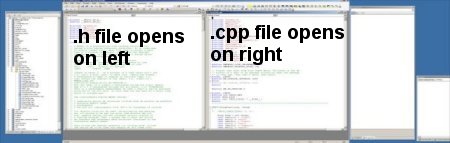
codewinpos.jpg - Click to enlarge image
When CodeWinPos is enabled, all .h files are opened on the left with the same position and size. Likewise for .c/.cpp files on the right.

Introduction

CodeWinPos is a simple plugin (VSIP) for Visual Studio 2005/2008 which opens *.h files on the left half of the IDE workspace and *.c/*.cpp files on the right. It works with either the tabbed or MDI window layout options in Visual Studio 2005/2008 IDE.

Background

Updated: March 2009 for Visual Studio 2008.

The project was completed in ~ March 2007 and I have been using it daily since then without encountering any bugs.

The download contains both the source and a setup.exe as well as a CodeWinPosSetup.msi. The setup.exe and CodeWinPosSetup.msi install the same binary VSIP addin.

CodeWinPos may be removed by invoking the uninstall routine via the Control Panel Add/Remove programs.

This plugin is an aid in an effort to use the mouse as little as possible. I use this along with another plugin which with a single CTRL-key stroke switches between *.h and *.cpp files.

Using the Code

Back in Visual Studio 6, it only took a couple dozen lines of macro to accomplish this. Now in Visual Studio 2005/2008 and the VSIP, it takes all of the code in this addin to accomplish it.

History

Original Project Specs

The product is a Microsoft Visual Studio 2005/2008 Integration Package (using Visual Studio SDK) which will allow the user (a developer) to have automatic control over the position of code windows when opened.

Problem

Standard Visual Studio opens code windows in either:

  1. The currently selected tab group if "Tabbed documents" is selected, or
  2. Cascading style if "Multiple documents" is selected

Using the tabbed style at least the Windows are sized consistently, but there's no consistency as far as *.Hs on the left and *.Cs on the right. With the MDI/cascading option, you're left with having to size and position code windows with the mouse every time you open them. I find it entirely cumbersome to have to reach for the mouse when I shouldn't have to.

Desired behavior with product installed: If "Tabbed documents" is selected, then *.h files will open in the left tab group and *.cpp files will open in the right tab group. If "Multiple documents" is selected, then *.h files will open in the left half of the MDI workspace and *.cpp files will be opened in the right half of the MDI workspace.

License

This article, along with any associated source code and files, is licensed under The Code Project Open License (CPOL)

About the Author

mikem8

Software Developer (Senior)
Pecan Ventures, LLC
United States United States

Member

Software engineer.

Sign Up to vote   Poor Excellent
Add a reason or comment to your vote: x
Votes of 3 or less require a comment

Comments and Discussions

 
You must Sign In to use this message board. (secure sign-in)
 
Search this forum  
 FAQ
    Noise  Layout  Per page   
  Refresh
QuestionInstall doesn't work? PinmemberRoms6:39 19 Feb '08  
AnswerRe: Install doesn't work? Pinmembermikem89:37 19 Feb '08  
GeneralRe: Install doesn't work? PinmemberRoms11:00 19 Feb '08  
GeneralRe: Install doesn't work? Pinmembermikem811:14 19 Feb '08  
AnswerRe: Install doesn't work? PinmemberValentin Ivanov12:08 19 Feb '08  
QuestionHow is this better than splitting the window? PinmemberShawn Poulson20:41 13 Aug '07  
AnswerRe: How is this better than splitting the window? [modified] Pinmembermikem813:40 14 Aug '07  
CodeWinPos is an aid to window management in your VS2005 IDE.
 
CodeWinPos does two things; 1) it automatically places .h files on the left and .c/.ccp files on the right in the same place with same size and 2) does so without using the mouse. When you open a .h/.c/.cpp file it automatically sizes/places it in "the correct" place for you. (Assuming you agree with "the correct" place being "on the left" and "on the right" for .h/.cpp respectively).
 
The point of CodeWinPos is that you do not have to manually size/move each code window with the mouse. CodeWinPos does it for you. So to answer your question, yes you can certainly do the same thing with the mouse. But that is exactly the point of CodeWinPos - not having to do it with the mouse.
 
CodeWinPos is for people who prefer to avoid reaching for the mouse when ever possible. For myself I setup various keyboard shortcuts to do things like navigating between apps etc., etc. I use ViEmu (viemu.com) for editing in VS2005, again avoiding the mouse. There are some good articles on the viemu site about how developing without using the mouse can be more productive. I find that using keystrokes instead of the mouse I can do things much faster than if I were using the mouse to do the same thing. I use keystrokes for switching between .h/.cpp, switching between apps - everything I can possibly setup a keyboard shortcut to do I do so. CodeWinPos is but another utility in my environment.
 
During development I like to keep my hands on the keyboard, typing code, locating/reading code, switching between source files, switching to a browser. If I can keep my hands on the keyboard through cycles of these types of operations my development goes faster, uninterrupted. If I have to move my hand from the keyboard over to the mouse to accomplish an operation it's an interruption - it slows down the process.
 
For example compare the physical hand movements required to switch between .h and .cpp file with keyboard versus mouse: (assume a header/source file switcher addin is installed)
 
1) With keyboard: 1 keystroke to switch from .cpp file to it's .h file (no hand movement only fingers)
 
2) With mouse: i) move hand from keyboard to mouse ii) move mouse around to move pointer to appropriate location to open the desired file iii) double click on desired file iv) move hand from mouse back to keyboard. (4 hand movements versus 0)
 
Some people will balk at this example. Some may even say I'm crazy. But I am not alone. There are many people who prefer to work without a mouse when possible. Once you "get it", you never go back!
 
IMHO a mouse pointer device makes things easier for beginners, but not necessarily more productive for experienced users.
 
I use VS2005 and CodeWinPos with the Multiple Window option rather than the Tabbed Windows option. Tabbed Windows does accomplish part of what CodeWinPos does in that it makes all the windows the same size, but it doesn't handle .h files on the left and .cpp's on the right as CodeWinPos does for me. I prefer the MDI option over Tabs with CodeWinPos. That way I can change the size of a single source file window without changing the size of the whole tab group (which I still have to use the mouse to do, sigh).
 
CodeWinPos does basically the same thing as the WinPos addin (over on codeguru) did for VS6. The WinPos author makes the point that it helps window management when debugging too. As you're stepping through code and new code windows are opened it keeps them nicely organized rather than cluttering the workspace (MDI option). Again the Tabbed option helps here but does nothing to keep .h/left .cpp/right.
 
Hope this helps explain the purpose of CodeWinPos.
 
If you're curious I encourage you to try CodeWinPos to see just how it behaves. I assure you that it installs, works and uninstalls cleanly.
 
Regards,
Mike
 

-- modified at 20:55 Thursday 16th August, 2007

General General    News News    Suggestion Suggestion    Question Question    Bug Bug    Answer Answer    Joke Joke    Rant Rant    Admin Admin   

Use Ctrl+Left/Right to switch messages, Ctrl+Up/Down to switch threads, Ctrl+Shift+Left/Right to switch pages.

Permalink | Advertise | Privacy | Mobile
Web04 | 2.5.120529.1 | Last Updated 13 May 2010
Article Copyright 2007 by mikem8
Everything else Copyright © CodeProject, 1999-2012
Terms of Use
Layout: fixed | fluid
