Introduction
This article describes the creation of a Label custom control that can be translucent to the background.
The Transparent Label Source Code
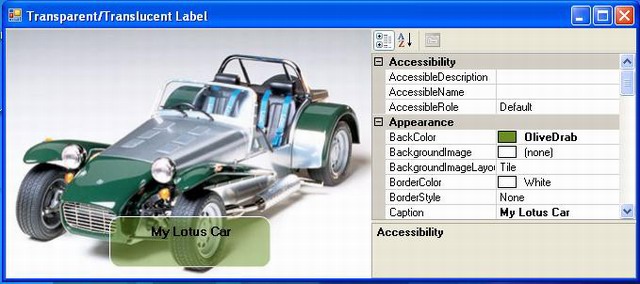
The Transparent Label has twelve added properties
BackColor - Gets or sets the background color of the control. Opacity - The alpha value used to blend the control's background. Valid values are 0 through 255. Radius - Radius of rounded borders. ShapeBorderStyle - Style of border to be drawn around the control. BorderColor - The color of border to be drawn around the control. Caption - The text associated with the control. Font - The font used to display text in the control. Forecolor - The foreground color of this component which is used to display the text. TextAlign - Text alignment (Left, Right or Center) only with Moving None. Moving - Text Moving (None, RightToLeft, DownToUp, LeftToRight, UpToDown). MovingActive - Activate the text movement. DimmedColor - Dims the text color when the mouse is passing over the control.
The OnPaint call has three simple methods, DrawBorder, DrawLabelBackground, DrawText.
This is the OnPaint method
protected override void OnPaint(PaintEventArgs e)
{
    SmoothingMode sm = e.Graphics.SmoothingMode;
    e.Graphics.SmoothingMode = SmoothingMode.AntiAlias;
    if (_borderStyle == ShapeBorderStyles.ShapeBSFixedSingle)
        DrawBorder(e.Graphics);
    DrawLabelBackground(e.Graphics);
    DrawText(e);
    e.Graphics.SmoothingMode = sm;
}
This is the DrawBorder method:
private void DrawBorder(Graphics g)
{
    Rectangle rect = this.ClientRectangle;
    rect.Width--;
    rect.Height--;
    using (GraphicsPath bp = GetPath(rect, _radius))
    {
        using (Pen p = new Pen(_borderColor))
        {
            g.DrawPath(p, bp);
        }
    }
}
This is the DrawLabelBackground method:
private void DrawLabelBackground(Graphics g)
{
    Rectangle rect = this.ClientRectangle;
    iRect = rect;
    rect.X++;
    rect.Y++;
    rect.Width -= 2;
    rect.Height -= 2;
    using (GraphicsPath bb = GetPath(rect, _radius))
    {
        using (Brush br = new SolidBrush(
            Color.FromArgb(_opacity, _backColor)))
        {
            g.FillPath(br, bb);
        }
    }
}
This is the GetPath method, called by DrawBorder and DrawLabelBackground
protected GraphicsPath GetPath(Rectangle rc, int r)
{
int x = rc.X, y = rc.Y, w = rc.Width, h = rc.Height;
r = r << 1;
GraphicsPath path = new GraphicsPath();
if (r > 0)
{
if (r > h) { r = h; };
if (r > w) { r = w; };
path.AddArc(x, y, r, r, 180, 90);
path.AddArc(x + w - r, y, r, r, 270, 90);
path.AddArc(x + w - r, y + h - r, r, r, 0, 90);
path.AddArc(x, y + h - r, r, r, 90, 90);
path.CloseFigure();
}
else
{
path.AddRectangle(rc);
}
return path;
}
This is DrawText method.
protected void DrawText(PaintEventArgs pe)
{
SizeF sz = pe.Graphics.MeasureString(_text, base.Font);
switch (_moving)
{
case MoveType.None:
NoMove();
break;
case MoveType.RightToLeft:
MoveRightToLeft();
break;
case MoveType.DownToUp:
MoveDownToUp();
break;
case MoveType.LeftToRight:
MoveLeftToRight();
break;
case MoveType.UpToDown:
MoveUpToDown();
break;
}
txtRect = new Rectangle(this.pointX, this.pointY,
(int)sz.Width + 1, (int)sz.Height);
Brush brText = new SolidBrush(base.ForeColor);
Brush brTextDimmed = new SolidBrush(_dimmedColor);
if (_isSelected)
pe.Graphics.DrawString(_text,
base.Font,
brTextDimmed,
txtRect);
else
pe.Graphics.DrawString(_text,
base.Font,
brText,
txtRect);
}
The methods NoMove(), MoveRigntToLeft(), MoveDownToUp(), MoveLeftToRight() and MoveUpToDown()updates, for each MoveType, the coordinates of text rectangle.
protected void NoMove()
{
switch (_textAlign)
{
case TextAlignment.Left:
pointX = (int)this.iRect.X;
break;
case TextAlignment.Center:
pointX = (this.iRect.Width - this.txtRect.Width) / 2;
break;
case TextAlignment.Right:
pointX = (this.iRect.Width - this.txtRect.Width);
break;
}
pointY = (this.iRect.Height - this.txtRect.Height) / 2;
}
protected void MoveRightToLeft()
{
if (pointX < -this.txtRect.Width)
{ pointX = this.iRect.X + this.iRect.Width; }
else
{ pointX -= 2; }
pointY = (this.iRect.Height - this.txtRect.Height) / 2;
}
protected void MoveDownToUp()
{
pointX = (this.iRect.Width - this.txtRect.Width) / 2;
if (pointY < -this.txtRect.Height)
{ pointY = (int)this.iRect.Y + this.iRect.Height; }
else
{ pointY -= 2; }
}
protected void MoveLeftToRight()
{
if (pointX > this.iRect.X + this.iRect.Width)
{ pointX = this.iRect.X - this.txtRect.Width; }
else
{ pointX += 2; }
pointY = (this.iRect.Height - this.txtRect.Height) / 2;
}
protected void MoveUpToDown()
{
pointX = (this.iRect.Width - this.txtRect.Width) / 2;
if (pointY > this.iRect.Y + this.iRect.Height)
{ pointY = (int)this.iRect.Y - this.iRect.Height; }
else
{ pointY += 2; }
}
If the mouse is passing over the text it will be dimmed, for that we use events OnMouseEnter and OnMouseLeave.
protected override void OnMouseEnter(EventArgs e)
{
    base.OnMouseEnter(e);
    _isSelected = true;
    this.Invalidate();
}
protected override void OnMouseLeave(EventArgs e)
{
    base.OnMouseLeave(e);
    _isSelected = false;
    this.Invalidate();
}
This component uses a timer to update and invalidate the Draw event OnPaint.
private void timer1_Tick(object sender, System.EventArgs e)
{
    this.Update();
    this.Invalidate();
}
Thanks
I'd like express my gratitude to Andreas for to fix the bug in my article "Two First Controls -A Shape and an Inherited Label Control" and to Jason (Apuhjee) who inspired this new article for your interest in if there was a way to alpha blend the shape with the background.
History
12/08/2007 First Version.
This member has not yet provided a Biography. Assume it's interesting and varied, and probably something to do with programming.



 General
  News
News  Suggestion
  Question
  Bug
Bug  Answer
  Joke
Joke  Praise
  Rant
Rant  Admin
Admin 


 Submit an article or tip


 (lo mismo ocurre en el ejemplo incluído con el código), y al hacer un mouseOver (como al activar el DimmedColor) queda centrado como corresponde
  . Lo mismo ocurre cuando modifico la propiedad caption y apago el movingActive en modo de ejecución; el texto queda desplazado, para luego corregirse la ubicación cuando me muevo sobre el control.