Introduction
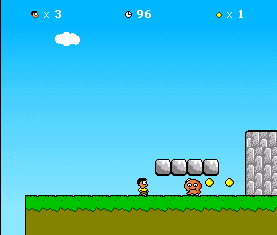
This article is based on the work from user_pk001, who created a platform game using HTML and JavaScript - brilliant work! But one thing is missing: Sound!
Adding sound effects
First, I inserted a reference to the JavaScript "playSound" file in the head section of the document "opiframe1.html".
<head>
...
<script type="text/javascript" src="playSound.js"></script>
...
</head>
The file "playSound.js" is used to play some sounds using different *.wav files. The *.wav files are located in the engine folder of the platform game. Here is the code to play sounds:
if (window.attachEvent)
    window.attachEvent("onload", setupPlaySound);
else
    window.addEventListener("load", setupPlaySound, false);

function setupPlaySound()
{
    if (navigator.appName == "Microsoft Internet Explorer")
    {
        var snd = document.createElement("bgsound");
        document.getElementsByTagName("body")[0].appendChild(snd);
        playSound = function(url)
        {
            snd.src = url;
        }
    }
    else
      {
        playSound = function(url)
        {
            var obj = document.createElement("object");
            obj.width="0px";
            obj.height="0px";
            obj.type = "audio/x-wav";
            obj.data = url;
            var body = document.getElementsByTagName("body")[0];
            body.appendChild(obj);
        }
    }
}
Next, we have to identify some events when to play sounds. Let's play a sound when the player collects a gold coin. The best place to do this is in the function "UpdateGoldctr":
function UpdateGoldctr(coinid1)
{
   coinid1obj=null;
   if(coinid1!="")
   {
       coinid1obj=mainScreenDoc.getElementById(coinid1);
       coinid1obj.src=eblanks;
       scoreScreenDoc.getElementById("goldctr").innerHTML=
         parseInt(scoreScreenDoc.getElementById("goldctr").innerHTML)+1;
       playSound("gold.wav");
       bisdead[Level_Objects_Array[coinid1obj.id][2]]=1;
   }
}
Then we add some sound when the hero dies:
function updateLives(lvalupd1) {
    oPLivesLeft+=lvalupd1;
    if(oPLivesLeft>-1)
    {scoreScreenDoc.getElementById('livesctr').innerHTML=oPLivesLeft;}
    playSound("dead.wav");
}
That's it!




 Submit an article or tip
