Click here to Skip to main content

Dynamic Crystal Report with C#

By , 29 Sep 2007
 
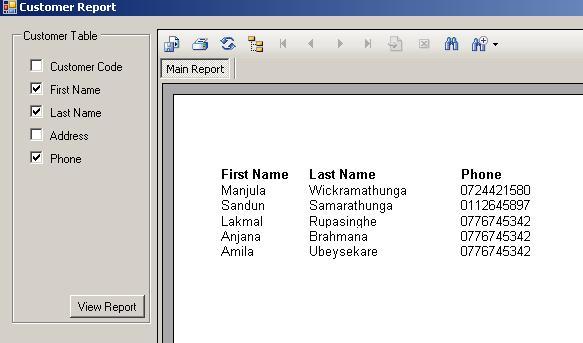
Screenshot - pic2.jpg

Introduction

This program shows how to dynamically load data from a database and application into the Crystal Report. By using this program, we can customize a Crystal Report to some limit at run time of the application like specifying which field (Columns of a particular table) should be displayed in the report.

Background

This problem arose because a group of students from SLIIT asked me how to dynamically generate a Crystal Report using C# 2.0 (.NET 2005). I tried to find a solution for this by searching many forums and sites, but unfortunately I couldn't find any solution for that. Some forums said that there is no way to create dynamic Crystal Reports using .NET 2005. Finally, I found a way to do that.

Using the Code

  1. Create a C# project or add a Form to your existing project.

    Now you can add Checkboxes that correspond to columns of a particular table that should be displayed in the Crystal Report and CrystalReportViewer control to the form.

Screenshot - pic4.jpg

For this demonstration, I have created a database called db1.mdb (in bin\Debug) using Access and created a table called Customer.

  1. Add a DataSet (*.xsd file) to your project using add -> New Items in solution explorer. After that, add a DataTable to the DataSet.

    Screenshot - pic5.jpg

    Add columns to DataTable and name them Column1, Column2, and so on. The number of columns depends on how many columns should be displayed in the Crystal report.

  2. Add a Crystal Report into the project and using the Report Wizard, choose ADO.NET DataSets of the Project data source as the data source of the Crystal Report and select Customer data table of DataSet1 as the selected table of the Crystal Report. Then select fields to be displayed in your report. Then remove Column1…, Column5 objects in Section 2 of the Crystal Report.

    Screenshot - pic7.jpg

    Screenshot - pic8.jpg

  3. Now add parameters called col1, col2col5 (the number of parameters should be equal to the number of columns displayed in the Crystal Report.) using Field Explorer.

    Screenshot - pic9.jpg

  4. Add the following method to your Form for Create SQL SELECT query and assign values to parameters of the Crystal Report according to user selected columns that should be displayed on your report.

    /// <span class="code-SummaryComment"><summary></span>
    /// This method is used to 
    /// 1. create SELECT query according to the selected column names and 
    /// 2. create parameters and assign values for that parameter
    /// that correspond to the crystal report.
    /// NOTE: This parameter is used to display Column names of the 
    /// Crystal Report according to the user selection.
    /// <span class="code-SummaryComment"></summary></span>
    /// <span class="code-SummaryComment"><returns></returns></span>
    private string CreateSelectQueryAndParameters()
    {
        ReportDocument reportDocument;
        ParameterFields paramFields;
        
        ParameterField paramField;
        ParameterDiscreteValue paramDiscreteValue;
    
        reportDocument = new ReportDocument();
        paramFields = new ParameterFields();
                   
        string query = "SELECT ";
        int columnNo = 0;                
    
        if (chbCode.Checked)
        {
            columnNo++;
            query = query.Insert(query.Length, "Code as Column" +
            columnNo.ToString());
    
            paramField = new ParameterField();
            paramField.Name = "col" + columnNo.ToString();
            paramDiscreteValue = new ParameterDiscreteValue();
            paramDiscreteValue.Value = "Customer Code";
            paramField.CurrentValues.Add(paramDiscreteValue);
            //Add the paramField to paramFields
            paramFields.Add(paramField);
        }
        if (chbFirstName.Checked)
        {
            columnNo++;
            if (query.Contains("Column"))
            {
                query = query.Insert(query.Length, ", ");
            }
            query = query.Insert(query.Length, "FirstName as Column" +
            columnNo.ToString());
            
            paramField = new ParameterField();
            paramField.Name = "col" + columnNo.ToString();
            paramDiscreteValue = new ParameterDiscreteValue();
            paramDiscreteValue.Value = "First Name";
            paramField.CurrentValues.Add(paramDiscreteValue);
            //Add the paramField to paramFields
            paramFields.Add(paramField);
        }
        if (chbLastName.Checked)
        {
            columnNo++; //To determine Column number
            if (query.Contains("Column"))
            {
                query = query.Insert(query.Length, ", ");
            }
            query = query.Insert(query.Length, "LastName as Column" +
            columnNo.ToString());
                            
            paramField = new ParameterField();
            paramField.Name = "col" + columnNo.ToString();
            paramDiscreteValue = new ParameterDiscreteValue();
            paramDiscreteValue.Value = "Last Name";
            paramField.CurrentValues.Add(paramDiscreteValue);
            //Add the paramField to paramFields
            paramFields.Add(paramField);
        }
        if (chbAddress.Checked)
        {
            columnNo++;
            if (query.Contains("Column"))
            {
                query = query.Insert(query.Length, ", ");
            }
            query = query.Insert(query.Length, "Address as Column" +
            columnNo.ToString());
                            
            paramField = new ParameterField();
            paramField.Name = "col" + columnNo.ToString();
            paramDiscreteValue = new ParameterDiscreteValue();
            paramDiscreteValue.Value = "Address";
            paramField.CurrentValues.Add(paramDiscreteValue);
            //Add the paramField to paramFields
            paramFields.Add(paramField);
        }
        if (chbPhone.Checked)
        {
            columnNo++;
            if (query.Contains("Column"))
            {
                query = query.Insert(query.Length, ", ");
            }
            query = query.Insert(query.Length, "Phone as Column" +
            columnNo.ToString());
    
            paramField = new ParameterField();
            paramField.Name = "col" + columnNo.ToString();
            paramDiscreteValue = new ParameterDiscreteValue();
            paramDiscreteValue.Value = "Phone";
            paramField.CurrentValues.Add(paramDiscreteValue);
            //Add the paramField to paramFields
            paramFields.Add(paramField);
        }
    
        //if there is any remaining parameter, assign empty value for that 
        //parameter.
        for (int i = columnNo; i < 5; i++)
        {
            columnNo++;
            paramField = new ParameterField();
            paramField.Name = "col" + columnNo.ToString();
            paramDiscreteValue = new ParameterDiscreteValue();
            paramDiscreteValue.Value = "";
            paramField.CurrentValues.Add(paramDiscreteValue);
            //Add the paramField to paramFields
            paramFields.Add(paramField);
        }
               
        crystalReportViewer1.ParameterFieldInfo = paramFields;
        
        query += " FROM Customer" ;
        return query;
    }
    //
  5. Add the following method to the button click event to display a report when the user presses the button:

    using System;
    using System.Collections.Generic;
    using System.ComponentModel;
    using System.Data;
    using System.Drawing;
    using System.Text;
    using System.Windows.Forms;
    using System.Data.OleDb;
    
    using CrystalDecisions.CrystalReports.Engine;
    using CrystalDecisions.ReportSource;
    using CrystalDecisions.Shared;
    using CrystalDecisions.Windows.Forms;
    
    namespace app5
    {
        public partial class Form1 : Form
        {
            CrystalReport1 objRpt;
    
            public Form1()
            {
                InitializeComponent();
            }
    
            private void button1_Click(object sender, EventArgs e)
            {
                objRpt = new CrystalReport1();
    
                string connString = "Provider=Microsoft.Jet.OLEDB.4.0;" +
                    "Data Source=|DataDirectory|\\db1.mdb"; 
               
                //Get Select query String and add parameters to the 
                //Crystal report.
                string query = CreateSelectQueryAndParameters();
    
                //if there is no item select, then exit from the method.
                if (!query.Contains("Column"))
                {
                    MessageBox.Show("No selection to display!");
                    return;
                }
    
                try
                {
                    OleDbConnection Conn = new OleDbConnection(connString);
    
                    OleDbDataAdapter adepter = 
                    new OleDbDataAdapter(query, connString);
                    DataSet1 Ds = new DataSet1();
    
                    adepter.Fill(Ds, "Customer");
                    
                    objRpt.SetDataSource(Ds);
                    crystalReportViewer1.ReportSource = objRpt;
                }
                catch (OleDbException oleEx)
                {
                    MessageBox.Show(oleEx.Message);
                }
                catch (Exception Ex)
                {
                    MessageBox.Show(Ex.Message);
                }
            }

History

  • 29th September, 2007: Initial post

License

This article, along with any associated source code and files, is licensed under The Code Project Open License (CPOL)

About the Author

Manjula Wickramathunga
Team Leader Creative Technology Solutions Pte Ltd
Sri Lanka Sri Lanka
Manjula Wickramathunga currently is working at Lion Brewery (Ceylon) PLC as a Team Leader. He is working with SAP and Microsoft Technologies such as C#, MS SQL server 2000,2005 and 2008, ASP.NET 2.0/3.5/4.0.

Sign Up to vote   Poor Excellent
Add a reason or comment to your vote: x
Votes of 3 or less require a comment

Comments and Discussions

 
Hint: For improved responsiveness ensure Javascript is enabled and choose 'Normal' from the Layout dropdown and hit 'Update'.
You must Sign In to use this message board.
Search this forum  
    Spacing  Noise  Layout  Per page   
GeneralMy vote of 5membergorgias9921-Feb-13 22:01 
GeneralRe: My vote of 5memberrobonmatt29-May-13 23:02 
QuestionNeed a helpmemberriffayu18-Dec-12 18:21 
BugEnter parameter values crystal reports in c#memberCHAITANYA KIRAN KASANI5-Dec-12 21:45 
QuestionhimemberNywalikar22-Nov-12 0:43 
Questionhimemberrifayee17-Oct-12 1:32 
GeneralMy vote of 5memberEaverae20-Sep-12 1:27 
GeneralMy vote of 2membermas7775-Jun-12 2:17 
GeneralRe: My vote of 2memberEaverae20-Sep-12 1:27 
GeneralThanks To Authormembersantosh kundkar17-May-12 23:03 
QuestionClean data of reportmemberQnhat1-May-12 23:55 
Questionabout SQL server..memberDinesh925-Feb-12 22:02 
GeneralMy vote of 4memberbilawal12118-Jan-12 0:43 
QuestionMy Vote of 5memberroshandavid5-Jan-12 5:58 
GeneralMy Vote of 5memberRaviRanjankr3-Dec-11 3:22 
GeneralMy vote of 5memberavcas29-Nov-11 5:05 
GeneralMy vote of 5membersantosh kundkar18-Oct-11 19:23 
QuestionThank you....memberjyothi87.u28-Sep-11 4:50 
GeneralMy vote of 5memberjyothi87.u28-Sep-11 4:49 
GeneralDynamic columns without specifying all column names in the reportmemberaswathy.s.888-Jun-11 23:19 
Questionerror in creating Dynamic Crystal Report with C#memberMember 78825659-May-11 22:11 
GeneralMy vote of 4memberHarry HJ Neethling9-May-11 2:44 
Its good, but it can do with improvement. Like referencing more than one table.
GeneralProblem with crystal report layout (dynamic)memberintelcore2quad8819-Feb-11 20:40 
GeneralThanksmembermelda_4447-Feb-11 3:43 
GeneralThanksmemberCaptainobvious1-Feb-11 22:04 
GeneralMy vote of 5memberАslam Iqbal16-Jan-11 19:58 
GeneralNeed a VB versionmemberShiblee16925-Oct-10 6:32 
GeneralThank You !!!membergayanperera018-Oct-10 20:28 
GeneralMy vote of 5membersheetalbhalerao17-Sep-10 1:45 
GeneralMy vote of 5memberRofael9-Aug-10 4:07 
GeneralMy vote of 4memberIakovos Karakizas9-Aug-10 1:38 
GeneralThank you! It helps a lot.memberben197815-May-10 9:09 
Generalsiraaaaaaaamemberamilakandambi11-Apr-10 19:42 
GeneralMy vote of 1memberssmani84195-Apr-10 19:55 
GeneralMy vote of 1memberssmani84195-Apr-10 19:53 
Generaldynamic report in asp.netmemberniktana16-Mar-10 20:08 
Generalcolumn names not displaying.memberrowter12-Jan-10 8:19 
Questionhow to display the column names?memberrowter4-Jan-10 18:07 
GeneralSuperb CodememberNarendraSinghJTV22-Nov-09 18:27 
GeneralExcellent code...memberpathakmanoj599-Oct-09 1:27 
Generalnot workingmemberarup200527-Sep-09 18:47 
GeneralYou rockmemberedochimu7-Aug-09 18:54 
Questioncan i change the width of the columnmemberpnvreddy2-Jul-09 21:17 
Questioncan I set column in center of the report?memberm905288884822-May-09 22:01 
GeneralThank you very much!! Good article!!memberSangseok Lee7-May-09 5:21 
GeneralThanks for your examplememberMD844-May-09 16:46 
GeneralPaper Sizemembernewbiecode4-May-09 8:41 
GeneralFinalymemberlokalokaloka19-Mar-09 4:52 
QuestionPrint or export buttong is not workingmemberpulak chetia12-Mar-09 21:27 
GeneralExcellent articlememberCarlosMPereira5-Mar-09 14:37 

General General    News News    Suggestion Suggestion    Question Question    Bug Bug    Answer Answer    Joke Joke    Rant Rant    Admin Admin   

Permalink | Advertise | Privacy | Mobile
Web04 | 2.6.130617.1 | Last Updated 29 Sep 2007
Article Copyright 2007 by Manjula Wickramathunga
Everything else Copyright © CodeProject, 1999-2013
Terms of Use
Layout: fixed | fluid
