Introduction
I looked around for a project capturing incoming video from external video devices to memory buffer for image processing applications and could not find the one I needed. The existing articles on The Code Project, An Easy Video Processing Framework by Grabbing Frames as Bitmaps using DirectShow, CAviCap and CFrameGrabber - Wrappers for AVICap Window, Real-time Video Image Processing / Frame Grabber using a Minimalistic Approach, Simultaneous Previewing & Video Capture using DirectShow do not provide the preferred buffering mode for capturing raw data from the stream. Some of them were tested only on WinXP and Windows 2000, pretty outdated, the latest one goes back to 1999 or captures samples from video files and so on.
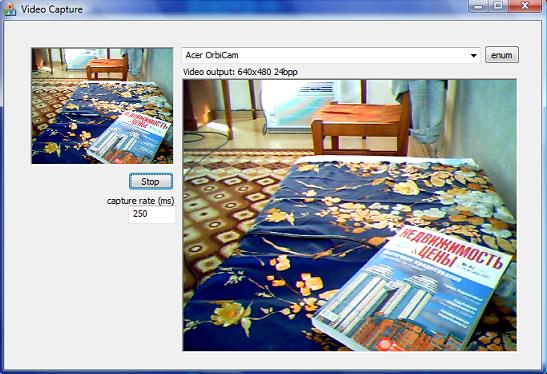
I have Vista on my computer and installed Windows SDK for Vista and DirectX SDK 2007. Now Direct Show is a part of Windows SDK and if you want to use ISampleGrabber for raw data capture, you need to install DirectX SDK too. I developed a simple MFC application supporting enumeration of existing video devices, preview of the video stream, capture raw image data in buffered mode with the desired frame rate, display it to the window with GDI+, taking snap shots to JPEG files. With that application as a skeleton, you can easily start with image/video processing tasks (video codecs development, motion estimation, edge detection). I use that one in my face detection program I'm going to post later.
Background
You need to have an understanding in Direct Show programming. Have a look at the above mentioned articles or Windows Vista SDK help. Understanding of COM technology is desired - have a look at the article, Introduction to COM - What It Is and How to Use It.
Using the Code
Click the enum button that will enumerate available video devices and select one. Specify the desired raw image data capture interval in milliseconds (default one is 1000, capture data every second), click the Run button. The left top small static will preview the video output and the center large one will show captured raw images. To take a snapshot, left mouse double click the center capture static window and the captured image will be saved on disk to the same directory with Snapshot X.jpg name, where X is the number of the image.
For code reuse, I provided Sample Grabber and Video Capture implementation in separate files. I used the Video Capture routines from the SDK example (SDK\Samples\Multimedia\DirectShow\Capture\PlayCap). I wrapped them in functions easy to use with an external application, and also added video devices enumeration:
-
void vcGetCaptureDevices(CComboBox& adaptersBox);
-
HRESULT vcCaptureVideo(HWND msgWindow, HWND prvWindow, unsigned int devIndex = 1);
-
void vcStopCaptureVideo();
vcGetCaptureDevices() enumerate video devices and add them to ComboBox. vcCaptureVideo() starts video preview to prvWindow with msgWindow application that will handle Filter Graph notification messages. devIndex is the index of the video device to capture data from. vcStopCaptureVideo stops capturing video data.
The Sample Grabber added to Filter Graph in vcCaptureVideo functions this way:
hr = sgAddSampleGrabber(g_pGraph);
if (FAILED(hr)) {
Msg(TEXT("Couldn't add the SampleGrabber filter to the graph! hr=0x%x"), hr);
return hr;
}
hr = sgSetSampleGrabberMediaType();
if (FAILED(hr)) {
Msg(TEXT("Couldn't set the SampleGrabber media type! hr=0x%x"), hr);
return hr;
}
IBaseFilter* pGrabber = sgGetSampleGrabber();
hr = g_pCapture->RenderStream(&PIN_CATEGORY_PREVIEW, &MEDIATYPE_Video,
pSrcFilter, pGrabber, NULL);
if (FAILED(hr)) {
Msg(TEXT("Couldn't render the video capture stream. hr=0x%x\r\n")
TEXT("The capture device may already be in use by another application.
\r\n\r\n")
TEXT("The sample will now close."), hr);
pSrcFilter->Release();
return hr;
}
hr = sgGetSampleGrabberMediaType();
The corresponding sg* functions are located in samplegrab.cpp:
HRESULT sgAddSampleGrabber(IGraphBuilder *pGraph)
{
HRESULT hr = CoCreateInstance(CLSID_SampleGrabber, NULL, CLSCTX_INPROC_SERVER,
IID_IBaseFilter, (void**) & pGrabberFilter);
if (FAILED(hr)) {
return hr;
}
hr = pGraph->AddFilter(pGrabberFilter, L"Sample Grabber");
if (FAILED(hr)) {
return hr;
}
pGrabberFilter->QueryInterface(IID_ISampleGrabber, (void**)&pGrabber);
return hr;
}
HRESULT sgSetSampleGrabberMediaType()
{
AM_MEDIA_TYPE mt;
ZeroMemory(&mt, sizeof(AM_MEDIA_TYPE));
mt.majortype = MEDIATYPE_Video;
mt.subtype = MEDIASUBTYPE_RGB24;
HRESULT hr = pGrabber->SetMediaType(&mt);
if (FAILED(hr)) {
return hr;
}
hr = pGrabber->SetOneShot(FALSE);
hr = pGrabber->SetBufferSamples(TRUE);
return hr;
}
IBaseFilter* sgGetSampleGrabber()
{
return pGrabberFilter;
}
HRESULT sgGetSampleGrabberMediaType()
{
AM_MEDIA_TYPE mt;
HRESULT hr = pGrabber->GetConnectedMediaType(&mt);
if (FAILED(hr)) {
return hr;
}
VIDEOINFOHEADER *pVih = (VIDEOINFOHEADER *)mt.pbFormat;
gChannels = pVih->bmiHeader.biBitCount / 8;
gWidth = pVih->bmiHeader.biWidth;
gHeight = pVih->bmiHeader.biHeight;
sgFreeMediaType(mt);
return hr;
}
The initialization of video preview and capture is implemented in the Run button click routine CVidCapDlg::OnBnClickedRunButton(), where the timer is created to query captured raw image data by Sample Grabber filter which is the preferred way of using it as described in SDK help under the topic "Using the Sample Grabber".
To grab the raw image data, use the following functions from samplegrab.h:
The first one returns a pointer to the buffer with raw image data, or NULL if the Sample Grabber is not ready yet. Note that Sample Grabber filter fills that buffer with the image turned upside down, as a bottom up bitmap. sgGetBitmap() returns GDI+ bitmap filled with raw image data after sgGrabData() call or NULL if the data was not captured. I use sgFlipUpDown() function to flip the raw image before copying it to the Bitmap. You should use those functions in that order, first call sgGrabData() to get the raw image and if you want Bitmap object to draw it into the window, call sgGetBitmap() later. To get the length of the buffer with raw image, call sgGetBufferSize().
The code for the grabbing is shown below:
unsigned char* sgGrabData()
{
        HRESULT hr;

        if (pGrabber == 0)
                return 0;

        long Size = 0;
        hr = pGrabber->GetCurrentBuffer(&Size, NULL);
        if (FAILED(hr))
                return 0;
        else if (Size != pBufferSize) {
                pBufferSize = Size;
                if (pBuffer != 0)
                        delete[] pBuffer;
                pBuffer = new unsigned char[pBufferSize];
        }

        hr = pGrabber->GetCurrentBuffer(&pBufferSize, (long*)pBuffer);
        if (FAILED(hr))
                return 0;
        else {
                sgFlipUpDown(pBuffer);
                return pBuffer;
        }
}
To determine the image size, call these functions:
-
unsigned int sgGetDataWidth();
-
unsigned int sgGetDataHeight();
-
unsigned int sgGetDataChannels();
Highly skilled Engineer with 14 years of experience in academia, R&D and commercial product development supporting full software life-cycle from idea to implementation and further support. During my academic career I was able to succeed in MIT Computers in Cardiology 2006 international challenge, as a R&D and SW engineer gain CodeProject MVP, find algorithmic solutions to quickly resolve tough customer problems to pass product requirements in tight deadlines. My key areas of expertise involve Object-Oriented
Analysis and Design OOAD, OOP, machine learning, natural language processing, face recognition, computer vision and image processing, wavelet analysis, digital signal processing in cardiology.



 General
  News
News  Suggestion
  Question
  Bug
Bug  Answer
  Joke
Joke  Praise
  Rant
Rant  Admin
Admin 


 Submit an article or tip


