Introduction
From Wiki:
Self-replication is any process by which a thing might make a copy of itself.
Background
At one point, I wanted a small program to compile some Notepad edited scripts and run them on the fly. There is this nice project called "C# Script: The Missing Puzzle Piece". But, that is for professionals. And then, one night I went to do some coding. And came up with a code compiler. But, this was not enough. I wanted to store the source-code for this program into the program itself, and a final spec was to generate this same source code out of the program.
In short:
- There is only one executable.
- When starting the executable, it generates its own source code.
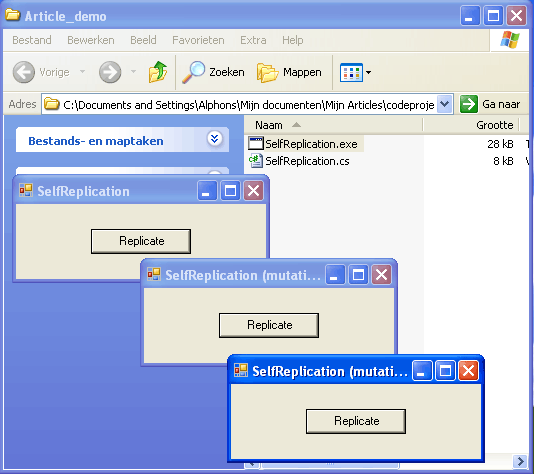
- When starting the executable again, it compiles this source code and executes it, showing the same user interface!
A nice test is to delete the executable and compile the generated source code by using Visual Studio or the command line C# compiler:
> del SelfReplication.exe
> csc SelfReplication.cs
> move SelfReplication.cs SelfReplication-old.cs
> SelfReplication.exe
- The last statement generates a SelfReplication.cs file.
- The old and the new generated files are exactly the same!!
A feature of the program is you can change (mutate) the source code, adding new functionality and generating a totally new executable. The new program will be able to replicate itself, including your mutation, in the same way as the original one.
Using the code
The code has four sections:
The compiler
The compiler is a straightforward C# compiler which uses a file path to a C# file and produces an assembly of the source file. A nice feature is to get the names for the ReferencedAssemblies by calling GetReferencedAssemblies on the assembly itself.
private Assembly CompileCSharp(string strFilePath)
{
    if (strFilePath == null)
        return null;
    StreamReader sr = new StreamReader(strFilePath);
    string strSource = sr.ReadToEnd();
    sr.Close();
    CodeDomProvider cc = new CSharpCodeProvider();
    CompilerParameters cp = new CompilerParameters();
    foreach (AssemblyName assemblyName in
    Assembly.GetEntryAssembly().GetReferencedAssemblies())
        cp.ReferencedAssemblies.Add(assemblyName.Name + ".dll");
    cp.GenerateInMemory = true;
    CompilerResults cr = cc.CompileAssemblyFromSource(cp, strSource);

    StringBuilder sb = new StringBuilder();

    if (cr.Errors.HasErrors || cr.Errors.HasWarnings)
    {
        foreach (CompilerError err in cr.Errors)
            sb.AppendLine(err.ToString());
        MessageBox.Show(sb.ToString(), "Error",
        MessageBoxButtons.OK,
        MessageBoxIcon.Error);
        return null;
    }
    return cr.CompiledAssembly;
}
Compiling and executing an assembly
This function is also straightforward. It searches for any Main method on the compiled assembly, and invokes (executes) this Main method using the FilePath as an argument.
private void Execute(object FilePath)
{
    Assembly assembly = CompileCSharp(FilePath as string);
    if (assembly == null)
        return;

    foreach (Type t in assembly.GetTypes())
    {
        MethodInfo info = t.GetMethod("Main",
            BindingFlags.Public |
            BindingFlags.NonPublic |
            BindingFlags.Static);

        if (info == null)
            continue;

        object[] parameters = new object[]
        { new string[] { FilePath as string } };
        info.Invoke(null, parameters);
    }
}
The main program
This is a tricky one. It checks for the existence of SeflReplication.cs. If it does not exist, it writes the contents of MYSELF to disk to clean up the code (not shown in this source listing for brevity). After writing it to disk, it is read back again and the MYSELF string is replaced by itself. It took me about 2 or 3 hours to get this right.
static class Program
{
    [STAThread]
    static void Main(string[] args)
    {
        string strFilePath;
        if (args.Length == 0)
        {
            string strDirectory =
                Path.GetDirectoryName(Assembly.GetExecutingAssembly().Location);
            strFilePath = Path.Combine(strDirectory, "SelfReplication.cs");
            if (!File.Exists(strFilePath))
            {
                StreamWriter sw = new StreamWriter(strFilePath);
                sw.Write(Program.MYSELF);
                sw.Close();

                StreamReader sr = new StreamReader(strFilePath);
                string strCode = sr.ReadToEnd();
                sr.Close();

                int intI = strCode.IndexOf(" " + "MYSELF");
                if (intI > 0)
                    strCode = strCode.Substring(0, intI + 7) +
                              ";\r\n\t}\r\n}\r\n";

                string strInsertCode = "MYSELF=@\"" +
                       strCode.Replace("\"", "\"\"") + "\";";

                strCode = strCode.Replace("MYSELF" + ";", strInsertCode);

                sw = new StreamWriter(strFilePath);
                sw.Write(strCode);
                sw.Close();

                return;
            }
        }
        else
        {
            strFilePath = args[0];
        }
        Application.Run(new SelfReplication(strFilePath));
    }
    public static string MYSELF=@".......";
}
Now, the basics are in place. But in this era, there is not much place for Console programs, so I added a simple user interface to the program. You have to press a button for starting the replication (once). This prevents us from making some kind of runaway virus.
Adding a GUI
The GUI has a button on a small window. An event handler starts a new thread, having the FilePath as an argument. When the parent of all parents dies, it kills all the children.
private string strFilePath;
public SelfReplication(string strFilePath)
{
    this.strFilePath = strFilePath;
    this.button1 = new Button();
    this.button1.Location = new Point(75, 25);
    this.button1.Size = new Size(100, 25);
    this.button1.Text = "Replicate";
    this.button1.Click += new System.EventHandler(this.button1_Click);
    this.ClientSize = new Size(250, 75);
    this.Controls.Add(this.button1);
    this.Text = "SelfReplication";
}

private void button1_Click(object sender, EventArgs e)
{
    Thread thread = new Thread(new ParameterizedThreadStart(Execute));
    thread.Name = "Execute";
    thread.IsBackground = true;
    thread.Start(strFilePath);
}
By writing this article, new ideas popped up. I am thinking of a contest to mutate the source-code, doing all kinds of weird stuff. There are only a few rules for this contest, which are mentioned in the head of this article.
Another idea is to compile to disk rather than compiling in-memory, leaving all other 'external' programs untouched.
Have fun with the program, and leave some comments when doing awful awesome things inspired by my article.
Points of interest
If you are interested in self-replication, you should definitely read the Wiki article about it.
And for this project, the Quin article will get you moving.
Acknowledgments
Thanks to Stewart Roberts for the Visual Basic .NET version of the program.
History
As of writing, the presented source code is version 1.0.
I'm Alphons van der Heijden, living in Lelystad, Netherlands, Europa, Earth. And currently I'm retiring from hard working ( ;- ), owning my own company. Because I'm full of energy, and a little to young to relax ...., I don't sit down, but create and recreate software solutions, that I like. Reinventing the wheel is my second nature. My interest is in the area of Internet technologies, .NET etc. I was there in 1992 when Mosaic came out, and from that point, my life changed dramatically, and so did the world, in fact. (Y)



 General
  News
News  Suggestion
  Question
  Bug
Bug  Answer
  Joke
Joke  Praise
  Rant
Rant  Admin
Admin 


 Submit an article or tip


![Rose | [Rose]](https://codeproject.global.ssl.fastly.net/script/Forums/Images/rose.gif) .
.

 ((
((
