Click here to Skip to main content

How to Read Microsoft Excel 2007 Using a Connection String in C#

By , 28 Nov 2007
 
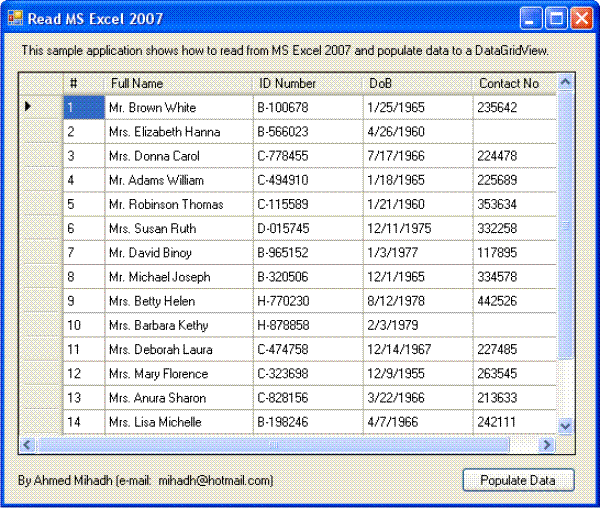
Screenshot - readExcel1.gif

Introduction

This article explains how to connect to Microsoft Excel 2007 using ADO.NET Connection string and populate a DataGridView on a form.

Using the Code

First create a C# Windows application using Visual Studio. Add the following controls to the main form from the tool box.

  • DataViewGrid control (name as dgvExcelList)
  • BindingSource control (name as dataBindingSrc)
  • Button control (name as btnPopulate)

Now open Microsoft Excel 2007 and enter a few records. Save the file and close Excel.

I have already created a sample Excel 2007 file which is available in the project folder of the demo project. If you want, you can use it by copying to C:\. The name of the Excel file is Members.xlsx.

Copy the following codes into the btnPopulate_Click event and run the application. you will find the dgvExcelList is filled with all the entries in Sheet1 of the Excel file.

Note: If you want to use your own Excel file or save the Members.xlsx file in a different location other than C:\, change the file and path name from the connection string.

Code

// You can change C:\Members.xlsx to any valid path 
// where the file is located.

string connectionString = @"Provider=Microsoft.ACE.OLEDB.12.0;
    FONT-SIZE: 10pt; COLOR: #a31515; FONT-FAMILY: 'Courier New'">
				Data Source=C:\Members.xlsx;Extended
    FONT-SIZE: 10pt; COLOR: #a31515; FONT-FAMILY: 'Courier New'">
				Properties=""Excel 12.0;HDR=YES;"""; 
// if you don't want to show the header row (first row) in the grid
// use 'HDR=NO' in the string

string strSQL = "SELECT * FROM [Sheet1$]";
OleDbConnection excelConnection = new OleDbConnection(connectionString);
excelConnection.Open(); // this will open an Excel file
OleDbCommand dbCommand = new OleDbCommand(strSQL,excelConnection);
OleDbDataAdapter dataAdapter = new OleDbDataAdapter(dbCommand);

// create data table
DataTable dTable = new DataTable();

dataAdapter.Fill(dTable);

// bind the datasource
dataBingingSrc.DataSource = dTable;
// assign the dataBindingSrc to the DataGridView
dgvExcelList.DataSource = dataBingingSrc;

// dispose used objects
dTable.Dispose()
dataAdapter.Dispose();
dbCommand.Dispose();
excelConnection.Close();
excelConnection.Dispose();

Your suggestions and comments are most welcome.

History

  • 28th November, 2007: Initial post 

License

This article, along with any associated source code and files, is licensed under The Code Project Open License (CPOL)

About the Author

Mihadh
Software Developer (Senior) Dhivehisoft
Maldives Maldives
Member
No Biography provided

Sign Up to vote   Poor Excellent
Add a reason or comment to your vote: x
Votes of 3 or less require a comment

Comments and Discussions

 
Hint: For improved responsiveness ensure Javascript is enabled and choose 'Normal' from the Layout dropdown and hit 'Update'.
You must Sign In to use this message board.
Search this forum  
    Spacing  Noise  Layout  Per page   
Question...memberaditya_prestige22 Dec '12 - 8:56 
BugGetting Error :membermansooralikhan5 May '12 - 21:39 
GeneralRe: Getting Error :membertaith14 Nov '12 - 5:02 
QuestionHow to Import Excel data to Ms access DatabasememberPrabakaranM8 Mar '12 - 2:34 
Questioneeception arised after this....membertripti_kumbhat18 Feb '12 - 6:24 
GeneralMy vote of 5memberAlisettar30 Dec '11 - 22:01 
QuestionThank YoumemberfreshonlineMax21 Oct '11 - 20:28 
QuestionDo i need Access installed on my system for this?memberMember 453129822 Sep '10 - 0:03 
QuestionRetieve the data from excel 2007 when the worksheet is open [modified]memberjaanu_simi16 Aug '10 - 23:57 
GeneralMy vote of 5memberdidi212013 Aug '10 - 6:31 
GeneralAlien CodememberWisam E. Mohammed25 Jun '10 - 6:49 
QuestionHow to support different versions of Excelmembermetazone27 Jan '09 - 15:02 
AnswerRe: How to support different versions of ExcelmemberCikaPero17 Jul '11 - 22:23 
GeneralFound a bug in vista and VS 2008membernewbieprogrammerguy24 Sep '08 - 16:05 
GeneralRe: Found a bug in vista and VS 2008memberashish diwakar22 Sep '09 - 19:00 
GeneralExcel 2007 - Reading more than 256 columns from a sheet using OLEDBmemberFad12320 May '08 - 3:51 
GeneralRe: Excel 2007 - Reading more than 256 columns from a sheet using OLEDBmembernishit.amin@successcraft.com16 Jun '09 - 4:04 
GeneralRe: Excel 2007 - Reading more than 256 columns from a sheet using OLEDBmemberokay2gonow22 Jun '09 - 9:57 
GeneralRe: Excel 2007 - Reading more than 256 columns from a sheet using OLEDBmemberstranger_From_Tepa6 Nov '09 - 12:24 
GeneralRe: Excel 2007 - Reading more than 256 columns from a sheet using OLEDBmemberstranger_From_Tepa10 Nov '09 - 13:10 
QuestionCan I read Opened Excel file continuosly?memberMember 458580414 Jan '08 - 9:59 
GeneralRe: Can I read Opened Excel file continuosly?membersmramesh15 Jan '08 - 12:10 
QuestionMixed Field issue?memberEdwardQ28 Nov '07 - 6:30 
AnswerRe: Mixed Field issue?memberSarafian29 Nov '07 - 1:52 
We had the same problem. I sure would like to know whether i has been fixed.
GeneralRe: Mixed Field issue?memberMKauffman29 Nov '07 - 6:34 
GeneralRe: Mixed Field issue?memberMihadh30 Nov '07 - 5:42 
GeneralRe: Mixed Field issue?memberNair Machaan9 Dec '07 - 17:23 
AnswerRe: Mixed Field issue?memberstevechurcher30 Apr '08 - 13:04 
GeneralRe: Mixed Field issue?memberMihadh27 Nov '08 - 9:54 
QuestionRe: Mixed Field issue?memberabhi_chadha13 Jan '09 - 13:12 
AnswerRe: Mixed Field issue?membercurro2k6 Mar '09 - 23:27 

General General    News News    Suggestion Suggestion    Question Question    Bug Bug    Answer Answer    Joke Joke    Rant Rant    Admin Admin   

Permalink | Advertise | Privacy | Mobile
Web02 | 2.6.130516.1 | Last Updated 28 Nov 2007
Article Copyright 2007 by Mihadh
Everything else Copyright © CodeProject, 1999-2013
Terms of Use
Layout: fixed | fluid
