This is an updated version of the article and sources. Changes in v1.1:
- OpenOffice 3.0 support
- OpenOffice 2.x is not supported anymore (but minor project changes should make it work)
- Chart (diagram) support added
Introduction
Using C# with OpenOffice.org Calc sometimes seems to be quite a problem. And creating reports using different table processors (Excel and OOo Calc) separately is a bad habit and will be a source of errors in future.
So I hope this article (and source code, of course) will make "cross-table processor" life for C# programmers a bit easier. You won't find a comprehensive solution for using both table processors here (some functionality is not implemented for OpenOffice and "cross-table-processor" interface is quite small too), but I believe that my library is:
- Useful for creating simple reports (I use it myself for small business solutions)
- A tool which makes communication with OpenOffice Calc easier (even if you wouldn't use the Excel and abstract parts of the library)
- A good source of OpenOffice Calc samples for C#
For historical reasons, I started working with Excel and later I had to convert my projects to use both — OOo and Excel. That's why the abstract table processor's interface is much like the Excel's one. Having experience working with Excel API should help you understand the code better.
Design
The basic design is quite simple:
- 4 abstract base classes:
TableProcessor TableSheet TableRange TableDiagram
- 4 Excel classes, derived from abstract classes mentioned:
ExcelApp ExcelSheet ExcelRange ExcelDiagram
- and similarly, 4 OpenOffice Calc classes:
OOApp OOSheet OORange OODiagram
I hope you've got the naming scheme and I have no need to draw the inheritance diagram.
Also, there is a set of enums for constants, constant converter (my consts to Excel or OOo) and several support classes.
The INull interface and classes which implement it are designed to support the "Null object" pattern.
Abstract Interface
TableProcessor — Used for an "Application Object"
ExcelAvailable and OOAvailable
These props should be used for determining if the desired table processor is installed. Both methods are based on a registry query. For OOo, it looks like this query determines only if the whole OpenOffice is installed, but I can't find any better solution.
CreateNextPage
Maybe, should be named CreateNextSheet. Guess what it does ... The startRow parameter is discussed below.
this[int]
TableSheet accessor. By sheet number, starting from 0.
CreateAvailable and overloads
Static factory methods. Creates ExcelApp if Excel available, else creates OOApp (if OOo is available) or throws NoTableProcessorAvailableException if nothing was found.
CreateExcel and CreateOO methods
Allow you to create the table processor you need directly.
TableSheet — Represents a Single Table Processor Page
CurrentRow (_curRow inside the class)
Can help you create reports row by row. You can use it for your own needs, but the common usage is for the AddArray method (see below). The initial value (default is 1) is specified by the startRow parameter for TableProcessor.CreateNextPage or TableProcessor.CreateAvailable. Row indexes start from 1 (Excel style).
AddArray
Adds an array you give it, starting at cell [CurrentRow, 1] and increases the CurrentRow according to the array's height. Row and cell indexes start from 1.
CreateAvailable
Static method. Uses TableProcessor.CreateAvailable, but you get the TableSheet reference at once. Useful for single-page reports.
Cell, Range
Gives you a TableRange object for the cell range you requested. Again, cell indexes start from 1.
-
AddDiagram(TableRange dataRange, RowsCols rowsCols,
			DiagramType type, DrawRect rect)
Adds a chart. New method in v1.1
TableRange — Represents a Range of Cells (Maybe One Cell)
Note: Unlike Microsoft Excel, TablePage doesn't support the TableRange interface.
Value
You can place a single value or an array here. These values will be placed to the range's coordinates. Values, which are out of range, will be silently ignored.
CreateArray, this[int,int], FlushArray:
CreateArray creates an inner array of the range's size of the type, which can be directly understood by table processor (uno.Any for OOo and object for Excel).
this[int,int] enables your interaction with the array created. Here indexes start from 0 and are relative to upper-left corner of the range. It's like with the usual array, which knows nothing about the range it will be placed to.
The FlushArray method transfers the data from the inner array, created with CreateArray, to the table processor.
TableDiagram — Represents a Chart. New interface in v1.1
-
Name, XAxisName, YAxisName
Names of the diagram, X, Y axis.
-
DrawRect
Chart position rectangle.
-
XAxisNamesRange
Sets a range, which gives names to items on X axis. The values from the range are copied.
-
SetMainAxisNamesRange
Sets a range, which gives names to items (columns, etc.). The values from the range are copied.
-
MainAxisNames
Same as above, but works with a string array, not range.
-
MoveToRectOf
Moves chart to the rectangle of the given TableRange (gets range's coordinates and uses DrawRect mutator).
Implementation Comments
- The effect of
double TableRange.ColumnWidth may vary from Excel to OOo, because I don't know what double means for both. But this property is still valuable if you need to make all the columns as wide as a particular one after auto-sizing. - I didn't do any experiments with border color parameter (
int color) in TableRange.BorderAround. I always use 0, and it gives me black. Maybe there's a way to use ColorIndexes conversion from the ConstConvert class somehow. - /* For Excel programmers */ Yes, I have no
Font class. I don't need so many font properties and I decided to implement valuable parts of its functionality in Range classes.
Excel Specific
- Excel likes color indexes and dislikes RGB. So RGB values like
FontColor and BackgroundColor are converted to the nearest color, understood by Excel. For details see ConstConvert class. ExcelApp.Workbook, ExcelSheet.Worksheet, ExcelRange.Range and ExcelDiagram.Chart properties give you raw access to Excel. - I don't use Microsoft custom Excel wrapper (as warning suggests) since I had some problems with it while deploying software on some machines. I suppose there's a checkbox in Microsoft Office's installation, which installs custom wrappers, and by default the checkbox is off. Anyway, my method works :-)
OpenOffice Calc Specific
- OpenOffice likes RBG colors and knows nothing about color indexes.
ColorIndexes for OpenOffice are converted to the corresponding RGB colors (great thanks for authors of Color Palette and the 56 Excel ColorIndex Colors) - OpenOffice supports no line styles (except for double lines). So line styles are NOT SUPPPORTED for OO implementation.
- OpenOffice dislikes a lack of values (when the array is smaller than the range) for
AddArray, etc., but this is fixed in the wrapper. - OpenOffice doesn't know what a "decimal" data type is, has his own strange
DateTime type (I can't make OO accept the value of its own DateTime type) and doesn't like bool values. So values of these types are hard-code-converted for OOo. See OORange.Conv method in the sources for details. - OpenOffice cross-platform design makes use of the
uno.Any data type to communicate with the outer world (something like VARIANT I suppose). That's why while using OORange.Value — the array or value is COPIED ELEMENT BY ELEMENT to the array of uno.Any objects. To avoid this, consider using TableRange.CreateArray and TableRange.FlushArray, it should work faster. OOApp.XSpreadsheetDocument gives you low-level OpenOffice Calc access. So does OOSheet.XSpreadsheet, OORange.XCellRange and OODiagram.XChartDocument - User
NumberFormats in OOo should be created in some number format storage for each document, but a particular format can be created only once for a document. So references for those formats are stored in OOApp.numberFormats (of course private). FitToPagesWide and FitToPagesTall (size decreasing to fit to the desired number of pages) IS NOT IMPLEMENTED for OOo. AddPageNumbering IS NOT IMPLEMENTED, because this is a default OOo behaviour. - Each OOSheet has a reference to its
OOApp, because I can't find the way to get the XSpreadsheetDocument reference via XSpreadsheet correctly (not by name, etc), and I need the document reference to work with number formats. - OpenOffice 3.0 support is added as described here. To use OpenOffice 2.x, you should remove all cli_*.dll references from the project and reference cli_*.dll from program/assembly folder inside the OpenOffice 2.x installation folder. If using OpenOffice 2.x, you can comment out
OOApp.ConfigureOO3x() call from OOApp constructor. - OpenOffice 3.0 DLLs, used in the sources, are extracted from the openofficeorg1.cab file. They shouldn't be distributed with the tblproc.dll, since OpenOffice installs them in the GAC.
Build Requirements
- .NET 2.0
- Visual Studio 2005
- OpenOffice.org 3.0 (maybe later versions will be compatible) and/or Microsoft Office XP or later. Not tested with Microsoft Office 2007.
- You need to reference
Microsoft.Office.Core and Microsoft Excel Object library. - You need to reference 6 OpenOffice .NET DLLs (cli_basetypes.dll, cli_cppuihelper.dll, cli_oootypes.dll, cli_uno.dll, cli_ure.dll, cli_uretypes.dll. I extracted them from OO installation .cab file, but they should reside in GAC after installation.
- In client code, you need to reference only tblProc.dll, but you'll need to have referenced Microsoft DLLs in application folder. You shouldn't copy OO DLLs to app folder, since there can be newer versions in GAC.
I tested all the stuff using Visual Studio 2005, Microsoft Office 2003, OpenOffice.org 3.0, Windows XP SP3.
Sample Code Discussion
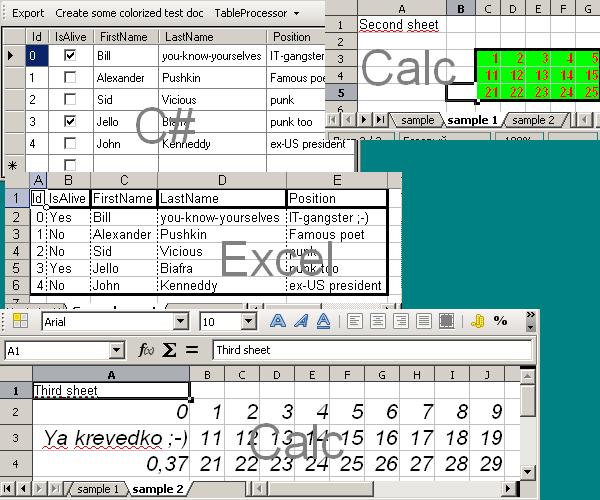
It's quite easy. The grid on the form uses the custom DataSet, based on DataClass class. The TableProcessor combo on the toolbar allows you to select the type of the table processor. The Export button just sends the contents of grid to the processor (using a handy Export class — I use it frequently).
The "Create some colorized test doc" button runs the code, which tries to show most of valuable features.
Links
This member has not yet provided a Biography. Assume it's interesting and varied, and probably something to do with programming.



 General
  News
News  Suggestion
  Question
  Bug
Bug  Answer
  Joke
Joke  Praise
  Rant
Rant  Admin
Admin 


 Submit an article or tip


 )
)
