|
|
 |
I was forced to change my provider.
The new email address is: fmsoft@a1.net
|
|
|
|
 |
|
 |
i want to print the Content of Excel file without opening that file. I need code in vb.net
Yaswan
|
|
|
|
 |
|
 |
for example
pSheet = pSheets->GetItem(COleVariant((short)1));
or
pSheet = pXL->ActiveSheet;
There are not valid in msdn library.
Ali Abedi Najafi
|
|
|
|
 |
|
 |
Hi Everyboady
Please Help me where can i find and learn functions of microsoft office (Excel)
COM suports.
Many Thanks
Ali Abedi Najafi
|
|
|
|
 |
|
 |
Hi, Myself kausthubha, I tried this method for exporting data to the excel sheet, it is working fine until GetSheets() funtion gets called, but this funtion is returning NULL value leading empty excel sheet creation. I am using Office-2000, i did the necessary changes everthing is working fine except GetSheets() function.
Please help me solving this probelm.
Thankyou in advance.
Regards
kausthubha
mail id: yash_023@yahoo.co.in
kausthubha
|
|
|
|
 |
|
 |
1.
Replace this lines
#import "mso97.dll" ...
#import "VBE6EXT.OLB" ...
#import "excel8.olb" ...
to this one line:
#import "c:\Program Files\Microsoft Office\OFFICE11\EXCEL.EXE" auto_search auto_rename dual_interfaces
2.
Replace
pSheet = pSheets->GetItem(COleVariant((short)1));
by
pSheet = pXL->ActiveSheet;
3.
Replace
pSheet->Range[COleVariant(cCell)]->Value = cText;
by
pSheet->Range[COleVariant(cCell)][vtMissing]->Value2 = cText;
4.
Replace each 'pXL->Visible' by 'pXL->Visible[0]'
|
|
|
|
 |
|
 |
Hi Franz,
Thank you for your lovely code.
I need to merge 2 or more cells in excel sheet via C++ code.
Is there a way to do it?
Thank you.
U.Ozkan
|
|
|
|
 |
|
 |
After calling ExcelGetRowCol method, the param cCell may be a range such as A1:C1, if you want to merge the range cells, just call Merge method of Range as follow:
pSheet->Range[COleVariant(cCell)]->Merge();
microspy
2006.2.7
|
|
|
|
 |
|
 |
Thank you very much microspy,
I have found some other way but this is much more simple.
I just wonder why I did not think of that.
Thank you very much again.
U.Ozkan
|
|
|
|
 |
|
 |
Environment: XP,VC++.net,
Input
#import "excel8.olb" rename("DialogBox", "DialogBoxXL") rename("RGB", "RBGXL") rename("DocumentProperties", "DocumentPropertiesXL") no_dual_interfaces
#pragma warning (disable:4278)
using namespace Excel;
Error:
h:\xxs\c++\test\3\Debug\excel8.tlh(1413): error C2146: syntax error : missing ';' before identifier 'GetRBGXL'
h:\xxs\c++\test\3\Debug\excel8.tlh(1413): error C2501: 'Excel::ColorFormat::MsoRGBType' : missing storage-class or type specifiers
h:\xxs\c++\test\3\Debug\excel8.tlh(1413): warning C4183: 'GetRBGXL': missing return type; assumed to be a member function returning 'int'
h:\xxs\c++\test\3\Debug\excel8.tlh(1415): error C2061: syntax error : identifier 'MsoRGBType'
h:\xxs\c++\test\3\Debug\excel8.tlh(1642): error C2146: syntax error : missing ';' before identifier 'GetTransparencyColor'
WHY????
asfazxdfvzxvcxzcv
|
|
|
|
 |
|
 |
what version of office do you have?
Office 97, Office 2003????
I need more details!
|
|
|
|
 |
|
 |
Thank you for your reply.
My version is "office 2000"
And now I solve the problem.(The lib file name is different)
I read your Print2Excel Class,It's really good.
But I have 2 questions.
1.I want to read a "*.txt" file to an existing excel file,How can I do that?In your program, the member function of "CPrintExcel" class establish a new excel file,But now I want to read "*.txt" to an existing excel file.How to do??
2. How to I know the functions of the excel-lib(something imported into our programs)?
Thank you very much. and suggetion is admired!
xixia
|
|
|
|
 |
|
 |
1. Instead of pBook = pBooks->Add (covOptional);
Use: pBook = pBooks->Open (_bstr_t Filename);
So you can open your *.txt file and append these fields to your existing excel-file.
2. Look at excel8.thl or excel9.tlh. When I wrote this routine I had only this information. I don’t know where to get better informations – ask M$.
|
|
|
|
 |
|
 |
How did you solve the problem in office 2000?
I continuously have the errors like:
エラー 1 error C2504: '_IMsoDispObj' : 定義されていない基本クラスが宣言されています。 d:\mali\adobe plugins\autoproject\autoproject\debug\excel9.tlh 1360
|
|
|
|
 |
|
 |
Hello there,
I've tried this method to print data to an excel sheet. It works fine, however, it takes quite a bit of time. The size of my data sheet was 800 lines by 10 columns. It took about 2 minutes to get the data from my program to Excel. Do you know if I could speed this up? Do I do anything wrong?
Thank you!
Luthov
|
|
|
|
 |
|
 |
Yes, it is right. Sending larger data to excel takes more time.
It seems to me that this is an Microsoft internal thing.
I am sorry, but I have no solution for this problem.
FM
|
|
|
|
 |
|
 |
Dear Franz,
I've been searching the Internet for a solution to the performance problem. I've found a Microsoft Knowledge Base article about how to improve the performance of office automation code. They say the problem is the utilization of COleVariant Type and the repetitive reading and writing of data. They suggest to either use SAFEARRAYs to transfer a multiple cell range of data instead of transfering cell by cell. Another alternative might be to use the clipboard. So far I've just looked up the SAFEARRAY sample, though I haven't changed my code yet. Can't tell how much faster that will do.
I certainly don't wanna lose all this nice formatting of your method. Hope I'll find some compromise.
Best regards,
Luthov
|
|
|
|
 |
|
 |
Dear Luthov, Franz and who are interested for better performance.
To get better performance it's better to use an Array and write the whole Array in the Excel sheet than write each cell separate.
I've tested this program with Office2000 at NT4.0/SP6 and XP/SP1.
#import "F:\\Programme\\Microsoft Office\\Office\\mso9.dll" no_namespace rename("DocumentProperties", "DocumentPropertiesXL")
#import "F:\\Programme\\Gemeinsame Dateien\\Microsoft Shared\\VBA\\vbeext1.olb" no_namespace
#import "F:\\Programme\\Microsoft Office\\Office\\excel9.olb" rename("DialogBox", "DialogBoxXL")rename("RGB", "RBGXL") rename("DocumentProperties", "DocumentPropertiesXL") no_dual_interfaces
void CTestExcelView::CreateExcelFile()
{
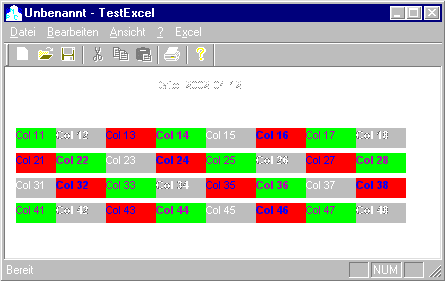
// it only takes moments to write 10 x 1000 cells
BeginWaitCursor();
using namespace Excel;
_ApplicationPtr pXL("Excel.Application");
WorkbooksPtr pBooks = pXL->Workbooks;
_WorkbookPtr pBook = pBooks->Add((long)xlWorksheet);
_WorksheetPtr pSheet = pXL->ActiveSheet;
COleSafeArray saRet;
WCHAR w_str[255];
int rows = 1000;
int col = 10;
DWORD numElements[] = {rows, col};
saRet.Create(VT_BSTR, 2, numElements); // 2...the dimension of the array
for(int i = 0; i < rows; i++)
{
for(int j = 0; j < col; j++)
{
swprintf(w_str, L"%c%i", 'A' + j, i + 1);
FillSafeArray(w_str, i, j, &saRet);
}
}
RangePtr prange;
CString start, end;
start = "A1";
end.Format("%c%i", 'A' + col - 1, rows);
prange = pSheet->GetRange(COleVariant(start.GetBuffer(0)), COleVariant(end.GetBuffer(0)));
prange->Value = saRet;
saRet.Detach();
// I thought it should be nicer to have the Excel file stored
pSheet->Name = "TEST";
pSheet->SaveAs("F:\\Temp\\test.xls");
EndWaitCursor();
}
void CTestExcelView::FillSafeArray(OLECHAR FAR* sz, int iRow, int iCol, COleSafeArray* sa)
{
VARIANT v;
long index[2];
index[0] = iRow;
index[1] = iCol;
VariantInit(&v);
v.vt = VT_BSTR;
v.bstrVal = SysAllocString(sz);
sa->PutElement(index, v.bstrVal);
SysFreeString(v.bstrVal);
VariantClear(&v);
}
Thanks to Franz
|
|
|
|
 |
|
 |
I've been trying to print to a bitmap or jpeg from a RichEdit control,
I have all the needed framework to save a DC to JPEG but I can't get the richedit DC to draw all of the data in my richedit but only the currently showing data.
Can anyone tell me how the resize the DC so that it draws the entire document?
Thanks. Tal
|
|
|
|
 |
|
 |
Dear Franz and all who read this thread,
How to print that created excel file directly to the printer from our program? (not by pressing printer icon or Ctrl-P at the Excel Application.)
After printing directly terminate excel application without asking saving option?
Regards,
Ridwan
|
|
|
|
 |
|
 |
Dear Ridwan,
all you have to do is to look at the objects: pXL, pBook, pSheet, .... (files: excel8.tli and excel8.tlh) or have a look at comexcel sample.
To print the sheet use:
pSheet->PrintOut (const _variant_t & From, const _variant_t & To, const _variant_t & Copies, const _variant_t & Preview, const _variant_t & ActivePrinter, const _variant_t & PrintToFile, const _variant_t & Collate ):
Example:
// Common OLE variants. These are easy variants to use for
// calling arguments.
COleVariant
covTrue((short)TRUE),
covFalse((short)FALSE),
covOptional((long)DISP_E_PARAMNOTFOUND, VT_ERROR);
pSheet->PrintOut( COleVariant((short)1), // From (page #).
COleVariant((short)1), // To (page #).
COleVariant((short)1), // Copies.
COleVariant((short)TRUE), // Preview.
covOptional, // ActivePrinter.
covFalse, // PrintToFile.
covFalse); // Collate.
To exit Excel use:
The easiest way is:
pBook->Saved = VARIANT_TRUE; // Avoids the 'Save changes?' dialog box.
pXL.Quit(); // Excel departs.
Another way is:
pBook->Close ( const _variant_t & SaveChanges, const _variant_t & Filename, const _variant_t & RouteWorkbook );
pXL.Quit(); // Excel departs.
I haven’t tried it, but these should be the right calls.
Best regards,
Franz Märzinger
|
|
|
|
 |
|
 |
Dear Franz,
Thanks for your explanation. I am going to try the solutions you gave. I will confirm you the result i got later.
Best Regards,
Ridwan Kuswoyo
|
|
|
|
 |
|
 |
I am sure i have installed Excel. my system is win98 / office2000.
|
|
|
|
 |
|
 |
Office 2000 and mso97.dll won´t match.
The MSofties have changed the name to mso9.dll and excel9.olb (???)
Try this @ home. (B&B)
|
|
|
|
 |
|
 |
office2000:
#import "mso9.dll" no_namespace rename("DocumentProperties", "DocumentPropertiesXL")
//#import "mso97.dll" no_namespace rename("DocumentProperties", "DocumentPropertiesXL")
#import "VBE6EXT.OLB" no_namespace
//#import "vbeext1.olb" no_namespace
#import "excel9.olb" rename("DialogBox", "DialogBoxXL") rename("RGB", "RBGXL") rename("DocumentProperties", "DocumentPropertiesXL") no_dual_interfaces
//#import "excel8.olb" rename("DialogBox", "DialogBoxXL") rename("RGB", "RBGXL") rename("DocumentProperties", "DocumentPropertiesXL") no_dual_interfaces
|
|
|
|
 |