Introduction
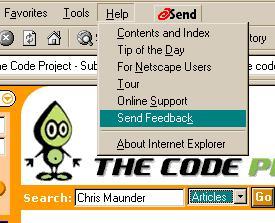
There are many shareware that capture screen and copy image to clipboard or save as a file. Some of them charge more than $15 and can't capture dropdown menu/list. The problem is when user "active CaptureScreen" program, all other windows become inactive and close their file menu or dropdown list. This simple program can capture any screen image including dropdown menu or combobox list.
Basic Idea
Since clicking on "PrintScreen" will send an entire window screen to the clipboard, we can read "entire window screen" from clipboard and then let users copy any portion of screen to clipboard. To implement this, we need:
- Hook keyboard: when user clicks "PrintScreen", application will be notified.
- Read image from clipboard.
- Copy image and paste to clipboard.
[DLL] Hook Keyboard
To hook system wide keyboard event, we need a DLL. The demo source code HScr2Clpbrd_DLL.cpp is pretty much similar to Joseph[2] demo program. The big difference is that Joseph[2] has a pretty neat header file that I don't use it. In case it's the first time you create a simple DLL file, you may follow this: VC++ -> File Menu -> New -> Win32 Dynamic-link Library -> A simply DLL project -> finish. you will get a DLLMain() method.
Change...
BOOL APIENTRY DllMain( HANDLE hModule,DWORD  ul_reason_for_call,
LPVOID lpReserved)
...to:
BOOL APIENTRY DllMain( HINSTANCE hInstance,DWORD  ul_reason_for_call,
LPVOID lpReserved)
And implement your InstallKBHook() and UnInstallKBHook() that simply use API: SetWindowsHookEx() and UnhookWindowsHookEx(), to hook/unhook keyboard event.
hookKeyBoard = SetWindowsHookEx(WH_KEYBOARD,(HOOKPROC)KeyboardHook,hInst,0);
BOOL bUnHook = UnhookWindowsHookEx(hookKeyBoard);
You may want to pay a little attention to the declaration of:
__declspec(dllexport) BOOL InstallKBHook(HWND hWnd);
__declspec(dllexport) BOOL UnInstallKBHook(HWND hWnd);
Because we will export those methods to the application, we declare them as __declspec(dllexport); and, on the other hand, application need to import them (see HScr2ClpDlg.cpp):
__declspec(dllimport) BOOL InstallKBHook(HWND hWnd);
__declspec(dllimport) BOOL UnInstallKBHook(HWND hWnd);
If you would like to know more about API Hook, please refer to Joseph[2], Ivo[3], and Kyle[4] for more details.
[DLL] Post Message to Application
So far, we can InstallKBHook() and UnInstallKBHook() but we need to notify our application that "PrintScreen" has been clicked. We need to register our window message:
UWM_ClickPrnScrn = ::RegisterWindowMessage(
"UWM_ClickPrintScreen_B2ABC742-0A63-49c3-9ACB-CF0068027A66");
Once we have our Window Message, we can Post Message to notify our application that user clicks "PrintScreen":
if( (nCode >=0) && (nCode == HC_ACTION) && (wParam == VK_SNAPSHOT))
	::PostMessage(hWndReceiver,UWM_ClickPrnScrn,0,0);
It's pretty simple to hook system wide keyboard. Isn't it? Please refer to Joseph[1] for more, wide and deep, details.
[Apps] Read Image from Clipboard
When DLL posts message, the application needs to receive the message. Since it's our, user defined, window message, we need to manually Map it.
- In header file, HScr2ClpDlg.h, declare this method:
afx_msg BOOL OnClickPrintScreen(WPARAM wParam, LPARAM lParam);
- In cpp file, HScr2ClpDlg.cpp, message map adds this
ON_REGISTERED_MESSAGE(UWM_ClickPrnScrn, OnClickPrintScreen):
BEGIN_MESSAGE_MAP(CHScr2ClpDlg, CDialog)
ON_REGISTERED_MESSAGE(UWM_ClickPrnScrn, OnClickPrintScreen)
...
END_MESSAGE_MAP()
In the definition of OnClickPrintScreen(), we first verify using IsClipboardFormatAvailable(CF_BITMAP) that the clipboard contains BITMAP data and then opens (using OpenClipboard()) clipboard. If so far is fine, attach a CBitmap to clipboard BITMAP Handle.
HBITMAP hBm;
CBitmap cBm;
hBm = (HBITMAP)GetClipboardData(CF_BITMAP);
...
if(!cBm.Attach(hBm))
...
Since we have a CBitmap now, we can Copy it to our application's panel and let user "select" any image she/he needs:
CClientDC dcScreen(this);
CDC dcMem;
dcMem.CreateCompatibleDC(&dcScreen);
CBitmap* pOldBitmap = dcMem.SelectObject(&cBm);
dcScreen.BitBlt(0,0,bBm.bmWidth,bBm.bmHeight ,&dcMem,0,0,SRCCOPY);
dcMem.SelectObject(pOldBitmap);
[Apps] Copy Image and Paste to Clipboard
We copy user's "selection" from client area and paste to clipboard:
BOOL CHScr2ClpDlg::CopyRect2Clipboard()
{
CRect rect(m_ptFirst,m_ptLast);
rect.NormalizeRect();
if(rect.IsRectEmpty() || rect.IsRectNull())
return FALSE;
CClientDC dcScrn(this);
CDC memDc;
if(!memDc.CreateCompatibleDC(&dcScrn))
return FALSE;
CBitmap bitmap;
if( !bitmap.CreateCompatibleBitmap(&dcScrn,rect.Width(),
rect.Height()))
return FALSE;
CBitmap* pOldBitmap = memDc.SelectObject(&bitmap);
memDc.BitBlt(0,0,rect.Width(),rect.Height(),&dcScrn,rect.left ,
rect.top ,SRCCOPY );
if(OpenClipboard())
{
EmptyClipboard();
SetClipboardData(CF_BITMAP,bitmap.GetSafeHandle());
CloseClipboard();
}
memDc.SelectObject(pOldBitmap);
return TRUE;
}
Summary
This tiny program is very simple because it doesn't have any complicated coding. You can find many articles showing you how to Copy images to the clipboard, Hook keyboard, or, Capture mouse movement... from CodeProject.com or other web sites.
However, there is one cool/neat "mailto button" on the demo program panel; it's, IMHO, the most difficult coding in this tiny utility. Please refer to Chris Maunder's "Tray Calendar", Chris[5]. The idea of this program is "put people's idea together and have fun"; and, of course, I need to capture screen for my work. I may enhance it that provide a "Preview" panel which has "Copy", "Save as file", and "Discard" options for user when I have time. If anyone can post your enhancement, I would love to update the article, and thank you.
Known Bug
If you run a program and leave it on screen, don't minimize it to taskbar, and click "PrintScreen", apps will set itself as MostTop Window as expected. But "minimize" and "close" buttons will not work until you set it to non-top Z-order. In other words, you need to click another window to make apps "inactive" and click apps itself to make it "active"; therefore, "minimize" and "close" buttons will work as usual. On the other hand, if you "minimize" apps to taskbar and "click "PrintScreen", everything just works fine.
References
- [1]: "Message Management", Joseph M. Newcomer, 05/17/2000
- [2]: "Hooks and DLLs", Joseph M. Newcomer, 04/01/2001
- [3]: "API hooking revealed", Ivo Ivanov, 04/06/2002
- [4]: "Win32 Hooks", Kyle Marsh, 07/29/1993, MSDN
- [5]: "Tray Calendar", Chris Maunder, 04/06/2002
License
This article has no explicit license attached to it, but may contain usage terms in the article text or the download files themselves. If in doubt, please contact the author via the discussion board below.
A list of licenses authors might use can be found here.
This member has not yet provided a Biography. Assume it's interesting and varied, and probably something to do with programming.



 General
  News
News  Suggestion
  Question
  Bug
Bug  Answer
  Joke
Joke  Praise
  Rant
Rant  Admin
Admin 


 Submit an article or tip


![Rose | [Rose]](https://www.codeproject.com/script/Forums/Images/rose.gif)
 )
)


 Do you have something to solve this ? Hopefully, it will be my last request.