Click here to Skip to main content

Model-View-ViewModel in WPF

By , 21 Dec 2007
 
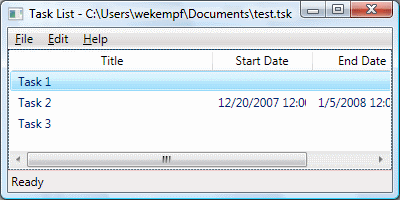
Screenshot -

Introduction

The Model-View-ViewModel pattern, a variant of Model-View-Controller, provides a nice way to develop graphical applications that are testable. Several features in Windows Presentation Foundation, such as data binding and the command architecture, go a long way towards making it possible to follow this pattern. Unfortunately, once you start to follow the pattern in a real application, you start to run into various things that make it very difficult to maintain the strict separation of Model, View and ViewModel. This article implements the basis of a full-featured application, illustrating various techniques that may be used to maintain the strict separation of concerns demanded by the M-V-VM pattern.

Background

I tried to implement this application while following the Behavior-driven Development methodology. I've captured the attempt by including a complete version history in the form of a Bazaar repository. Bazaar is a distributed version control system and, as such, the entire repository was included in the downloadable source archive. You can see every step of development, including all of the various mistakes I made while coding.

Despite the attempt to follow BDD, don't expect production-quality code here. First, I'm new to this methodology and you can be certain that I didn't follow it as well as one should. Second, although the project includes a fairly complete example application, it is only an example. I've focused on the necessary things to illustrate how to implement an application in WPF following M-V-VM, not on what would be necessary to make a production-worthy application. This is a starting place only.

Also, note that the unit-testing code uses a lot of custom code. This was a large enough portion of the effort that I split it out into a separate article: Visual Studio Unit Testing Extensions.

Using the Code

The "core" to a lot of the code in this project can be found in the ViewModel class. This class is both a MarkupExtension class, as well as a class providing a few attached properties. In order to associate your ViewModel with your View, you use the ViewModel class like this:

<Window
    xmlns="http://schemas.microsoft.com/winfx/2006/xaml/presentation"
    xmlns:x="http://schemas.microsoft.com/winfx/2006/xaml"
    xmlns:c="clr-namespace:CodeProject.Windows.Markup;assembly=CodeProjectCore"
    xmlns:vm="clr-namespace:TaskList.ViewModel;assembly=TaskList.ViewModel"
    c:ViewModel.Instance="{c:ViewModel {x:Type vm:MainWindowViewModel}}">

Assigning the ViewModel.Instance attached property does several things:

  • Assigns the property to an instance of an object. Note that this property is inherited by children.
  • Assigns the DataContext property to the same instance.
  • Assigns the ViewModel.Commands property to the empty string.

That last bullet point is worth explaining further. The ViewModel.Commands attached property is used to create command bindings on the View for command handlers in the ViewModel. This is actually one of the trickier things to accomplish in a simple and "clean" manner. I've blogged about this on my blog (check out the archives for several posts on this topic) and others, such as Brownie, have as well.

When ViewModel.Commands is attached to an element, it searches ViewModel.Instance for a property of type CommandBindingCollection with the CommandSinkAttribute and a matching KeyName. All CommandBinding instances in this collection are added to the element's Commands. This solution was inspired by the article Smart Routed Commands in WPF, although obviously the purpose and implementation are different here.

The ViewModel does not need to inherit from any base class or implement any interfaces. The ViewModel markup extension will try to instantiate an instance of the ViewModel first by looking for a constructor that takes a single parameter compatible with the element. You should avoid creating a tight coupling to the View here by using an interface that the element can implement. If the ViewModel doesn't have a constructor that fits the criteria here, it will instead be instantiated using the default constructor, if present. It's generally best to not create any coupling here at all, but there are some things you simply can't do in the ViewModel, such as navigate to another page. A View-specific interface allows you to put such code in the View while retaining as little coupling as possible.

A similar interface can be used for the Application. This gives the ViewModel access to application-wide settings and functionality, while not being closely tied to the actual Application. The sample application demonstrates using both the View interfaces, as well as an application interface, including how to use Mock Objects that implement these interfaces to facilitate testing.

The goal with the ViewModel is to put as much UI state as possible into it. The View then binds this state to the necessary elements. The classic example here is the selection state for a collection that will be presented in the View. The problem is that some states in the View are given in read-only properties that cannot be used in data-binding. The SelectedItems property on several controls is an example of this. In order to maintain such states in the ViewModel, a unique solution must be found to bind the state to the read-only properties on elements in the View. The Selection class provides an attached SelectedItems property to illustrate one way in which this can be accomplished. The attached property is responsible for watching the state both on the element as well as in the ViewModel, and keeping the two in sync.

Bonus: DataErrorInfo

This class isn't really related to M-V-VM, the main focus of this article. So, consider it a bonus. This is the starting point for a validation framework based on IDataErrorInfo. It uses various ValidatorAttribute classes to specify how properties are supposed to be validated. Only StringLengthValidatorAttribute is included in the code, but it should be straightforward to create other validators. The Task Model class illustrates the use and the EditTaskPage shows how to do validation with it in WPF.

History

12/16/2007 - Initial article published.

License

This article, along with any associated source code and files, is licensed under The Code Project Open License (CPOL)

About the Author

William E. Kempf
Web Developer
United States United States
Windows developer with 10+ years experience working in the banking industry.

Sign Up to vote   Poor Excellent
Add a reason or comment to your vote: x
Votes of 3 or less require a comment

Comments and Discussions

 
You must Sign In to use this message board.
Search this forum  
    Spacing  Layout  Per page   
GeneralA Word of WarningmemberMirko Klemm1-Sep-10 10:01 
The MVVM approach is all good and fine, but in the end, it says nothing else but: "If you are mixing WPF Databinding with procedural GUI component state change you'll make a mess".
This is what I have learned so far in my WPF experience.
So: Rather than inventing a new buzzword, why don't you just tell people what actually the problem is? There are so many developers now trying squeeze every little bit of their application into a MVVM as if it was a new religion. Most developers I meet just confuse it with creating a complete wrapper around their business model even in applications entirely designed from scratch. This is just plain wrong. With WPF, I'm sure that, if your application is designed correctly, you can get along with XAML, Data Binding, maybe some event/command handler which simply translate the EventArgs to property business method calls, and your business model. There is simply no need for an additional layer. With MVVM, you add a lot of complexity, because you will have to propagate CollectionChanged and PropertyChanged event from the business model to the View, and in many cases this fails and gives you just as much headaches as if you would just data Bind to business model properties.
For very complex cases, I'd rather completely separate view state with model state, and use a view model which is only bound to the view, with no dependencies whatsoever to the business model. Usually, I do this by creating a custom class intended to hold the complex view state, and instantiate this in a resource dictionary in XAML and Assign it to the "Resources" property in the component where it is needed, like this:
 <Window.Resources>
  <ResourceDictionary>
   <MyNamespacePrefix:MyClass x:Key="myKey" MyProperty1="..." MyProperty2=".."/>
  </ResourceDictionary>
 </Window.Resources>
 
After that, you can reference myKey as a StaticResource everywhere in the context, and bind whatever you want to it. And still the whole thing is self-contained and does not need to reference the business model anywhere.
NewsAlternative approach with MEFmemberjbe82244-Jul-09 0:53 
Fascinating approach of yours to use a markup extension and attached properties.
 
If you are interested in an alternative approach that uses an IoC container (MEF) to create the ViewModel class and wire all together then have a look at the WPF Application Framework (WAF) project.


GeneralGood articlememberCIDev2-Jun-09 7:54 
While you do have some useful example code. More explanatory text would really make this a better article.
 
Bill W
 
Just because the code works, it doesn't mean that it is good code.

GeneralA little bit too complicated :/memberjohn19977-Apr-09 3:17 
isn't it supposed to be an introduction to Model-View-ViewModel in wpf ?
GeneralDataErrorInfo - ArgumentOutOfRangeExceptionmemberJohn Myczek15-Dec-08 9:00 
I am using DataErrorInfo in one of my projects and it is working fine, but I noticed data errors (see below) in the Visual Studio output window. I was able to recreate the same error in your sample application:
1) Click Edit > Add Task
2) Enter a title and tab out of the field
3) Look at the Visual Studio output window:
 
System.Windows.Data Error: 16 : Cannot get 'Item[]' value (type 'ValidationError') from '(Validation.Errors)' (type 'ReadOnlyObservableCollection`1'). BindingExpression:Path=(0).[0].ErrorContent; DataItem='TextBox' (Name='title'); target element is 'TextBox' (Name='title'); target property is 'ToolTip' (type 'Object') TargetInvocationException:'System.Reflection.TargetInvocationException: Exception has been thrown by the target of an invocation. ---> System.ArgumentOutOfRangeException: Index was out of range. Must be non-negative and less than the size of the collection.
Parameter name: index
at System.ThrowHelper.ThrowArgumentOutOfRangeException(ExceptionArgument argument, ExceptionResource resource)
at System.ThrowHelper.ThrowArgumentOutOfRangeException()
at System.Collections.Generic.List`1.get_Item(Int32 index)
at System.Collections.ObjectModel.Collection`1.get_Item(Int32 index)
at System.Collections.ObjectModel.ReadOnlyCollection`1.get_Item(Int32 index)
--- End of inner exception stack trace ---
at System.RuntimeMethodHandle._InvokeMethodFast(Object target, Object[] arguments, SignatureStruct& sig, MethodAttributes methodAttributes, RuntimeTypeHandle typeOwner)
at System.RuntimeMethodHandle.InvokeMethodFast(Object target, Object[] arguments, Signature sig, MethodAttributes methodAttributes, RuntimeTypeHandle typeOwner)
at System.Reflection.RuntimeMethodInfo.Invoke(Object obj, BindingFlags invokeAttr, Binder binder, Object[] parameters, CultureInfo culture, Boolean skipVisibilityChecks)
at System.Reflection.RuntimeMethodInfo.Invoke(Object obj, BindingFlags invokeAttr, Binder binder, Object[] parameters, CultureInfo culture)
at System.Reflection.RuntimePropertyInfo.GetValue(Object obj, BindingFlags invokeAttr, Binder binder, Object[] index, CultureInfo culture)
at MS.Internal.Data.PropertyPathWorker.GetValue(Object item, Int32 level)
at MS.Internal.Data.PropertyPathWorker.RawValue(Int32 k)'
 
This seems to happen anytime the field goes from an invalid state to a valid state. The validation still works, but I'd like to get rid of the exception in the output window.
 
Any ideas?
GeneralMy vote of 2memberJared Morton28-Nov-08 2:32 
Too short, not enough information.
Generalmany interesting ideasmemberQuang Tran Minh17-Jun-08 21:51 
Thanks for your article! You have raised some interesting ideas on this pattern! I am trying to understand the way you implement Commands.
QuestionDataModel instancememberFantaMango776-Jan-08 20:33 
Hello,
 
I wonder where the ViewModel object gets the model instance from. Instantiating the ViewModel declaratively leaves you with a reference to the view only. In you source code you get the model object from the view. This doesn't feel right.
 
Unfortunately, I haven't found a good solution yet. Doing a google search didn't bring up anything useful. Besides the standard articles by John Gossman and Dan Crevier there isn't much out there. I'm still looking for some comprehensive sample apps that demonstrate the use of the DM-V-VM pattern.
GeneralRe: DataModel instancememberWilliam E. Kempf8-Jan-08 10:49 
I'm not at all certain I understand you correctly, because some of what you said seems to be using the wrong terminology. For instance, you say "in you (sic) source code you get the model object from the view". I'm not sure what source code you're referring to, but no where do I get the Model from the View. In fact, ideally no code anywhere should use any UI components, much less access the View. The current framework here doesn't achieve this... there is some interaction with the View from the ViewModel, but it's for manipulating the View, not retrieving state from the View.
 
Here's a description of what's actually going on.
 
The View is created declaratively in the XAML. In addition, the ViewModel is also created declaratively in the XAML and associated with the View, through the use of the ViewModel.Instance attached property and ViewModel markup extension. The ViewModel is responsible for exposing the Model to the View, which is precisely what the M-V-VM pattern is expected to do. The ViewModel is responsible for adapting the Model to the needs of the View, in this pattern.
 
I hope that helps. If not, try to reword the question so I can better understand what you're trying to do.
 
William E. Kempf

GeneralRe: DataModel instancememberFantaMango779-Jan-08 2:07 
Hello William,
 
Sorry, for causing confusion. I will try to restate my question.
 
First of all, I'm referring to the sample source code that is provided with this article.
 
In the EditTaskPageViewModel class the Task instance is obviously the model that is being exposed by the ViewModel. But this Task object is just a Property that is exposed by the View interface, that the ViewModel holds.
 
This seems like an unnecessary overhead, as the view is binding to the Task eventually.
 
Another way to inject the Model into the ViewModel is to use globally accessible objects, like the Application object.
 
In the end I can't see the advantage of specifying the ViewModel declaratively in any but pretty simple user interfaces. Perhaps I will try to use your solution in a more complex scenario with nested ViewModels.
GeneralRe: DataModel instancememberWilliam E. Kempf9-Jan-08 2:46 
Ahhh... I have it now. This is a consequence of the PageFunction. When executing the PageFunction we pass data to the constructor. This is one area in which the Model does come from the View, simply because of the concept of PageFunctions. Certainly not ideal, as you point out, but most other solutions are not ideal either. The payload has to be carried somewhere.
 
One solution that would help to decouple things here, though the Model will still come from the View, would be to make use of attached properties. When we construct the EditTaskPage, you'd set an attached property on the instance that contains the Task. Then the constructor of the EditTaskPageViewModel can use the attached property to extract the Task. Now the View is completely ignorant of the fact that it carried the Task, and the ViewModel isn't dependent on any special View. However, there's still all sorts of dependencies caused by the nature of navigation here. That's something I'm working on for a follow up article. Suffice it to say, though, it's not easy to remove all code dependencies from the View, which is one of the goals here.
 
William E. Kempf

General General    News News    Suggestion Suggestion    Question Question    Bug Bug    Answer Answer    Joke Joke    Rant Rant    Admin Admin   

Permalink | Advertise | Privacy | Mobile
Web03 | 2.6.130617.1 | Last Updated 22 Dec 2007
Article Copyright 2007 by William E. Kempf
Everything else Copyright © CodeProject, 1999-2013
Terms of Use
Layout: fixed | fluid
