RSS FEED SERVER - (Explained !!)
(For all the girls who needed explaination)
Download RSSFeedService.zip - 899.12 KB
Introduction
RSS Feed Server allows organizations and individuals who are behind firewall and proxy. And in many cases users tend to not have internet access in different organizations. But for intranet or any other application they are using, if they want to subscribe to RSS, this server will help you expose those rss feeds from internet to your local users who dont have internet access.
Application Structure
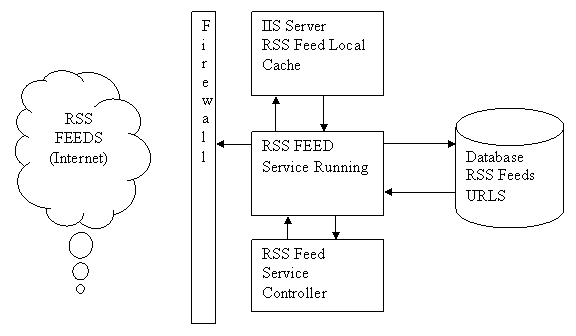
As can be seen from above, corporate which have policy to restrict users from going on to internet will be of interest to this application design.
It has 2 major components
- RSS Feed Service
- RSS Feed Controller
The service simply put has 2 major roles. First it reads off a table list of URL of RSS Feeds. It pulls it down from internet and save it on a shared virtual folder of an IIS Server Hosted. This enables the users not having internet to consume RSS virtually over the internet. Feed Controller helps to start and stop the service.
Class Diagram

How to use
The first thing you need to do is create a table in the database.
SET ANSI_NULLS ON
GO
SET QUOTED_IDENTIFIER ON
GO
CREATE TABLE dbo.RSSFeeds(FeedID numeric(18, 0) IDENTITY(1,1) NOT NULL,FeedURL nvarchar(max) NOT NULL,Category nvarchar(max) NOT NULL
) ON PRIMARY
Then create a IIS Virtual Folder where you need to drop the feeds.
last thing to do is modify the config file below:
<appSettings>
<add key="FilesDrop" value="C:\Inetpub\wwwroot\RSSFeeds\" />
<add key="UserName" value="XXXXX" />
<add key="Domain" value="XXXX" />
<add key="Password" value="XXXXXX" />
<add key="ProxyServer" value="XXX.XXX.XXX.XXX" />
<add key="Port" value="80" />
<add key="AppName" value="Name to be given" />
<add key ="ConnectionString" value= "Data Source=XXX;Initial Catalog=XXX;User Id=XX;Password=XXXX"/>
<add key ="TimerElapsedTime" value="60000"/> /// This is in milliseconds (remove this comment)
</appSettings>
Fill in the table with urls for feeds and there you go !!
Once you have created the table [RSSFeeds] in sql server, then you need to configure the application.config file. Here you will find
<add key="ConnectionString" value="Data Source=XXXX;Initial Catalog=XXX;User Id=XXXX;Password=XXXXX" />
in this you put your datasource as database server, initial catalog as database name and username and password
then create virtual folder in ur iis
give the physical path in app config
<add key="FilesDrop" value="C:\Inetpub\wwwroot\RSSFeeds\" />
remember: in table, the column name "Category" is going to be the name of the file generated in ur drop folder i.e. news.xml. its just i named the column wrong you can change it to "filename".
Do look into public void FetchXML() in rssfeeds.cs file in the rssfeedservice project.



 General
  News
News  Suggestion
  Question
  Bug
Bug  Answer
  Joke
Joke  Praise
  Rant
Rant  Admin
Admin 


 Submit an article or tip


 theres nothing much fancy on programming side of it. Being a developer you can easily see whats going inside the project. standard stuff. Dont want to waste developers time in making them read something they already know, the thing to understand is the approach and need suggestions to optimise it and give more features to it ... would welcome these suggestions as this is something running in my organization and wud love to have more features for the other group developers in my company who are using it.
