Introduction
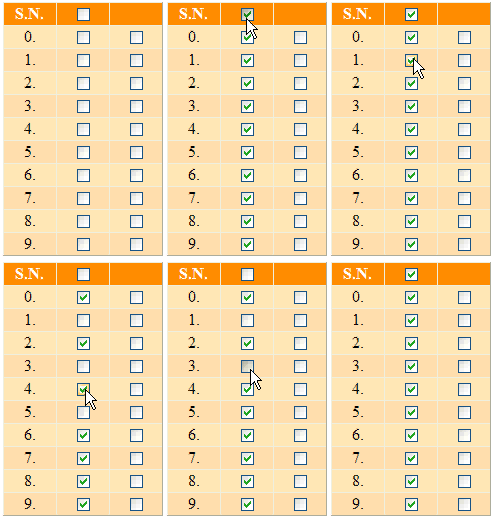
I am going to present here a functionality that selects / deselects all checkboxes of a particular column inside a GridView control, provided the header checkbox of that column is checked or unchecked using JavaScript. This functionality also has a feature that when all checkboxes of a particular column inside the GridView are checked, then the header checkbox gets checked, and vice versa.
Using the code
I have used a TemplateField inside the GridView and put a CheckBox in the ItemTemplate as well as another CheckBox in the HeaderTemplate of the TemplateField.
The HTML code looks like this:
<asp:GridView ID="gvCheckboxes" runat="server"
              AutoGenerateColumns="False" OnRowCreated="gvCheckboxes_RowCreated">
   <Columns>
      <asp:BoundField HeaderText="S.N." DataField="sno">
         <HeaderStyle HorizontalAlign="Center" VerticalAlign="Middle" Width="50px" />
         <ItemStyle HorizontalAlign="Center" VerticalAlign="Middle" Width="50px" />
      </asp:BoundField>
      <asp:TemplateField HeaderText="Select">
         <ItemTemplate>
            <asp:CheckBox ID="chkBxSelect" runat="server" />
         </ItemTemplate>
         <HeaderStyle HorizontalAlign="Center" VerticalAlign="Middle" Width="50px" />
         <ItemStyle HorizontalAlign="Center" VerticalAlign="Middle" Width="50px" />
         <HeaderTemplate>
            <asp:CheckBox ID="chkBxHeader"
                 onclick="javascript:HeaderClick(this);" runat="server" />
         </HeaderTemplate>
      </asp:TemplateField>
      <asp:TemplateField>
         <ItemTemplate>
            <asp:CheckBox ID="chkBx" runat="server" />
         </ItemTemplate>
         <ItemStyle HorizontalAlign="Center" VerticalAlign="Middle" Width="50px" />
      </asp:TemplateField>
   </Columns>
   <RowStyle BackColor="Moccasin" />
   <AlternatingRowStyle BackColor="NavajoWhite" />
   <HeaderStyle BackColor="DarkOrange" Font-Bold="true" ForeColor="white" />
</asp:GridView>
Attach a client-side onclick event on the header checkbox [chkBxHeader].
<asp:CheckBox ID="chkBxHeader" onclick="javascript:HeaderClick(this);" runat="server" />
Put the following code in the GridView's RowCreated event:
if (e.Row.RowType == DataControlRowType.DataRow &&
   (e.Row.RowState == DataControlRowState.Normal ||
    e.Row.RowState == DataControlRowState.Alternate))
{
   CheckBox chkBxSelect = (CheckBox)e.Row.Cells[1].FindControl("chkBxSelect");
   CheckBox chkBxHeader = (CheckBox)this.gvCheckboxes.HeaderRow.FindControl("chkBxHeader");
   chkBxSelect.Attributes["onclick"] = string.Format
                                          (
                                             "javascript:ChildClick(this,'{0}');",
                                             chkBxHeader.ClientID
                                          );
}
In the above code, a client side onclick event has been attached to the child checkbox [chkBxChild].
Add this JavaScript in the page’s head section:
<script type="text/javascript">
var TotalChkBx;
var Counter;
window.onload = function()
{
TotalChkBx = parseInt('<%= this.gvCheckboxes.Rows.Count %>');
Counter = 0;
}
function HeaderClick(CheckBox)
{
var TargetBaseControl =
document.getElementById('<%= this.gvCheckboxes.ClientID %>');
var TargetChildControl = "chkBxSelect";
var Inputs = TargetBaseControl.getElementsByTagName("input");
for(var n = 0; n < Inputs.length; ++n)
if(Inputs[n].type == 'checkbox' &&
Inputs[n].id.indexOf(TargetChildControl,0) >= 0)
Inputs[n].checked = CheckBox.checked;
Counter = CheckBox.checked ? TotalChkBx : 0;
}
function ChildClick(CheckBox, HCheckBox)
{
var HeaderCheckBox = document.getElementById(HCheckBox);
if(CheckBox.checked && Counter < TotalChkBx)
Counter++;
else if(Counter > 0)
Counter--;
if(Counter < TotalChkBx)
HeaderCheckBox.checked = false;
else if(Counter == TotalChkBx)
HeaderCheckBox.checked = true;
}
</script>
In the above script, there are two global variables: TotalChkBx and Counter. These are initialised in the window.onload event. There are two methods: HeaderClick and ChildClick. The method HeaderClick checks / unchecks all checkboxes of a particular column inside the GridView depending upon whether the header checkbox is checked or unchecked. The method ChildClick checks / unchecks the header checkbox depending upon whether all checkboxes of a particular column inside the GridView are checked or unchecked.
Just download the sample application and enjoy coding! I hope you will like this article.
Supported browsers
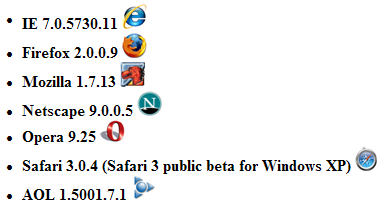
I have tested this script on the following browsers:
Samir NIGAM is a Microsoft Certified Professional. He is an insightful IT professional with results-driven comprehensive technical skill having rich, hands-on work experience n web-based applications using ASP.NET, C#, AJAX, Web Service, WCF, jQuery, Microsoft Enterprise Library , LINQ, MS Entity Framework, nHibernate, MS SQL Server & SSRS.
He has earned his master degree (MCA) from U.P. Technical University, Lucknow, INDIA, his post graduate dipoma (PGDCA ) from Institute of Engineering and Rural Technology, Allahabad, INDIA and his bachelor degree (BSc - Mathematics) from University of Allahabad, Allahabad, INDIA.
He has good knowledge of Object Oriented Programming, n-Tier Architecture, SOLID Principle, and Algorithm Analysis & Design as well as good command over cross-browser client side programming using JavaScript & jQuery,.
Awards:



 General
  News
News  Suggestion
  Question
  Bug
Bug  Answer
  Joke
Joke  Praise
  Rant
Rant  Admin
Admin 


 Submit an article or tip


